
 Need help?
Do you have a question about the Orinoquia U5760 and is the answer not in the manual?
Avoid physical damage and use in damp or wet environments.
Follow rules in hazardous areas, driving, medical facilities, aircraft, and near electronics.
Avoid disassembly, electromagnetic fields, magnetic media, extreme temperatures, and flammables.
Ensure child safety, use approved accessories, observe laws, and follow USB cable instructions.
How to switch between different text input modes on the screen.
Methods for entering words using multi-tap and predictive input.
Procedures for entering numbers using the keypad.
Device complies with RF specs when used near ear or 1.5cm from body.
Device meets FCC exposure requirements; SAR limit is 1.6 W/kg.
Equipment complies with FCC rules, but may cause interference; provides measures to correct interference.
This document provides a Quick Start Guide for the Orinoquia U5760, a mobile phone designed for basic communication and multimedia functions. The guide covers essential operations, safety precautions, and regulatory information to ensure proper and safe use of the device.
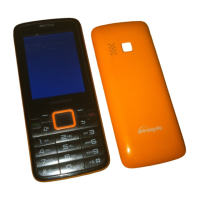
The Orinoquia U5760 is a mobile phone primarily designed for making and receiving calls, sending and receiving text messages, and basic multimedia functions such as playing music and taking photos. It supports the use of a SIM card for network connectivity and a microSD card for expandable storage. The phone features a traditional keypad for navigation and text input, an earpiece and loudspeaker for audio, and a camera for capturing images. It also includes a headset jack for private listening and a charger jack/USB port for charging and data transfer.
The phone's interface is designed for straightforward operation. The front panel includes an earpiece, screen, and a keypad with dedicated keys for various functions. The keypad consists of a confirm key, left and right soft keys, call/answer key, music key, number keys, asterisk (*) key, and pound (#) key. The back key, end/power key, and navigation keys are also integral to the user experience.
To begin using the phone, a SIM card must be inserted, followed by the battery. The guide provides clear visual instructions for these steps. For additional storage, a microSD card can also be inserted. The battery charging process is indicated by an icon on the screen, and the phone is fully charged when the icon becomes static. If the battery has been depleted for a long time, the charging icon may take several minutes to appear.
Key functions are easily accessible through the keypad. The left and right soft keys allow users to select options displayed on the lower corners of the screen. The call/answer key is used to dial numbers, answer calls, and access call logs from standby mode. The end/power key serves multiple purposes: pressing and holding it for about 3 seconds powers the phone on or off, it ends or rejects calls, returns to standby mode, and toggles the backlight. A dedicated music key allows for quick access to music playback.
Text input modes include multi-tap and predictive text. In multi-tap mode, users press number keys repeatedly to cycle through letters. Predictive input mode suggests words based on keystrokes, which can be selected using navigation keys. Numbers can be entered directly in 123 input mode or by pressing and holding number keys in other input modes. Symbols are accessed via the asterisk (*) key.
Creating contacts involves navigating to the "Menu > Contacts > Create Contact" option, editing information, and saving. Making and answering calls is intuitive: dial a number using the number keys and the call/answer key, or press the call/answer key to answer an incoming call. The end/power key can be used to reject calls.
Messaging is initiated through "Menu > Messages > Create Message." Users can enter a phone number or select a recipient from contacts, then compose the message. Multimedia attachments like pictures, audio, and video can be added.
The camera function is accessed via "Menu > Multimedia > Camera." Photos can be taken by pressing a dedicated key, and camera settings can be configured. Photos are viewed in the album, and the default storage location can be set in the settings.
Music playback is managed by selecting a music file and pressing the play key. During playback, users can pause/continue, skip to the next/previous song, fast-forward/rewind, display the active playlist or media library, and minimize the player to continue music in the background. The music player can be exited through the options menu.
For security, the keypad can be locked by pressing and holding the pound (#) key for about 3 seconds in standby mode. Emergency calls can still be made when the keypad is locked. The phone also features a phone lock, which is disabled by default but can be enabled and customized with a password (default is 1234).
The manual emphasizes several safety precautions and maintenance guidelines to ensure the longevity and safe operation of the device. Users are advised not to crush, throw, puncture, drop, squeeze, or bend the phone. It should not be used in damp environments or submerged in liquid.
Regarding medical equipment, users should avoid using the phone in areas where it may cause interference or present a hazard, such as hospitals or near medical apparatus. It is recommended to maintain a minimum distance of 15 cm between the device and pacemakers.
For travel, the phone should be powered off in aircraft to prevent interference with control and navigation systems. It should also be powered off near high-precision electronic devices.
Disassembly of the phone or its accessories is prohibited for unauthorized personnel. The phone and its accessories should not be placed in strong electromagnetic fields or near magnetic storage media, as radio waves may erase stored information.
Extreme temperatures and flammable materials should be avoided. The phone should not be exposed to direct sunlight for prolonged periods. It should be kept away from children, and only approved batteries and chargers should be used to prevent explosions.
Users must observe all laws and regulations regarding wireless devices, respecting privacy and legal rights. When using the USB cable, all instructions should be followed to prevent damage to the phone or computer.
For cleaning, the device and accessories should be kept dry. Chemical detergents, powders, or agents like alcohol and benzene should not be used. Instead, a clean, soft, and dry cloth is recommended.
In case of a broken screen, users should immediately stop using the device, avoid touching broken parts, and contact an authorized service center.
Battery safety is critical: battery poles should not be connected with conductors, and the battery should be kept away from excessive heat and direct sunlight. Modifying, immersing, or exposing the battery to liquids is prohibited. If the battery leaks, direct contact with skin or eyes should be avoided, and medical attention sought if contact occurs. Any deformation, color change, or overheating of the battery should prompt immediate removal and cessation of use. Used batteries must be disposed of according to local regulations. Children or pets should not be allowed to bite or suck the battery. The battery should not be smashed, pierced, or exposed to high external pressure. If the device or battery is dropped and damaged, or if standby time shortens significantly, the battery should be replaced.
Environmental protection guidelines state that the device and its accessories should not be disposed of with household garbage but rather collected and recycled according to local regulations.
 General
| Technology | GSM / HSPA |
|---|---|
| GPRS | Yes |
| EDGE | Yes |
| Alert types | Vibration; MP3, WAV ringtones |
| Loudspeaker | Yes |
| 3.5mm jack | Yes |
| GPS | Yes, with A-GPS |
| Radio | FM radio |
| Sensors | Accelerometer, proximity |
| Browser | HTML |
| 2G bands | GSM 850 / 900 / 1800 / 1900 |
| SIM | Mini-SIM |
| Features | Geo-tagging |
| WLAN | Wi-Fi 802.11 b/g |
| Bluetooth | v4.0, A2DP |
| USB | microUSB 2.0 |
| Messaging | SMS, MMS, Email, Push Email, IM |
| Battery | Removable Li-Ion battery |

 To Next Page