EasyManua.ls Logo

Orion COMBI 2612 - Page 9

Orion COMBI 2612
68 pages
Print Icon
To Next Page IconTo Next Page
To Previous Page IconTo Previous Page
Loading...
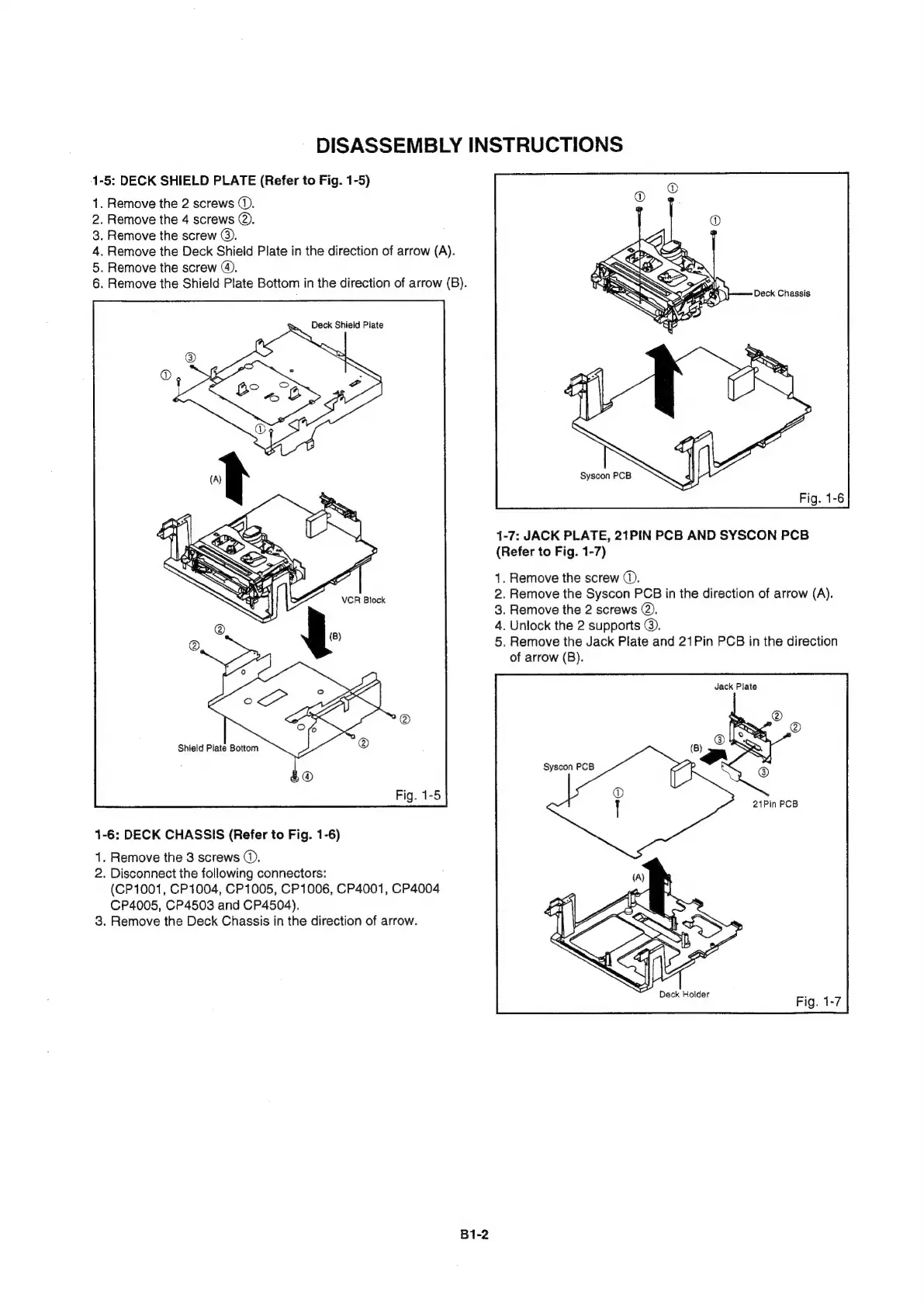
DISASSEMBLY
INSTRUCTIONS
1-5:
DECK
SHIELD
PLATE
(Refer
to
Fig.
1-5)
1.
Remove
the
2
screws
(.
2.
Remove
the
4
screws
@.
3.
Remove
the
screw
©).
4.
Remove
the
Deck
Shieid
Plate
in
the
direction
of
arrow
(A).
5.
Remove
the
screw
@.
6.
Remove
the
Shield
Plate
Bottom
in
the
direction
of
arrow
(B).
Deck
Chassis
Deck
Shield
Plate
1-7:
JACK
PLATE,
21PIN
PCB
AND
SYSCON
PCB
(Refer
to
Fig.
1-7)
1.
Remove
the
screw
©.
2.
Remove
the
Syscon
PCB
in
the
direction
of
arrow
(A).
3.
Remove
the
2
screws
@,
4.
Unlock
the
2
supports
@.
5.
Remove
the
Jack
Plate
and
21Pin
PCB
in
the
direction
of
arrow
(B).
Jack
Plate
Shield
Plate
Bottom
Syscon
PCB
1-6:
DECK
CHASSIS
(Refer
to
Fig.
1-6)
1.
Remove
the
3
screws
©.
2.
Disconnect
the
following
connectors:
(CP1001,
CP1004,
CP1005,
CP1006,
CP4001,
CP4004
CP4005,
CP4503
and
CP4504).
3.
Remove
the
Deck
Chassis
in
the
direction
of
arrow.
Deck
Holder
B1-2

Related product manuals