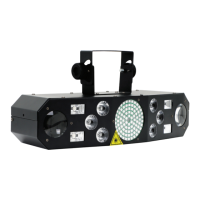
ORLASER103–Tri‐ScannerRGB
VividStandaloneLaserTunnel/ScannerEffect
HundredsofPatterns,TracesanEffects
DramaticCenterpieceUnitforAnyLightingArray
(EspeciallywhenusedwithSmokeMachinesorHazers)
ExtremelyWideScannerAngles
DMX,AudioChaseorAutomaticOperation
Integrated
MicrophoneforAudioChase
GeneralInformation:
OrionORLASER103Tri‐Scannerlaserisdesignedforindooruseonly;theunitshouldneverbeexposed
torainorexcessmoisture.Althoughproperlyventedandcooled,thislasereffectshouldalwaysbe
usedinaventilatedspace,awayfromexternalheatsources.
Likeall
ClassIIIAlasers,neverlookdirectlyatthelaseremitterasseriouseyeinjurycanoccur.Unit
shouldneveroperateformorethantwohours(continuous)withoutabriefcooldownperiodtosave
heatstressdamagetolaserdiodes.
Donotinsertanythingintolaserapertureasit
maydamagemirrorsorcausemotorstobecome
misaligned.Donotpoweruplaserifapertureisobstructedinanyway.
TheORLASER103shouldneverbeconnectedtoanykindofexternalACdimmer,andoperateonlyat
intendedvoltage.Therearenouserserviceableparts inside.ShouldtheScannerfail,
itshouldbe
referredtoqualifiedservicetechnicianforrepair.
ORLASER103BackPanel
1–PowerSwitch
2–ACInput
3–XLRDMX/LinkInput/Output
4–Mic&LEDIndicators(SoundActiveMode)
5–DIPSwitches
6–AudioSensitivityKnob

 Need help?
 General

 To Next Page