EasyManua.ls Logo

ORIUM Quaelis 14 - User Manual

ORIUM Quaelis 14
5 pages
Print Icon
To Next Page IconTo Next Page
Loading...
Imported by :
AIC International - 44980 Ste Luce sur Loire - France
CO2 AIR QUALITY MONITOR
User's manual
Please read the product instructions carefully before use. Please keep this leaflet in a safe place.
The Quaelis 14 CO2 meter (part number 11325) has been designed for indoor use only.
Carbon dioxide is an odourless and colourless gas from various sources (greenhouse gases, transport, fuel oil, heating,
etc.).
Carbon dioxide (CO2), which occurs naturally in the atmosphere, is a molecule produced by the human body during
respiration. Its concentration in the indoor air of buildings is related to human occupancy and air change, and is an
indicator of the level of air confinement. For this reason, the concentration of CO2 in indoor air is one of the criteria on
which the regulation of ventilation in buildings is based. Current regulatory or normative limit values usually vary between
1000 and 1500 ppm. They apply to school buildings, residential buildings and offices and have no significance for the
health quality of indoor air.
Source : www.anses.fr
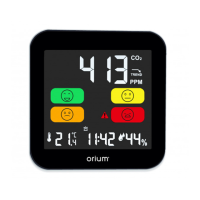
The Quaelis 14 carbon dioxide (CO2) meter allows continuous measurement of the CO2 level and
provides a practical, timely and alternative prevention solution to the decree (referred to in Article 5.1 of
Decree No. 2015-1000 of 17 August 2015: 2012-14 on the measurement of indoor air pollutants in
establishments open to the public (ERP).
Art. 5 - 1. - The pollutant campaign consists of a continuous measurement of carbon dioxide (CO2) carried out over a
single period, during the facility's heating period, if any.
The Quaelis 14 CO2 meter has been designed to continuously monitor and analyse the CO2 (carbon
dioxide) concentration level as well as the temperature and humidity of the room in real time.
Technical characteristics :
- Colour LCD screen.
- CO2 measurement. Technology: NDIR sensor.
- Display of time, temperature and indoor humidity.
- Adjustable brightness.
- A wake-up alarm
- Power supply: 500 mAh rechargeable battery via DC 5.0V USB adapter cable (supplied).
Measuring range
CO2
From 400 to 5000 ppm
Temperature
From -9°c to +50°C
Moisture content
From 1% to 99%.
Accuracy
CO2
50 ppm +/- 5%.
Temperature
+/- 1%
Moisture content
+/- 2%
Sensitivity/ resolution
CO2
1 ppm
Temperature
1°C
Moisture content
1%
Take the product out of its packaging and check that all parts are included.
Transport and protective packaging of the product requires the meter to be placed in a well-
ventilated area for 30 minutes before use to allow the sensors to clear.
Question and Answer IconNeed help?

Do you have a question about the ORIUM Quaelis 14 and is the answer not in the manual?

Overview

The Quaelis 14 CO2 Air Quality Monitor (part number 11325) is a device designed for indoor use to continuously measure and analyze carbon dioxide (CO2) concentration, as well as real-time temperature and humidity. It serves as a practical, timely, and alternative prevention solution in accordance with regulations concerning indoor air pollutants in establishments open to the public (ERP), particularly Decree No. 2015-1000 of 17 August 2015. The device utilizes an NDIR sensor for CO2 measurement, ensuring accuracy and reliability.

Function Description

The primary function of the Quaelis 14 is to provide continuous monitoring of indoor air quality by measuring CO2 levels, temperature, and humidity. It features a color LCD screen that displays all relevant information, including CO2 concentration, time, temperature, and indoor humidity. The device is equipped with an adjustable brightness setting for the display.

A key feature is the CO2 alarm function, which can be customized to trigger at a specific CO2 threshold between 500 ppm and 3000 ppm. By default, the audible alarm is set to 1000 ppm. When the set threshold is exceeded, an alarm sounds, and a visual icon flashes on the display. The alarm can be temporarily snoozed or stopped.

The monitor also provides a CO2 trend indicator, displayed to the right of the CO2 concentration measurement. This indicator shows if the concentration has increased or decreased by 100 ppm or more, or if it remains stable within that range. This allows users to quickly understand changes in air quality.

Furthermore, the device records and displays the minimum and maximum values for CO2, temperature, and humidity over a 24-hour period, with values automatically resetting daily at 00:00.

Important Technical Specifications

  • CO2 Measurement Technology: NDIR sensor
  • Measuring Range:
    • CO2: 400 to 5000 ppm
    • Temperature: -9°C to +50°C
    • Moisture content (Humidity): 1% to 99%
  • Accuracy:
    • CO2: 50 ppm +/- 5%
    • Temperature: +/- 1%
    • Moisture content (Humidity): +/- 2%
  • Sensitivity/Resolution:
    • CO2: 1 ppm
    • Temperature: 1°C
    • Moisture content (Humidity): 1%
  • Power Supply: 500 mAh rechargeable battery, charged via DC 5.0V USB adapter cable (supplied).
  • Battery Life: Approximately 5 hours on a full charge (excluding continuous USB connection).
  • Display: Color LCD screen with adjustable brightness.
  • Alarm: Customizable CO2 alarm threshold (500 ppm to 3000 ppm), audible alarm, and visual indicator.
  • Calibration: Equipped with ABC (Automatic Baseline Calibration) technology for regular automatic calibration. Manual calibration option available.

Usage Features

  • Charging and Power On: The device is charged via a USB cable connected to a powered USB port. To turn on, the cursor (6) must be moved to the ON position. The display lights up, beeps, and undergoes a one-minute warm-up and adjustment period before displaying measurements.
  • Placement: It is recommended to place the meter in a well-ventilated area, such as a living room, bedroom, or meeting room, at least one meter away from walls or the ceiling. Sensors (7) should remain unobstructed. The device should be kept away from direct sources of pollutants, liquids, heat, flammable products, and magnetic fields. For optimal sensor clearing, it is advised to place the meter in a well-ventilated area for 30 minutes before initial use.
  • Time and Alarm Settings: Users can set the time (12H or 24H format), minutes, and alarm time using the "+" and "-" buttons (5) and the settings menu button (3). The temperature unit can also be set to Celsius (°C) or Fahrenheit (°F).
  • CO2 Alarm Customization: The CO2 alarm threshold can be adjusted by pressing and holding the "-" button (5) until the CO2 value flashes, then using "+" and "-" buttons to set the desired ppm value, and confirming with button (3). The alarm can be activated or deactivated by briefly pressing the "-" button.
  • Display of Min/Max Values: By briefly pressing the "+" button (5), users can cycle through the display of maximum and minimum recorded values for CO2, temperature, and humidity. These values can be reset by pressing and holding the "+" button (5).
  • Brightness Adjustment: The screen brightness can be adjusted across three levels by successively pressing button (2).
  • Air Quality Indicators: The device provides a color-coded smiley face indicator for CO2 levels, ranging from "Excellent" (Green, 400-600 ppm) to "Review" (Flashing Red, > 2000 ppm), offering a quick visual assessment of air quality. Recommendations for airing the room are provided for "Poor" and "Bad" air quality levels.

Maintenance Features

  • Automatic Calibration (ABC Technology): The Quaelis 14 incorporates ABC (Automatic Baseline Calibration) technology, which ensures regular automatic calibration of the device to counteract sensor wear and potential drift due to pollution, thereby maintaining measurement accuracy.
  • Manual Calibration: For users who wish to perform a manual calibration, the device must be placed in a 400 ppm outdoor environment, be in the ON position, and have a fully charged battery. Manual calibration is initiated by pressing and holding the "+" button (5) until "CAL" flashes, then pressing button (3). The process can take up to 30 minutes, during which no buttons should be pressed, and the device should not be turned off.
  • Cleaning: Do not use cleaning products containing caustic or abrasive agents and pollutants.
  • Troubleshooting: The manual provides a comprehensive troubleshooting guide for common issues such as the meter not lighting up, not charging, incorrect time, alarm not ringing, high/wrong temperature readings, or frozen/incorrect measurements. Solutions typically involve checking battery charge, USB connections, ON/OFF switch position, alarm activation, temperature unit settings, and placing the monitor outside for sensor clearing.
  • Battery Status: A low battery indicator icon flashes when the battery is low, and the display brightness is automatically reduced. The battery does not charge when the device is in the OFF position.

The Quaelis 14 CO2 Air Quality Monitor is designed to be user-friendly and reliable, providing essential information for maintaining healthy indoor air quality.

ORIUM Quaelis 14 Specifications

General IconGeneral
BrandORIUM
ModelQuaelis 14
CategoryMeasuring Instruments
LanguageEnglish