EasyManua.ls Logo

Orlaco 0000300 - User Manual

Orlaco 0000300
12 pages
Print Icon
To Next Page IconTo Next Page
Loading...
DVR - One Channel 32Gb
DVR - One Channel 32Gb, PL
User manual
No. UM0972031 A 05
Art. No. 0000300
0000310
10/2016
English
Art. no. 0000300
Art. no. 0000310
Question and Answer IconNeed help?

Do you have a question about the Orlaco 0000300 and is the answer not in the manual?

Summary

Introducing the Orlaco DVR

Quad Service Menu Access

Channel Mode Settings

Camera Settings Configuration

Image Orientation and Tagging

Controls for image mirroring, upside-down display, and text tag positioning and color.

Horizontal Marker 1 Settings

Configure the first horizontal marker's position, color, and transparency.

Horizontal Marker 2 Settings

Configure the second horizontal marker's position, color, and transparency.

Vertical Marker Settings

Configure vertical markers' position, color, and transparency.

Image Quality Adjustments

Adjust image brightness, contrast, and saturation for optimal viewing.

Camera Tagging Configuration

Recording Settings Management

Recording Control

Enable or disable video data recording to the SD card.

Recording Rate and Quality

Select recording rate and encoding quality for SD card storage.

Status Line Configuration

Configure status line visibility, position, and foreground color.

Status Line Transparency

Adjust status line transparency for the black background.

Advanced System Settings

Language Selection

Choose the OSD menu language from a list of available options.

Default System Settings

Option to select factory defaults or restore factory settings.

Channel Settings

Menu option not used in this DVR model; do not change.

Time and Date Settings

Function to change the system time and date.

Device ID and Firmware Update

Set device ID and update firmware via SD card.

SD Card Formatting

Format the SD card, which will delete all existing files.

OSD and Status Line Settings

Configure On Screen Display and status line position, color, and transparency.

Boundary Settings

Configure boundary on/off, color, and blink settings.

System Information

Menu Structure Overview

Release Notes and Revisions

Overview

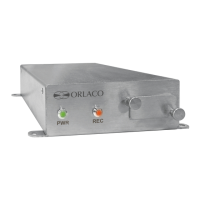
The Orlaco DVR - One Channel 32Gb is a digital video recorder designed for use with Orlaco compact cameras (4-pin connector) or AF-Zoom cameras (7-pin connector). It features one camera input (PAL or NTSC) and one video output. The recorded video files are stored on an SD memory card and can be viewed on a PC. This DVR is based on the 0000250 – DVR Multiview, which is a video view system capable of handling up to 4 PAL or NTSC cameras. However, the DVR - One Channel 32Gb is specifically designed to connect and record only one video input; it does not support Orlaco Switchers or Multiviews with multiple views. For systems requiring more than one camera, the 0000250 – DVR Multiview should be used instead.

Function Description:

The primary function of the DVR - One Channel 32Gb is to record video from a single camera input onto an SD memory card. It provides an On-Screen Display (OSD) menu for configuring various settings. To access the OSD menu, an Orlaco serial monitor must be connected to the 7-pin LCD connection of the DVR. A monitor connected to the 4-pin connection will not grant access to the menu. The OSD menu is based on the DVR Multiview, so some options may not be applicable to the single-channel DVR.

Important Technical Specifications:

  • Model: DVR - One Channel 32Gb
  • Article Numbers: 0000300, 0000310 (PL version)
  • Video Inputs: 1 (PAL or NTSC)
  • Video Outputs: 1
  • Camera Compatibility: Orlaco compact cameras (4-pin connector), AF-Zoom cameras (7-pin connector)
  • Storage: SD memory card (32GB SD Card included, Article number 0060210)
  • Included Accessories: USB All in one card reader (Article number 2130630), 32GB SD Card
  • Compliance: CE, ADR, EMC, mirror-directive regulations (where applicable)
  • Quality Management: Manufactured under ISO 9001, IATF 16949 automotive, ISO 14001 environmental management systems.

Usage Features:

OSD Menu Navigation:

The OSD menu, referred to as the 'Quad Service menu,' is accessed by selecting 'Ext. device config' from the Orlaco Monitor User Manual (UM0972080). To exit the Quad Service menu, the Option button must be pressed for 3 seconds.

Camera Settings:

This menu allows configuration of image, tag, and marker options for the connected camera (C1).

  • Mirror: Mirrors the image (left/right).
  • Upside down: Reverses the image (flips it upside down).
  • Tag hor. pos / Tag ver. pos: Adjusts the horizontal and vertical position of the tag (0-100).
  • Tag color: Selects the color of the tag (Black, Blue, White, Yellow, Magenta, Red, Cyan, Green).
  • Hor. marker1 / Hor. marker2: Enables horizontal markers.
  • Marker pos.: Adjusts the horizontal position of the marker (0 is top, 100 is bottom).
  • Marker col.: Adjusts the color of the marker (Green, Magenta, Red, Yellow, Blue, Black, White, Cyan).
  • Marker mix: Adjusts the transparency of the marker (0-, 25-, 50-, 100%).
  • Ver. marker1 / Ver. marker2: Enables vertical markers with similar position, color, and mix options as horizontal markers.
  • Brightness: Adjusts image brightness (0-100).
  • Contrast: Adjusts image contrast (0-100).
  • Saturation: Adjusts color intensity (0-100).

Camera Tags:

Allows defining text labels for the camera input. The DVR - One Channel 32Gb uses only C1.

Recording Settings:

  • Record: Enables or disables video recording.
  • Rate: Sets the recording rate, which determines how much space is taken on the SD card. Options include 1:1, 1:2, 1:3, 1:4, 1:5, 1:8, 1:10, 1:15, 1:20, 1:25, 1:30.
  • Quality: Sets the recording quality. Options are NOR (normal quality), LOW (low quality), HI (high quality). Higher quality takes more space on the SD card.
  • Status line: Provides information about settings. Can be enabled/disabled.
  • Stat hpos / Stat vpos: Adjusts the horizontal and vertical position of the status line (0-100).
  • Stat color: Sets the foreground color of the status line (background is black). Options: Green, Magenta, Red, Yellow, Blue, Black, White, Cyan.
  • Stat transp: Makes the black background of the status line transparent (0-100).

Advanced Settings:

  • Language: Selects the OSD menu language from English, Dutch, German, French, Czech, Hungarian, Italian, Polish, Portuguese, Spanish, Turkish, Swedish, Finnish, Danish, and Norwegian.
  • Default settings: Allows selecting and restoring factory defaults. Restoring defaults will reset all user settings.
  • Set time / Set date: Functions to change the current time and date.
  • Set device ID: Allows changing the device ID.
  • Update firmware: Updates the firmware from a file on the SD-Card. Power must not be removed during this process. Orlaco should be consulted before updating.
  • OSD settings: Configures the On Screen Display.
    • OSD horizontal pos / OSD vertical pos: Adjusts the horizontal and vertical position of the OSD (1-100).
    • Menu horizontal pos / Menu vertical pos: Adjusts the horizontal and vertical position of the menu (1-100).
    • Status on: Enables or disables the status line in the OSD.
    • Stat horizontal pos / Status vertical pos: Adjusts the horizontal and vertical position of the status line (1-100).
    • Status color: Adjusts the foreground color of the status line (background is black). Options: Green, Magenta, Red, Yellow, Blue, Black, White, Cyan.
    • Status transparent: Makes the black background transparent when set to ON.
  • Boundary settings: (Not used in this DVR model, do not change).

Info:

Displays Orlaco DVR-Multiview information, including software version, date, and gcc.

Maintenance Features:

  • Format the SD-Card: This function deletes all existing files on the SD card.
  • Memory Card Formatting Recommendation: It is recommended to format the memory card once per month.

Orlaco 0000300 Specifications

General IconGeneral
BrandOrlaco
Model0000300
CategoryRecording Equipment
LanguageEnglish