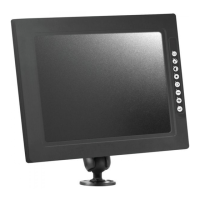
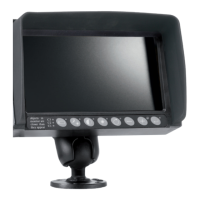
The ORLACO Display 7" RLED CAN RB 4D CS is a specialized camera display designed for commercial vehicles, fork-lift trucks, cranes, off-shore, and maritime applications. It serves as a user interface for various camera systems, offering a range of settings and functionalities to enhance visibility and operational efficiency.
Function Description:
The device functions primarily as a monitor for displaying camera feeds, with an emphasis on safety-critical operations. It features an 8-button keyboard for quick access to various settings and menu navigation. The display supports both single and multiple camera systems, including 1-camera, 2-camera (with Y-split cable), and 4-camera (with Y-split cable and switcher) configurations.
Key functions include:
- Camera Selection: Allows users to switch between multiple connected cameras.
- Backlight Control: Features automatic LCD backlight control for day/night settings, as well as manual adjustment options.
- Image Adjustment: Provides controls for contrast, brightness, and color saturation, which can be set independently for each camera.
- Menu Navigation: An option/previous menu button allows users to return to previous menus. Minus and plus buttons are used for navigating menu options and adjusting settings. An enter button is used to select or activate chosen options, or to switch to standby mode.
- Quick Settings (Shortcuts):
- TIC Camera: When a Thermal Image Camera (TIC) is selected, button 2 enables Color LUT (Look Up Table) and DDE (Digital Detail Enhancement) quick settings. The minus button selects Color LUT settings (WHO, BHO, FUS, RB, I&F), while the plus button selects DDE settings (OFF, LOW, MED, HI). Pressing button 2 for more than 3 seconds initiates a Flat Field Correction (FFC) cycle.
- AFZ Camera: When an Auto Focus Zoom (AFZ) camera is selected, button 2 enables/disables zero lux and backlight functions.
- CCC Camera: When a Compact Color Camera (CCC) is selected, button 2 switches between all backlight settings for the entire system (DAY, NIGHT, ABC).
- Operator Menu: Accessible by simultaneously pressing the minus and plus buttons, this menu allows adjustment of language, camera settings, and video channel.
- Service Menu: Provides advanced settings for mirror image, upside down display, switch delay, horizontal and vertical markers, graticule, cinema mode, camera type, video standard, backlight, zero lux, stabilizer, color LUT, TIC DDE, spot meter, pan/tilt, brightness, contrast, and saturation.
- Scanning: Configures scan sequence (which cameras to display in sequence) and scan interval (how long each image is displayed).
- Camera Switch Configuration: Allows selection of the video switch type (OFF, 3C, 2C, 4C, QUA).
- Front Camera Functionality: Supports front camera features, which may be a statutory obligation in some contexts.
- Default Settings: Enables restoration of factory default settings, with multiple sets available.
- External Device Configuration: For connecting devices with their own OSD.
Important Technical Specifications:
- Model Name: Display 7" RLED CAN RB 4D CS
- User Manual Number: UM0972011 A 01
- Date of Issue: 08/2019
- Language: English
- Article Number: 0208930
- Display Type: RLED (likely referring to a type of LED display, possibly with specific ruggedization or backlighting characteristics for industrial use).
- Camera Compatibility: Supports AFZ (Auto Focus Zoom), TIC (Thermal Image Camera), and CCC (Compact Color Camera) types.
- Video Standards: PAL or NTSC (NTS) for TIC cameras.
- Connectivity: CAN bus for communication, serial connection for RLED displays, Y-split cables for multiple camera systems, and a switcher for 4-camera systems.
- OSD Languages: English, Dutch, German, French, Italian, Czech, Polish, Portuguese, Spanish, Turkish, Swedish, Finnish, Danish, and Norwegian.
- CAN-bus Speed Options: 1M, 500, 250, 200, 125, 100.
- Certifications: IATF 16949 (quality automotive), ISO 14001 (environmental management system), ISO 9001.
Usage Features:
- Intuitive Keyboard: The 8-button keyboard is designed for ease of use, allowing operators to quickly adjust settings without complex menu navigation.
- Disclaimer for Safety: Upon startup, a disclaimer appears for 5 seconds, reminding users not to operate display functions during safety-critical operations and that "objects in the monitor are closer than they appear." This emphasizes the safety-first design philosophy.
- Customizable Image Settings: Operators can fine-tune contrast, brightness, and color saturation for each camera, ensuring optimal visibility in varying conditions.
- Flexible Camera Systems: The display supports various camera configurations (1, 2, or 4 cameras), making it adaptable to different vehicle and machinery setups.
- Specialized Camera Support: Integration with AFZ, TIC, and CCC cameras allows for advanced functionalities like zoom, thermal imaging palettes, and digital detail enhancement.
- OSD Customization: The On Screen Display (OSD) menu offers options for timeout, position, and transparency, allowing users to personalize the interface.
- Reference Lines and Graticule: Horizontal and vertical line markers, as well as a graticule, can be enabled and positioned to aid in spatial awareness, particularly for rearview cameras.
- Keyboard Lock: A keyboard lock feature prevents unintended changes to settings.
- Beeper Volume Control: Allows adjustment of audible feedback.
- Standby Modes: Includes immediate standby (IMM) and menu-driven standby (MNU) options.
Maintenance Features:
- Default Settings Restoration: The ability to restore factory default settings simplifies troubleshooting and reconfiguration. Multiple default sets are available, indicating potential for different pre-configured profiles.
- Software Information: The "Info" section in the standby menu provides software version details, which is useful for support and updates.
- Comprehensive Manual: The user manual provides detailed instructions for all functions and settings, aiding in setup, operation, and basic troubleshooting.
- Modular System: The system overview diagrams (1, 2, and 4 camera systems) illustrate a modular design, which can simplify component replacement and system expansion.
- Service Menu for Advanced Configuration: The service menu offers in-depth settings for technicians to configure the display and connected cameras, ensuring optimal performance and compatibility.
- CAN-bus Diagnostics: CAN-bus settings allow for configuration of protocol, speed, and terminators, which are crucial for maintaining reliable communication within the vehicle's network.

 Need help?

 To Next Page
 General