【
F
】
REPLACEMENT OF KNIFE
18. When to replace
The width of a brand new knife is 10mm and reduces little by little each time ground.
Replace the knife if the width is reduced to about 3mm.
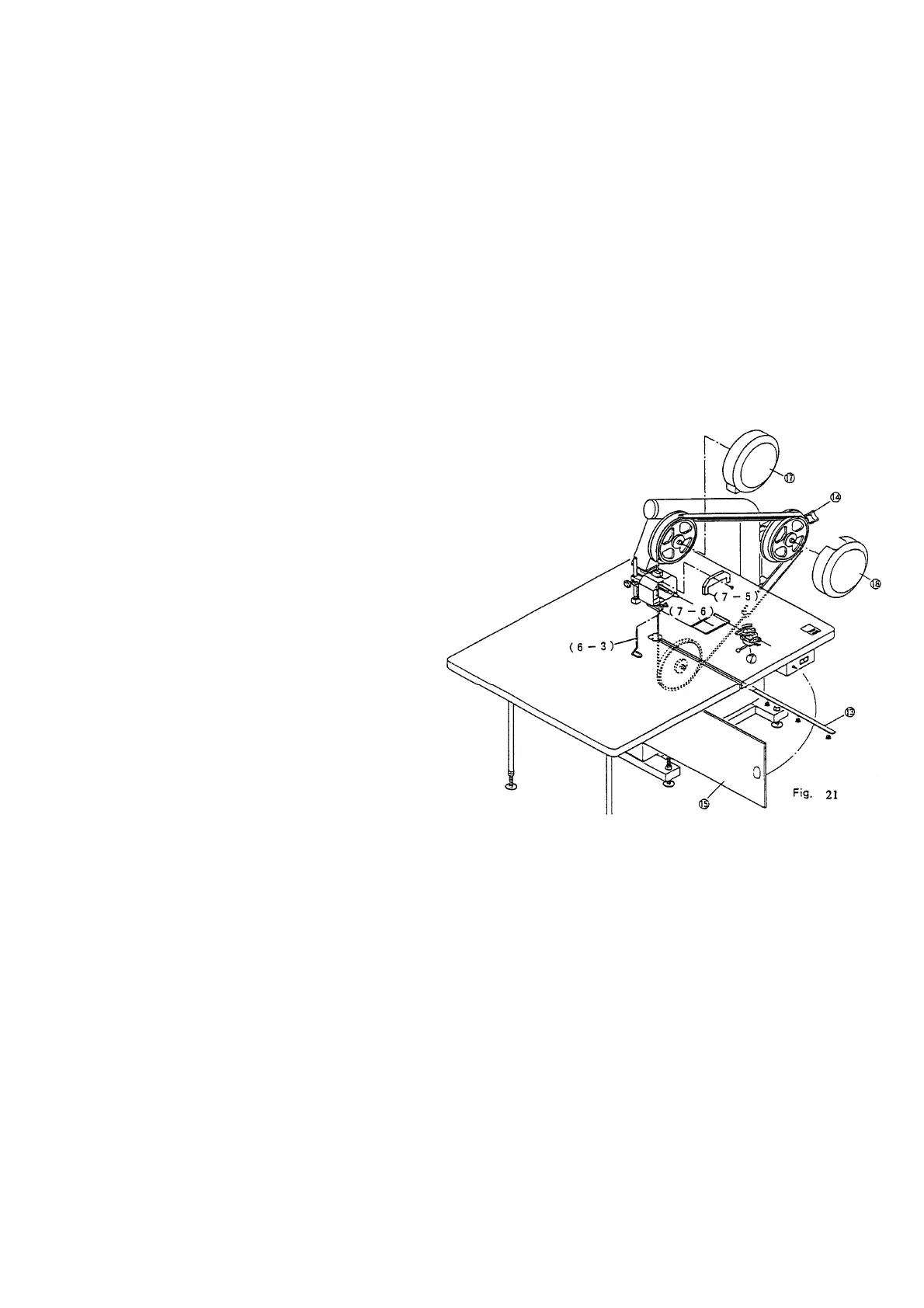
19. Removal of knife (see fig.21)
a) Remove the table plate (13).
b) Remove the safety fitting (6-3) of the knife guide.
c) Remove the grinder front cover (7-5) and the screws from the grinder (7).
d) Remove the top pulley cover (17) and the tension pulley cover (18).
e) Open the front cover (15).
f) Turn the tension handle to slacken the knife.
g) Remove the knife with extreme
care.
The knife installation
dimensions are given in para.3
on page 4.
(Caution)
Disconnect the power supply
cable plug from the outlet prior
to starting knife replacement.
It is recommended to put on
stainless steel mesh gloves
(safety gloves) for safety when
replacing the knife.
【
G
】
OTHER
1. If there is lighting, stop the operation of the cutter and disconnect the power supply
cable from the outlet because the inverter may be damaged by lighting surge.
2. Disconnect the power supply cable from the outlet if the cutter is not being operated
for a long period of time.
3. Press the power supply off pushbutton switch on the switch box if the power supply
is interrupted during operation.
4. Maintenance
Open the pulley cover and the front cove and remove cut cloth waste etc. by a
vacuum cleaner etc. at regular intervals.
Each time the knife is ground. Remove grit from the grit tray by a vacuum cleaner
etc.
Fill the silicon oil tank located above the grinder with silicon oil at regular intervals.


 To Next Page
 Loading...