11
EN
Operation
mode 1
Operation
mode 2
Operation
mode 3
Operation
mode 4
Operation
mode 5
OSEF100 Z1T
ON
1
2
3
4
ON
1
2
3
4
ON
1
2
3
4
— —
OSEF100 Z1PCT
OSEF100 Z1PIR
OSEF100 Z1H
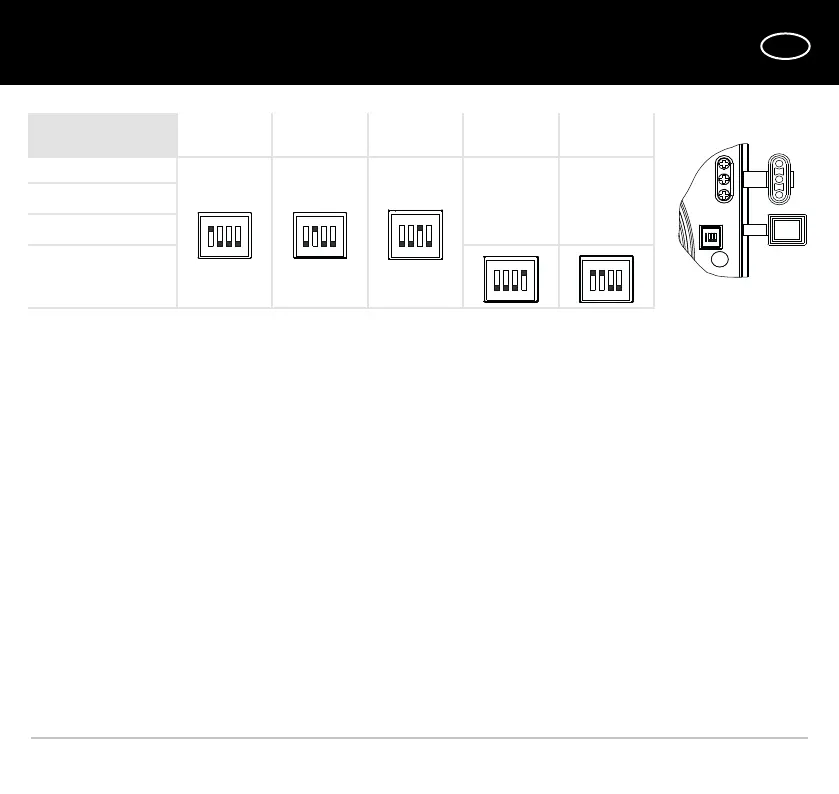
The choice of operating mode is carried out by setting the DIP switch to a certain position. Use the plastic screwdriver from
the delivery set to set the DIP switch to a required position.
Operation mode 1 (single-speed)
The fan is turned off by default. The fan starts operating at speed 1 when the switch is turned on or one of the sensors is
activated.
Operation mode 2 (single-speed)
The fan is turned off by default.
The fan starts operating at speed 2 when the switch is turned on or one of the sensors is activated.
Operation mode 3 (two-speed)
The fan operates at speed 1 by default.
The fan switches to the speed 2 when the switch is turned on or a sensor is activated.
Operation mode 4 (two-speed)
The fan is turned off by default. The fan starts operating at low speed when the switch is turned on and switches to high
speed when the humidity sensor is activated.
Operation mode 5 (two-speed)
The fan is turned off by default. The fan starts operating at speed 1 when the switch is turned on or when the humidity
sensor is activated. If during the operation at low speed the humidity sensor is activated and the switch is turned on, the fan
switches to high speed.
Caution! The operation mode 1 is set by default. The operating mode may be changed during the fan mounting or operation.
Setting the DIP switch to any position other than stated in the table results in the emergency mode communicated by the
red light indication. In such a case disconnect the fan from power supply and set the DIP switch to a correct position.
ON
1
2
3
4


 To Next Page