7. Firewall Settings
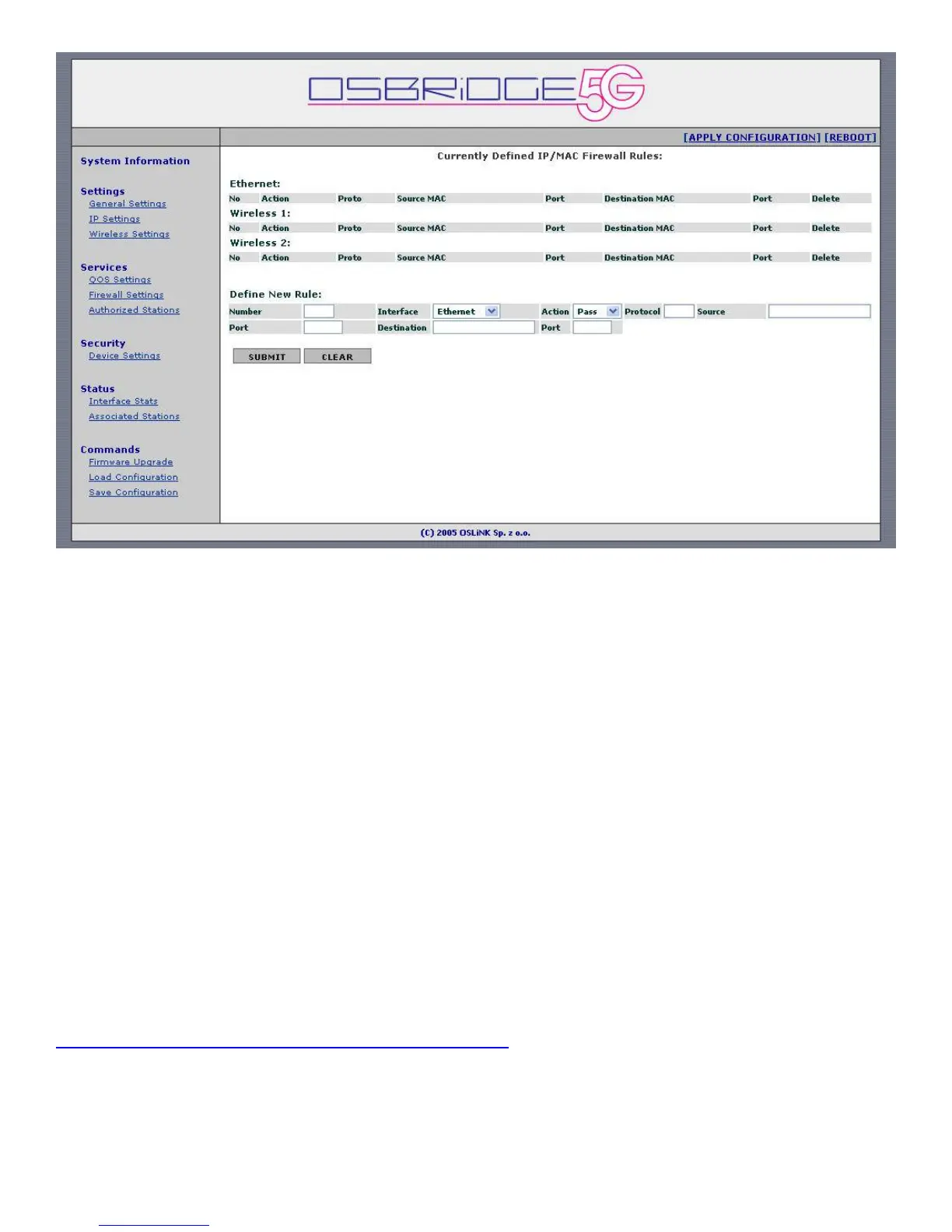
Built in Firewall allows you to pass or block traffic going through the device, based on selected
criteria.
There are three tables shown on the configuration screen. "Ethernet" table shows currently
defined firewall rules for the wired interface of the OSBRiDGE 5G device. "Wireless" tables show
currently defined rules for the wireless interfaces. You can delete existing firewall rules by
selecting "Delete" checkbox on the right side of the rule and pressing Submit button.
Define New Rule (IP Bridge Mode):
Interface – Select the incoming interface the rule should apply to. Choose either Ethernet or
Wireless interface.
Action – Select what to do with the packet matching the rule. You can either pass that packet
through, or block it.
Protocol – Enter the number representing protocol that should be matched. Use "*" to match all
protocols. Most common numbers are:
0 – All IP protcols
1 – ICMP protocol
6 – TCP protocol
17 – UDP protocol
For complete list of protocols please see Appendix 1 of this document, or go to:
http://www.iana.org/assignments/protocol-numbers
Source – Source MAC address of the packet to be matched. Use "*" to match any MAC address.
Source Port – Source port of the packet to be matched. Use "*" to match any source port.
Destination – Destination MAC address of the packet to be matched. Use "*" to match any MAC
address.


 To Next Page
 Loading...