6. Quality of Service Settings
The built-in traffic shaper allows you to set up different data flow speeds for the device clients –
In IP Bridge Mode - based on MAC Address,
In IP Router Mode - based on IP Address or IP Subnetwork.
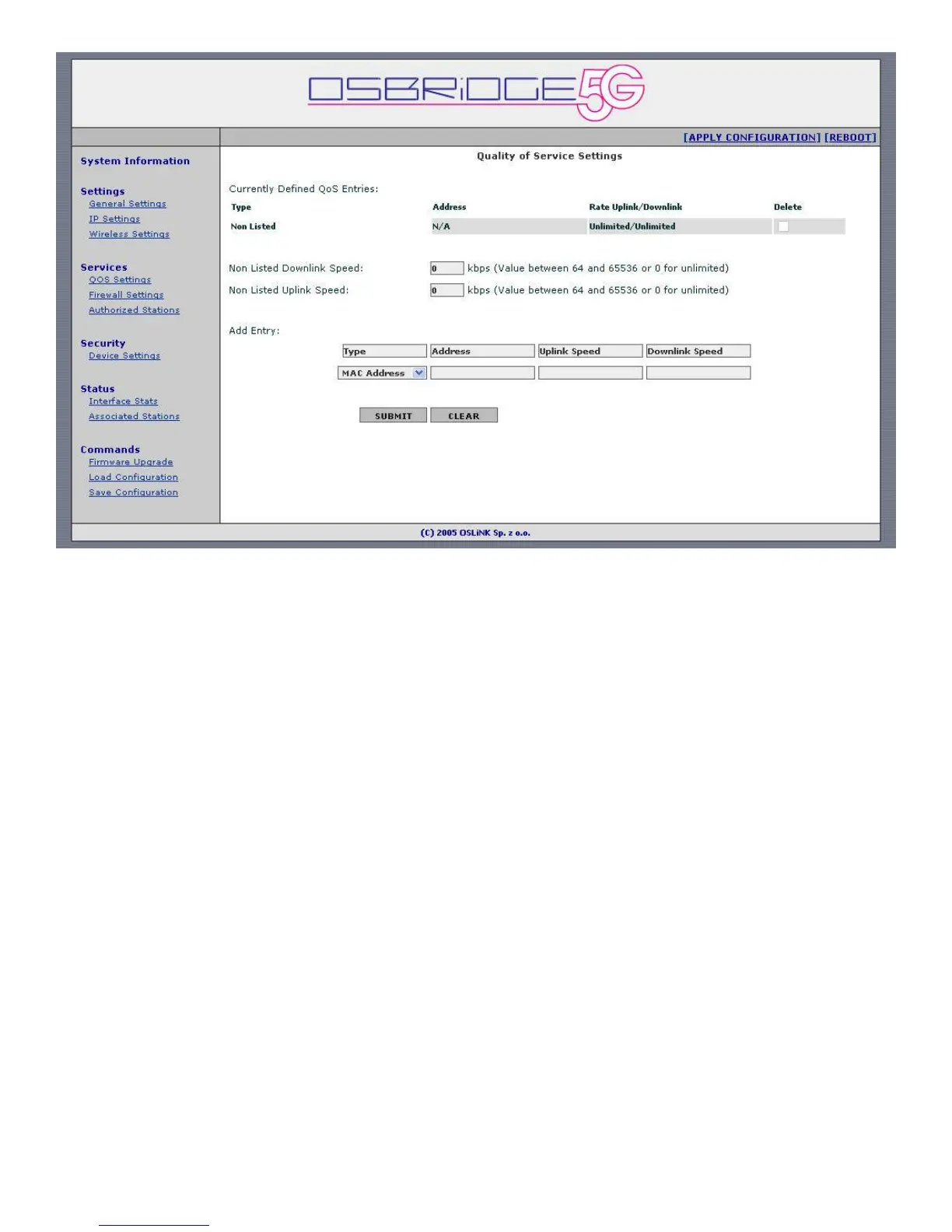
The Currently Defined QOS Entries table shows current traffic shaping configuration. First
entry shows default uplink/downlink speed for connections that don’t have matching entries in
the table. After that there are configured entries shown.
Non Listed Downlink Speed – Cumultative data flow speed for all packets going out of the
Access Point through WLAN interface, that don’t match any of the configured entries.
Non Listed Uplink Speed – Cumultative data flow speed for all packets going out of the Access
Point through Ethernet interface, that don’t match any of the configured entries.
Add Entry –
Type – choose either MAC Address or IP Address.
Address – For MAC Address enter it as "xx:yy:xx:yy:xx:yy". For IP Address enter it as "x.x.x.x",
or if you want to limit speed for whole subnetwork enter it as "x.x.x.x/y".
Uplink Speed – Enter data flow speed for all packets matching defined IP/MAC address, going
out of the Access Point through Ethernet interface.
Downlink Speed - Enter data flow speed for all packets matching defined IP/MAC address,
going out of the Access Point through WLAN interface.


 To Next Page
 Loading...