3. Remote Control Operation
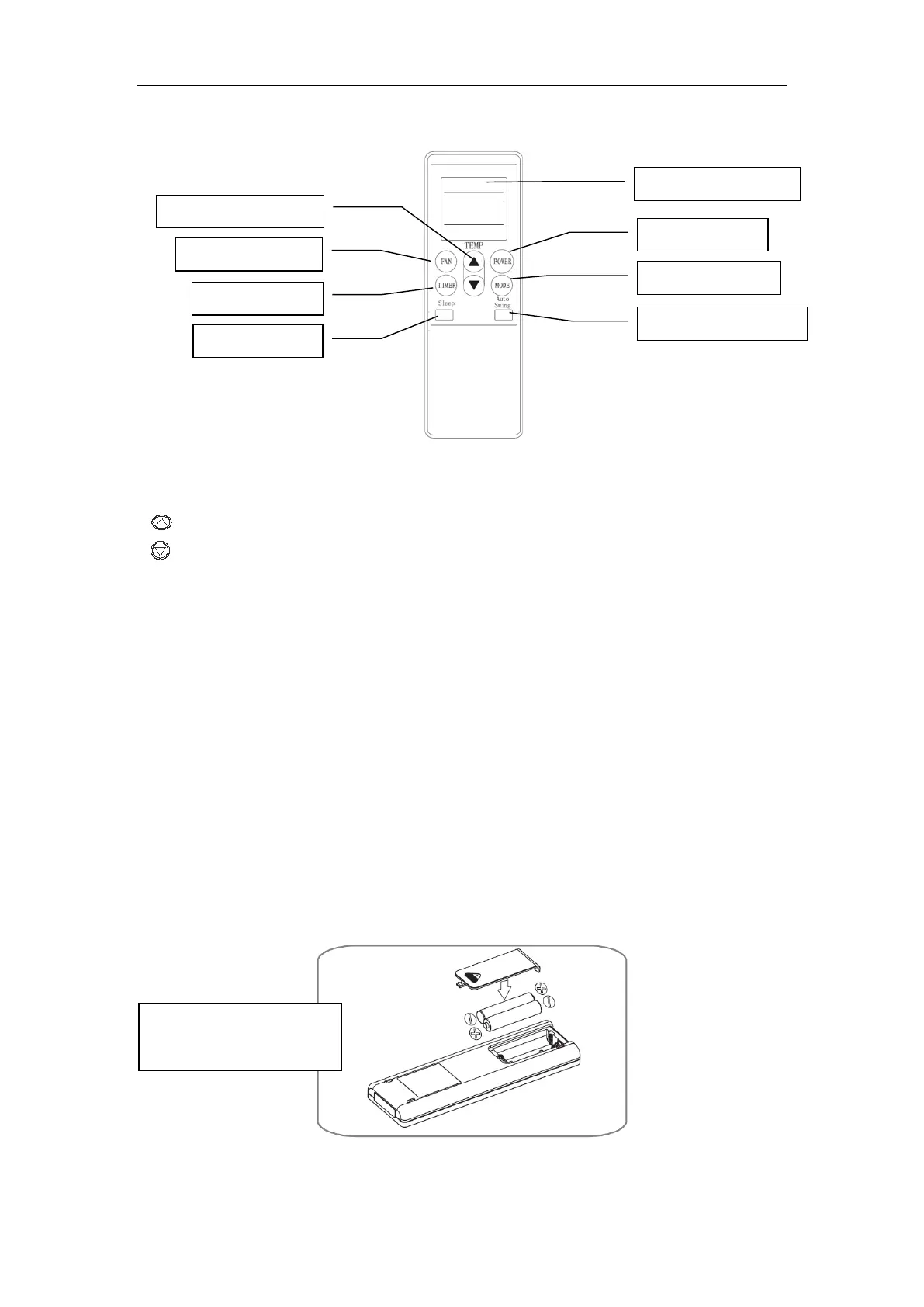
1) Power: Press this button to start the unit when it is energized or stop the unit when it is in operation.
2) Mode: Press this button to select operation mode.
3)
: Press this button to increase room temperature and timer setting.
4)
: Press this button to decrease room temperature and timer setting.
5) Fan: Press this button to select fan speed in sequence: Low → Medium → High.
6) Auto-Swing: Press this button to turn on or turn off auto-swing function.
7) Sleep: Press this button to select or cancel sleep mode (only effective under coolingoperation or
energy conversation modes).
8) Timer: press this button to set AUTO-ON and AUTO-OFF time. Time can be adjusted between 0.5-
24 hours. It jumps by 0.5 hour interval within 5 hours, and 1 hour interval over 5 hours, set time will
flash 5 times on screen then confirm the setting.
Before using your remote, install the AAA batteries into remote control.
1) Press and glide the battery cover on the back of the remote control, then you can remove the cover.
2) Insert two new alkaline AAA batteries into the battery compartment, being sure to note the proper
polarity.
Reattach the battery cover, making sure the locking tab clicks into place.
Notes:
Be sure to note proper
polarity of batteries
5


 To Next Page