CUSTOMER SERVICE: 800-973-8374 CUSTOMERSERVICE@REVERIE.COM
3
400
F
B
E
D
F
E
A
D
E
D
C
E
REMOTE CONTROL
OPERATION &
PROGRAMMING
OPERATING INSTRUCTIONS
WIRELESS REMOTE PAIRING
PROCESS
POWER BASE HEAD AND FOOT
ADJUSTMENT
Adjusts the head and foot sections to
the desired positions.
FOUNDATION “FLAT” BUTTON
Return both head and foot to the at
position.
ZERO GRAVITY
Allows your legs to be lifted to a
position slightly above the chest, which
enables blood ow to easily circulate
back to the heart, thus reducing stress
and fatigue.
LOCK
Press the Lock button for 3 seconds,
the remote will not be functional until
you press the lock key for 3 seconds
again.
PROGRAMMABLE MEMORY
BUTTONS
You can store 2 personalized memory
positions. Press and hold the “SET”
button for 3 seconds until the LED
light ashes once and then stays lit,
then press button “1” or “2” to store
the position. The LED will turn off
after the process is complete.
HEAD AND FOOT MASSAGE
CONTROLS
Turns on the corresponding massage
unit (starting at intensity 5 of 10). To
increase massage intensity, press
(+) button. To decrease massage
intensity, press (-) button.
MASSAGE TIMER
Press the timer button to cycle the
operation time from 15-30-45-off.
LIGHT
Press to turn on/off the Nightlight under
the bed.
STEP 1
STEP 2
Place batteries into the remote control
(3 x AAA batteries)
Ensure the power base is plugged into
a functioning outlet.
NOTE: If no time is set for the
massage, it will run for 30 minutes.
NOTE: When you press multiple
buttons at the same time, the
system will identify an invalid
operation, except for special
combination keys.
STEP 5
STEP 6
Press any button on the remote control
within 30 seconds to pair successfully.
When the receiver light stops ashing
and turns solid, you have completed
the learning process of the RF
frequency code.
STEP 4
The indicator light will begin to ash
rapidly.
STEP 3
Press the pair button on the control
box for 3 seconds.

 Need help?
 General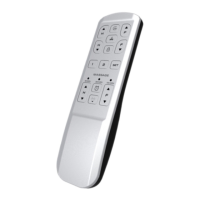

 To Next Page