

EasyManua.ls Logo

Osram AR111 - User Manual

Osram AR111
7 pages
Print Icon
To Next Page IconTo Next Page
Loading...
Installation instructions for AR111 luminaires
Product overview
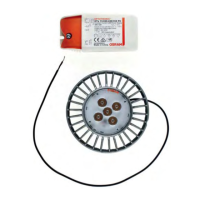
• COINlight AR111 (LED module)
• Matching OPTOTRONIC control gear
The following instructions demonstrate how easy it is to replace an AR111 halogen lamp with a COINlight
AR111 LED module. These instructions are also applicable for initial installations of LED luminaire systems.*
*Please observe the safety and mounting information specified in the product data sheets.
Question and Answer IconNeed help?

Do you have a question about the Osram AR111 and is the answer not in the manual?

Summary

Product Overview

LED Luminaire Installation

Disconnect Power Supply

Step 1: Disconnect the existing luminaire from its power supply cable.

Disconnect Lamp from Driver

Step 2: Disconnect the existing lamp from the control gear.

Remove Lamp from Housing

Step 3: Open the lamp housing and remove the existing lamp.

Install LED Module

Step 4: Install the COINlight AR111 LED module into the luminaire.

Connect Control Gear

Step 5: Connect power supply cables to the control gear, observing correct polarity.

Finalize Installation

Step 6: Complete the installation and remove unused connectors.
Summary

Product Overview

LED Luminaire Installation

Disconnect Power Supply

Step 1: Disconnect the existing luminaire from its power supply cable.

Disconnect Lamp from Driver

Step 2: Disconnect the existing lamp from the control gear.

Remove Lamp from Housing

Step 3: Open the lamp housing and remove the existing lamp.

Install LED Module

Step 4: Install the COINlight AR111 LED module into the luminaire.

Connect Control Gear

Step 5: Connect power supply cables to the control gear, observing correct polarity.

Finalize Installation

Step 6: Complete the installation and remove unused connectors.

Osram AR111 Specifications

General IconGeneral
BrandOsram
ModelAR111
CategoryLantern
LanguageEnglish