25
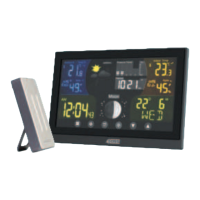
1 – Snooze/light button
2 – Sensor no. 1/2/3
3 – Data from outdoor sensor
4 – Cycling through data from connected sensors
5 – Outdoor temperature trend
6 – Outdoor humidity trend
7 – Weather forecast
8 – Moon phase
9 – Pressure history
10 – Pressure value
11 – Pressure trend
12 – Indoor temperature alert
13 – Indoor temperature
14 – Indoor temperature trend
15 – Station batteries low
16 – Indoor humidity trend
17 – Indoor humidity
18 – Date
19 – Day of the week
20 – UP button – Step forward in settings, memory of max/min
temperature and humidity
21 – DOWN button – Step back in settings
22 – CHANNEL button – Searching for sensor signal/switching
through information from connected sensors
23 – ALARM button – Alarm activation/deactivation
24 – SET button – °C/°F unit of temperature setting, function
settings
25 – MODE button – Display mode switching
26 – Time
27 – Alarm no. 1/no. 2
Monitor Information cont...


 To Next Page