
 Need help?
Do you have a question about the OSS OSS-PCIE-4UV-5-1 and is the answer not in the manual?
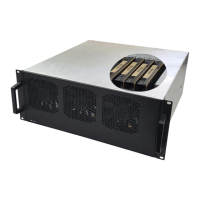
The device described in this manual is a 4U Value Gen4 5-Slot PCIe (4.0 x16) Slot Expansion System, designed to provide PCIe expansion at a competitive price. It allows for the connection of a host server to five PCIe 4.0 x16 slots, located 1m to 2m away from the host.
This system functions as an external expansion chassis for host servers, enabling the integration of up to five full-length PCIe add-in cards (AICs) such as GPU cards, NVMe flash storage, and industrial I/O cards. It provides a robust and scalable solution for applications requiring significant PCIe bandwidth and processing power, particularly in HPC and cloud computing environments. The expansion unit automatically powers on when the host computer is turned on, and powers off when the host computer is shut down.
Host Card: The system includes two PCIe 4.0 x16 adapter cards: one host card and one target card. These are HIB616-x16 Host/Target Interface cards with a PCIe Switch 88032. The host card is a half-height, half-length, single-slot x16 PCIe add-in card form factor with a PCIe4 x16 physical card edge connector (256Gb/s).
Backplane: The system utilizes two OSS-PCIe4-BP-5X16 (522 board) backplanes, each featuring a PCIe switch 88096 and a PCIe 3 5-slot expansion backplane. The integrated system includes one HIB616x16 PCIe card and four (4) PCIe4 x16 double-width slots, plus one x16 single-width slot.
Enclosure: The enclosure supports up to five full-height, full-length PCIe slots, plus one cable interface. It can also accommodate extended height cards and top GPU power cables. The finish is black medium texture liquid paint, with an optional OEM logo area. It includes a power and fan status bi-color LED panel and tool-less rack slides. Dimensions: 19" W x 7" H x 17.7" D. Weight: 30.0 lbs without the baseboards (522) or add-in cards.
PCI Express Bus Spec.: Revision 4.0. Interconnect Bandwidth: 256Gb/s.
Cooling: The chassis features three 120mm x 38mm fans mounted to the front bezel. Two standard fan options are available:
Power Supply: The system features dual load-sharing power supplies pluggable from the rear. These are two 2000W 80Plus Titanium efficiency power supplies, each with integrated 90-264VAC AC inputs. The system can provide up to 4000W non-redundant total power. Supplies are redundant hot-swap when system power requirements are under 2000W total. Auxiliary Power: An array of 8 EPS12V AUX power connectors is available for high-power cards. Power supply specifications: 2000W output power at 91% efficiency, active power factor correction (PFC), and automatically corrects AC input for a full range of voltages. MTBF is greater than 200,000 hours. The power supply automatically adjusts to input voltages between 100 to 240 Vac.
MTBF: 53,000 hours.
Operating Environment: Temperature: 0-35°C. Relative Humidity: 10-90%. Altitude: 0-10,000 feet above sea level.
Storage Environment: Temperature: -40 to 85°C. Relative Humidity: 5-96%. Altitude: 0-50,000 feet above sea level.
Operating Systems: Microsoft Windows Operating Systems and Linux base OS.
Agency Compliance: FCC Class A, CE Safety & Emissions, UL, CUL, RoHS2 (testing pending).
Warranty: 1 Year Return to Factory. Extended Warranty is available and sold separately.
GPU/PCIe Card Configuration: The 4U Value Gen4 5-slot expansion backplane supports up to five full-length single-wide GPUs or four full-length double-wide GPUs. GPUs are installed on the PCIe x16 Gen4 PCIe slots. It is strictly recommended to install GPUs of the same brand/maker. The system provides auxiliary power cables (8-pin, 6+2 pin, 6-pin) to support high-power PCIe cards, with a PCIe slot providing 75 watts, an 8-pin connector providing 150 watts, and a 6-pin connector providing 75 watts.
Link Cable Configurations: The system supports various link cable configurations:
LED Indicators: The system provides various LED indicators for status monitoring:
Software Installation: The 4U Value expansion unit requires no specific drivers for Windows 7, 8, 10, Windows Server, Linux, Unix, Centos, and Mac OS. It functions as a standard desktop computer chassis, and any third-party PCIe card drivers should be installed according to the card manufacturer's instructions.
Troubleshooting: The manual provides comprehensive troubleshooting steps for common issues such as:
Hot-Swap Power Supplies: The dual 2000W power supplies are hot-swappable, allowing for replacement without system downtime in case of a module failure. An indicator on the back panel of the power supply signals a failure.
Fan Control (Optional): An optional PWM fan controller is available for managing fan speed, which can help reduce noise in situations where low heat-producing cards are installed. This upgrade requires sending the unit back to OSS for installation.
Auxiliary Cable Management: Users are advised to route auxiliary power cables away from fans and use zip-ties or Velcro to secure them, ensuring proper airflow and preventing GPU card overheating.
Shipping/Transporting: GPU cards must be removed from the slots when transporting or shipping the unit to prevent damage to the slots or cards, and to avoid voiding the warranty.
Technical Support: One Stop Systems provides technical support via fax, phone, and an online support portal. Users are encouraged to provide detailed descriptions of problems and diagnostic files for faster resolution. While OSS supports its own hardware, for issues related to third-party PCIe cards, users are advised to contact the card manufacturer.

 To Next Page
 General