Cleanblenderaccordingtotheinstructionsinthe
“CleaningandStoringYourBlender”section.
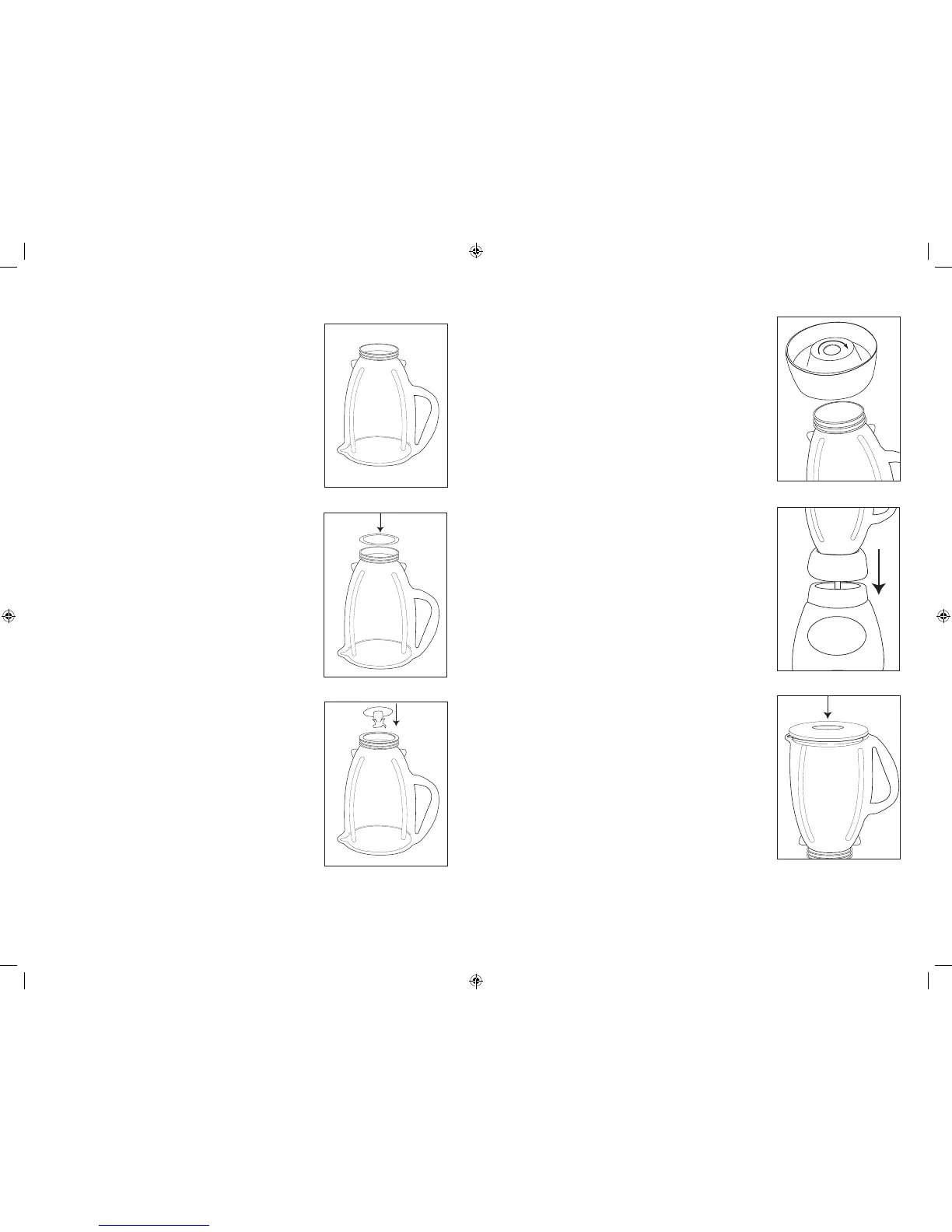
JarAssembly:
–Turnjarupsidedownsothesmallopeningisat
thetop.(Figure1)
–Placesealingringoverjaropening.(Figure2)
–Placebladeintojar.(Figure3)
–Snapthreadedbottomdiscandcollartogether.
Placecollaroverbladeandjar.(Note:Ifthere
areslotsontopofcollar,linethemupwith
notchesonjar.)Placethecollaronjarandturn
thethreadedbottomdiscclockwisetotighten.
(Figure4)
–Placejarassemblyontobase.(Figure5)
–Placeingredientsintojar.
–Placelidwithfeedercaponjar.
–Plugthepowercordintoa120VoltAC
electricaloutlet.
SlideswitchtoHIGHorLOW(Ifyourmodeldoes
nothaveaslideswitch,pushHIGHorLOWbutton.)
Pushdesiredspeedandblendingredientstodesired
consistency.
PushOFFtostoptheblenderandturnblenderoff.To
usePULSE,selectHIGHorLOW.PushPULSEand
holddownfordesiredlengthoftime.ReleasePULSE
andallowbladetostop.Repeatcycleasdesired.
dIal models wIthout tImer
Turndialtodesiredfood/drinkselection.PressON
andblendingredientstodesiredconsistency.Press
OFFtostopthemotorandturnblenderoff.Note:
Food/drinkselectioncanbechangedduringblending
byturningthedialtothedesiredselection.
TousePULSE,turndialtodesiredfood/drink
selection.PressPULSEandholddownfordesired
lengthoftime.Releaseandallowbladetostop.
Repeatcycleasdesired.
PRESSPOWERTOTURNTHEBLENDERON.
Theblenderissettothefood/drinkselectionidentied
byablinkingindicatorlight.Turndialtochangethe
food/drinkselection.
PressSTARTandblendingredientstodesired
consistency.PressSTOPtostopthemotor.(Pressing
POWERstopsthemotorandturnstheblenderoff.)
NOTE:Food/drinkselectioncanbechangedduring
blendingbyturningthedialtothedesiredselection.
NOTE:Thisblenderisprogrammedtoturnthepower
offautomaticallyifnotusedforaperiodofseveral
minutes.
TousePULSE,turndialtodesiredfood/drink
selection.PressPULSEandholddownfordesired
lengthoftime.Releaseandallowbladetostop.
Repeatcycleasdesired.
TouseAutoBlend™Timer,pressBLENDTIME
untildesiredlengthofblendingtime(15,30,45,60
seconds)isilluminated.
Turndialtodesiredfood/drinkselection.Press
START.Blenderwillautomaticallystopwhenselected
timehaselapsed.Tostopblenderbeforeelapsed
time,pressSTOP.Touseblenderwithouttimer,press
BLENDTIMEuntilnolightsareilluminated.
• Putliquidsinthejarrst,unlessarecipesays
otherwise.
• Crushingice:Crush6icecubesorapproximately
2cupsoficeatatime.
• Thisblenderhasbeendesignedtogentlyprocess
foodswhenoperatingatlowspeeds.Ifbladesdo
notrotateduringoperation,simplychooseahigher
speed.
• Donotremovethelidwhileinuse.Removefeeder
captoaddsmalleringredients.(Figure7)
•Cutallrmfruitsandvegetables,cookedmeats,
shandseafoodintopiecesnolargerthan1/2inch
(1.8cm)to1inch(2.5cm).Cutallkindsofcheeses
intopiecesnolargerthan1/2inch(1.8cm).
• Thisblenderwillnotmashpotatoes,whipeggwhitesorsubstitutedairy
toppings,mixstiffdoughorgrindrawmeat.
FIGURE 1
FIGURE 2
FIGURE 4
FIGURE 5
FIGURE 3
FIGURE 6
FIGURE 4
FIGURE 5
FIGURE 3
FIGURE 6
FIGURE 1
FIGURE 2
FIGURE 4
F
FIGURE 1
FIGURE 2
FIGURE 4
FIGURE 5
FIGURE 1
FIGURE 2
FIGURE 4
FIGURE 5
FIGURE 3
F
English6 English7
6800-6839_6850-6889_BLSTCP_BLSTCC_14EFSM1.indd 24-25 12/24/14 9:37 AM



 To Next Page