DAILY USE
English-9
Using the control panel
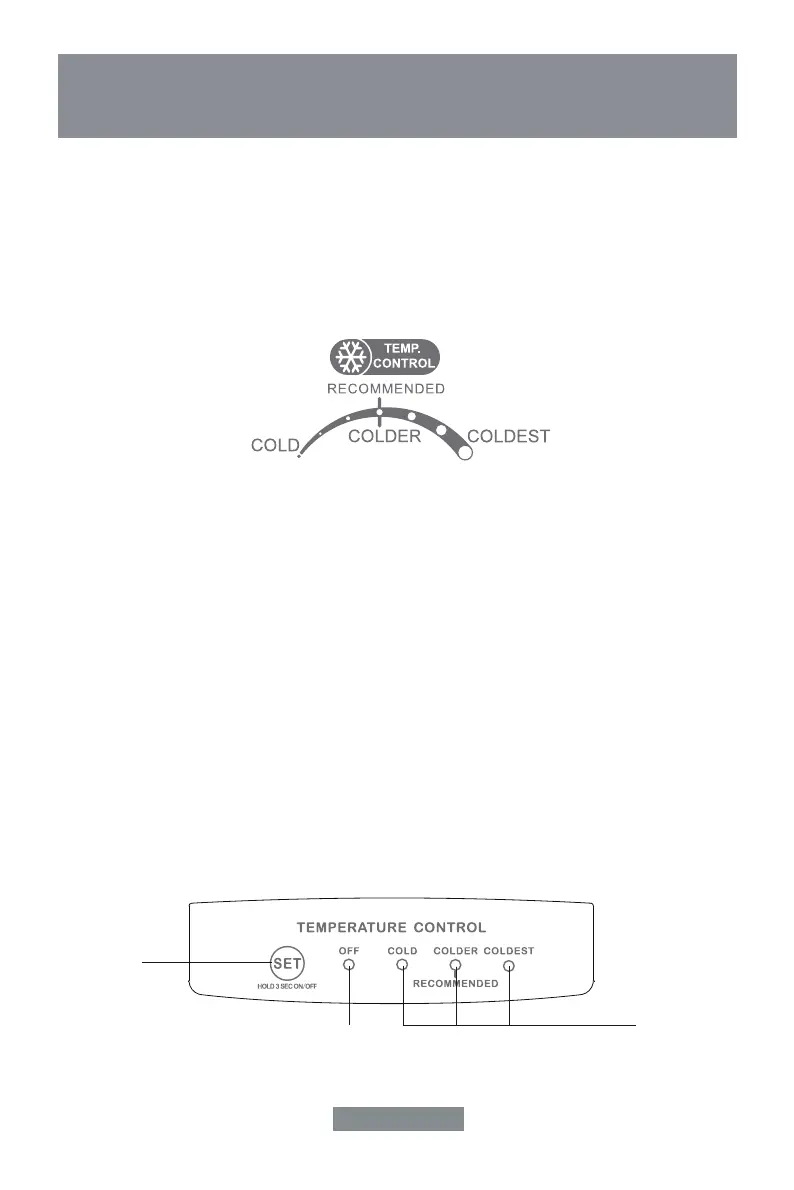
FREEZER TEMPERATURE SETTING
• Switch on your appliance. The internal temperature is controlled by a sensor. There are 3
settings: cold, recommended and coldest
Cold is the warmest setting and colder is the coldest setting.
• The appliance may not operate at the correct temperature if you are in a particularly hot
environment or if you open the door often.
REFRIGERATOR TEMPERATURE SETTING
1.0 Control panel
1.1 Operating key
B - Temperature setting key
1.2 LED indication light
L1 - Display refrigerator compartment setting.
L2 - Power off
2.0 Operation
2.1 The room temperature is cycled between "cold", "plus" and "cold", when the "Set" key is pressed.
After each operation is terminated for 5 seconds, the temperature setting is confirmed.
2.2 Power off and on
The power is turned off after pressing "Set" Key 3 seconds.
Then the compressor stopped, the light indication.
The power will be turned on, when pressing "Set" Key 3 seconds again.
TEMPERATURE CONTROL
FREEZER CONTROL
B
L2
L1


 To Next Page