12
11
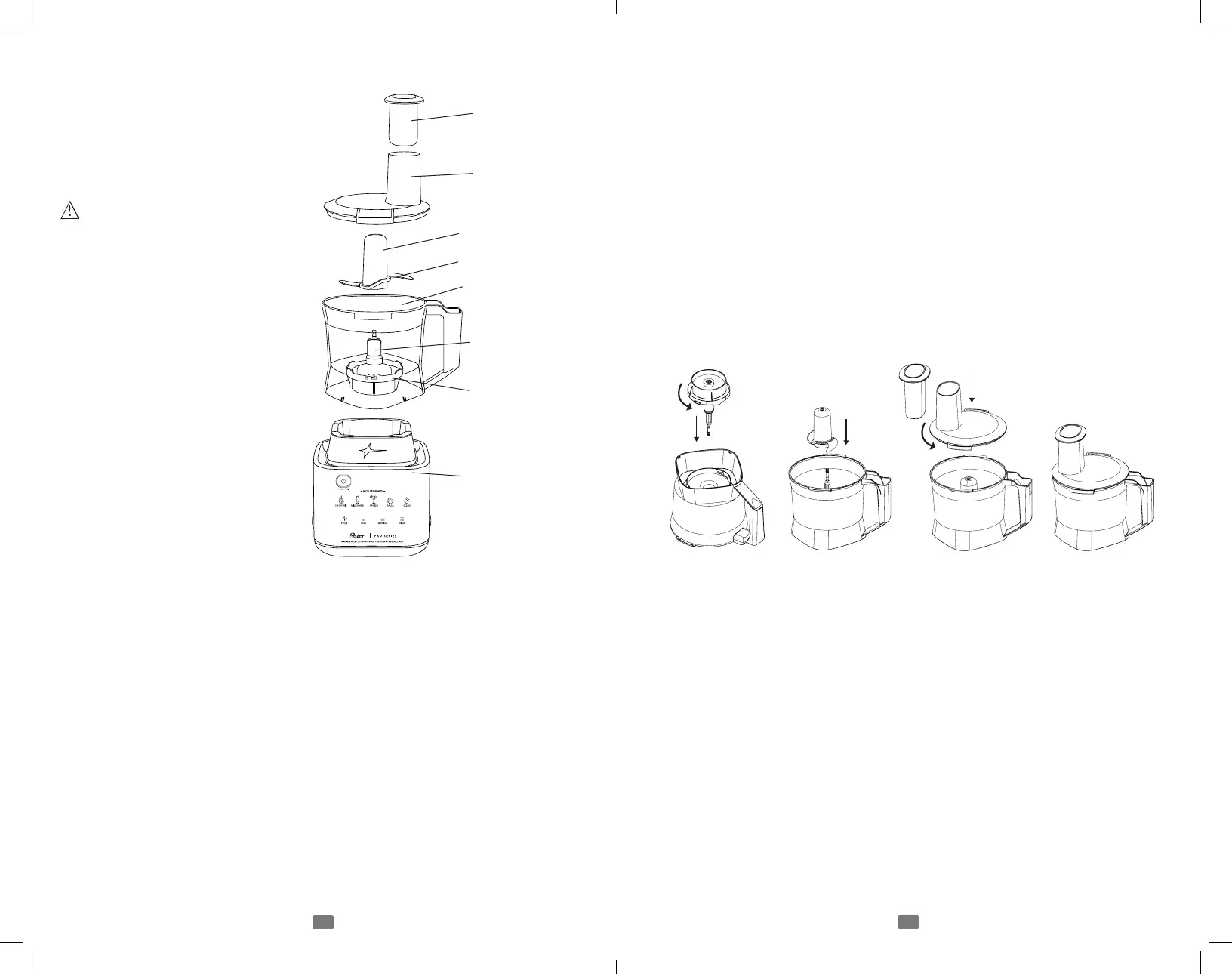
Food Processor Accessory (Select Models Only)
Food Pusher – Use to safely push
ingredients into Slicing/Shredding
Disk.
Cover – The feed tube allows the
addition of ingredients while processing.
Plastic Center Hub
WARNING: The blade is very
sharp, handle carefully.
S Blade – Specially designed for
chopping and mincing. Grasp the
plastic Center Hub when handling the
Blade.
Bowl – 5-cup capacity allows for fast
processing of hard-to-chop foods.
Blade Shaft – For use with Slicing/
Shredding Disk.
Adaptor – Transfers the power
of your Motor Base to the Food
Processor Accessory.
Motor Base
Before Using for the First Time –
After unpacking, disassemble unit before using for the first time.
Wash all parts (except Adaptor) in warm, soapy water.
Rinse and dry immediately.
CAUTION: DO NOT IMMERSE ADAPTOR IN ANY LIQUID.
Cover
Food Pusher
Bowl
Blade Shaft
Plastic Center Hub
S Blade
Adaptor
Motor Base
Assembling and Using Your Food Processor
1. Before assembly, make sure Adaptor is operating correctly. Unplug Motor
Base during assembly.
2. Place Adaptor in bowl and turn counterclockwise to lock.
3. Place Bowl with Adaptor on Motor Base.
Chop or Mince
4. Hold S Blade by the plastic Center Hub and place over post of Bowl.
CAUTION: Blade is very sharp, handle carefully. Rotate the S Blade to make
certain it is seated on the post as far as it will go. Always place S blade in
Food Processor before adding ingredients.
5. Place food in Processing Bowl. Food to be processed should always be cut
into 1-inch (2.5 cm) pieces.
6. Using alignment marks on the lid, place cover on bowl and press down
firmly while turning counterclockwise to lock.
DO NOT OPERATE UNIT UNLESS COMPLETELY ASSEMBLED
7. Turn unit “ON.” (Select Pulse, Low, or Med setting on the Motor Base.)
ALWAYS HOLD FOOD PROCESSOR FIRMLY WITH ONE HAND
WHEN STARTING UNIT AND WHEN PROCESSING. Process until
desired results are achieved by running the unit continuously or Fast Pulsing.
Fast Pulsing is the technique used to control the size of the food being
processed with the Food Processor Accessory. Press and release the Pulse
button very quickly. Refer to Processing Chart for proper techniques and end
results.
NOTE: Only the “Salsa” auto program setting is functional when Food
Processor is attached.
Slice or Shred
8. Place Blade Shaft over post. Place Slicing/Shredding Disk over Blade Shaft
with the blade of your choice facing up. CAUTION: Blade is very sharp,
handle carefully.
9. Using alignment marks on the lid, place cover on bowl and press down
firmly while turning counterclockwise to lock.
10. Load the feed tube with ingredients before turning the Food Processor
“ON”.
BLSTEPH_22EM1.indd 11-12BLSTEPH_22EM1.indd 11-12 2022/12/12 上午9:562022/12/12 上午9:56



 To Next Page