English - 11
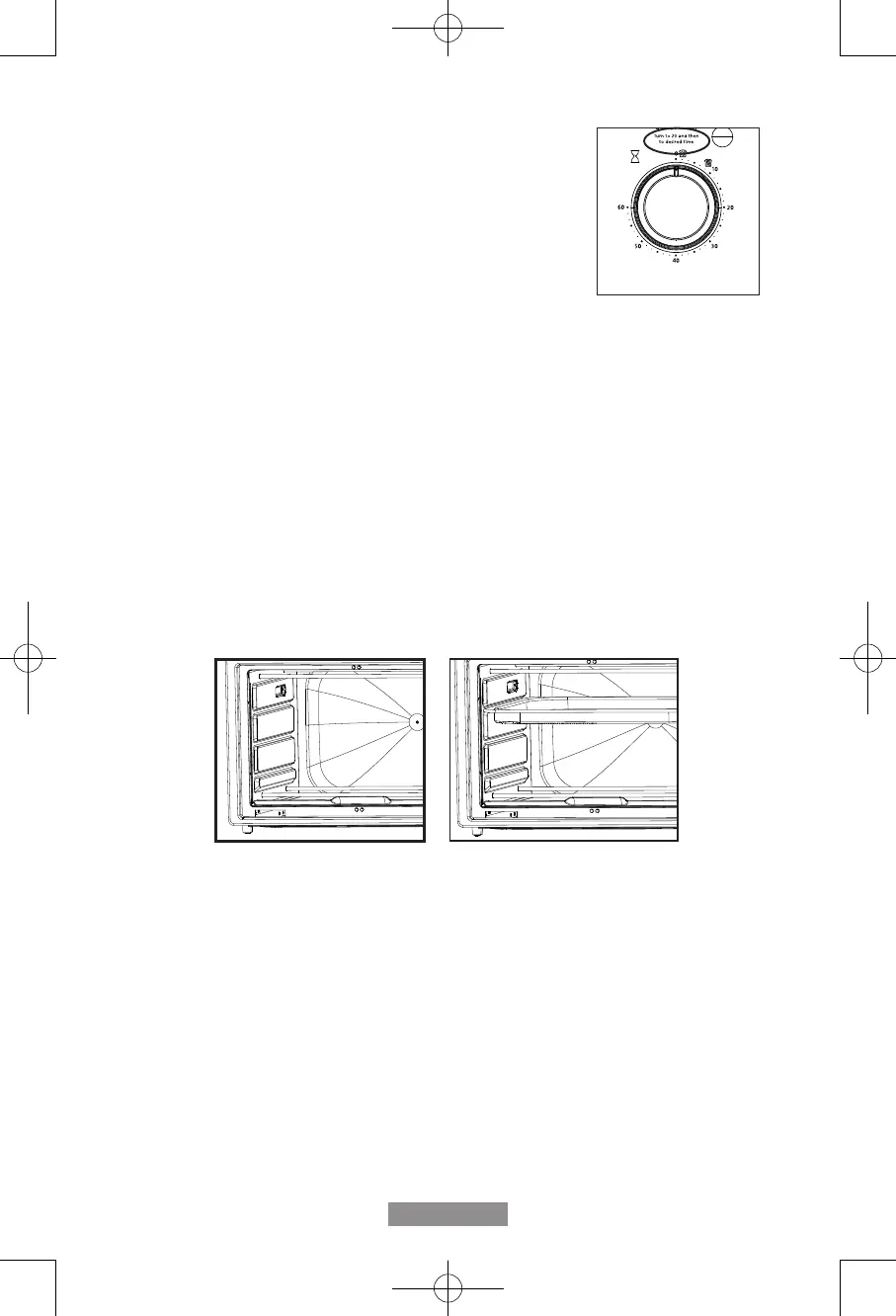
To Use The Timer (See Fig. 10)
After rotating the Temperature Dial to your desired temperature,
rotate the Timer Dial to the desired cook time. If the desired
cooking time is shorter than 20 minutes, turn the dial to 20
minutes and then to the desired time.
Positioning Rack
• To accommodate a wide variety of foods the oven has three rack positions. The racks
can be inserted in the oven top, middle, or lower rack guides. (See Figure Below)
• Before removing the rack allow the unit to cool.
• To remove the racks, open the oven doors and pull the racks towards the front of the
oven. The racks will slide on the rack guides on the inside of the oven.
PLEASE NOTE: the oven rack may tilt downward causing food to shift when the racks
are pulled out, proceed with caution.
• Positioning of the oven racks will depend on the size of the food and desired
browning. Move the racks to the lower rack position to prevent top browning and move
the racks to the upper rack position to prevent bottom burning.
• For best toasting results, position the rack in the middle rack guide.
Figure 10
Figure 3
For Air Fry
TSSTTVFDMAFNS_22SEM1 (LA).indd 11TSSTTVFDMAFNS_22SEM1 (LA).indd 11 2022/5/13 上午11:382022/5/13 上午11:38


 To Next Page