4
Step 1: Select Instrument and Rationale
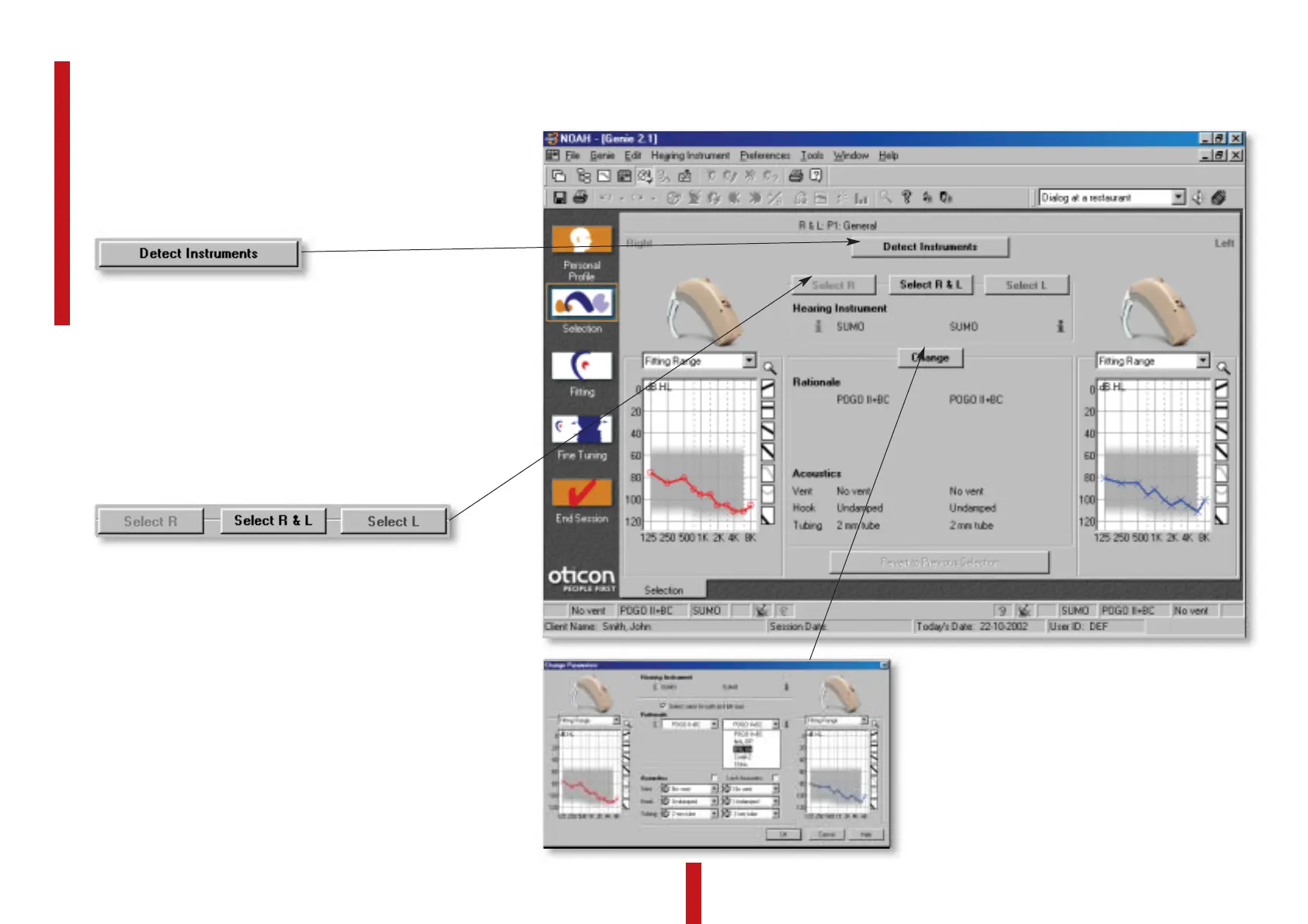
Select Hearing Instrument
Manually selecting the hearing instru-
ment is also an option. The intuitive
software makes it easy to select the
correct hearing aid for the client. Click
on the Select button and then choose
SUMO.
Choose Rationale, venting, damping, etc.
The fitting software offers five different linear
rationales, including three of the most popular
for power fittings: POGO II + BC, NAL-RP, and
DSL i/o, as well as Correll-2 and SSM+. Click
on the Change button to access the rationales.
Detect Instruments
For a fast and easy fitting; connect the
instruments to the HI-PRO and click
on the Detect Instruments button. The
instruments will then automatically be
detected showing the model, type and
rationale.
Or
SUMO is fitted using Genie 2.1 (or higher). SUMO
incorporates linear gain amplification, which is
applied as specified by standard gain rationales.






 To Next Page