/9 /8 ENGLISH NEDERLANS
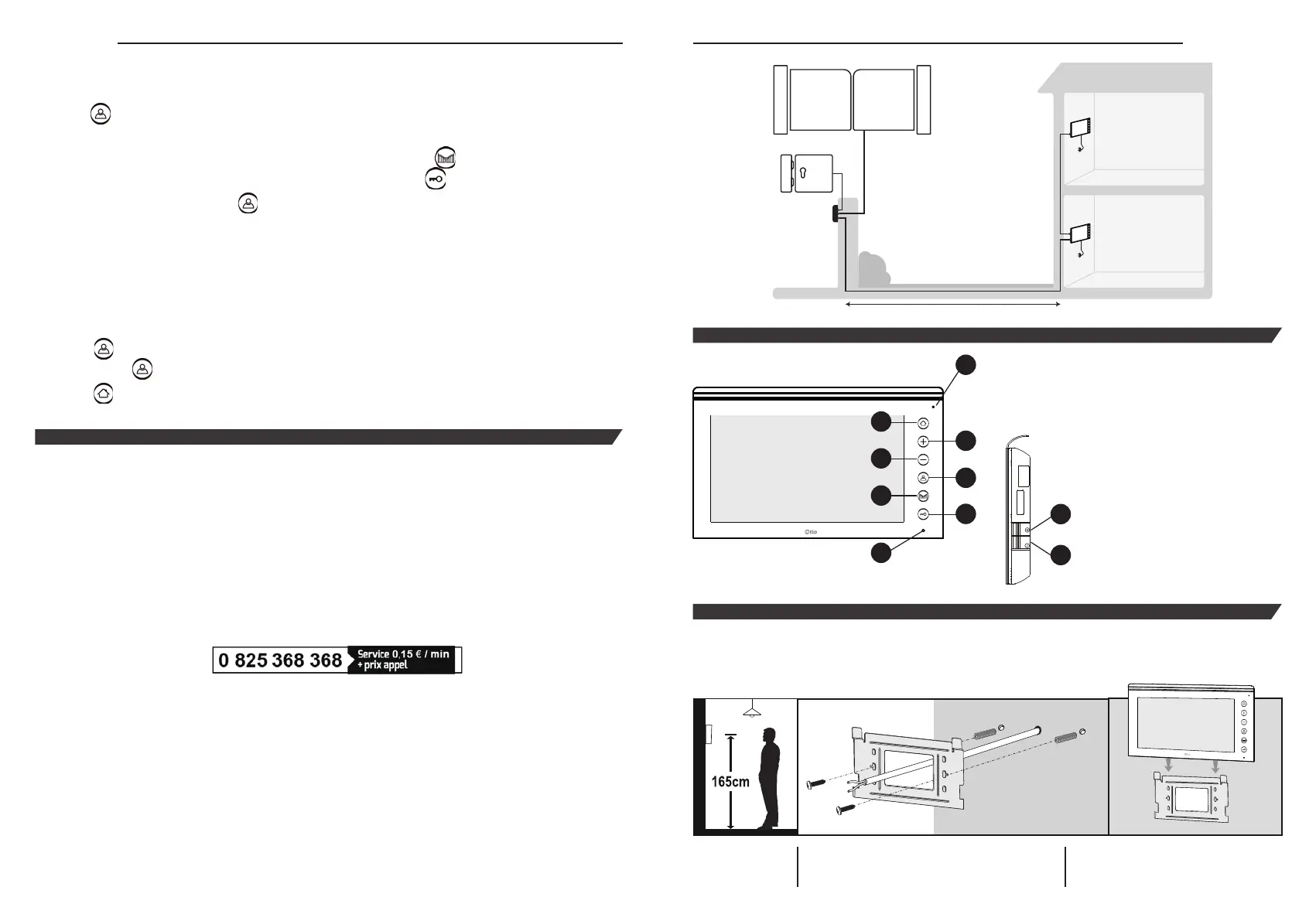
1. Microfoon
2. Knop voor instellingen
3. Instelknop +
4. Instelknop -
5. Knop beantwoorden oproep
en interne oproep
6. Bedieningsknop voor openen hek
7. Bedieningsknop
voor openen slot
8. LED indicator MUTE
9. Knop geluidsvolume
10. Knop melodieselectie
9
10
OVERZICHT
INSTALLATIE
Aanbeveling: Sluit de elektriciteit af voordat u de installatie start.
De monitor moet niet onder spanning gezet worden voordat het straatunit en alle elektrische apparaten zijn
aangesloten. Dit product is niet geschikt voor extreme weersomstandigheden.
Breng de houder aan met de meegeleverde
pluggen en schroeven. Plaats het monitor
op de bevestigde houder.
Plaats de monitor op de houder door
deze in de uitsparingen aan de achterkant
van de monitor te laten glijden.
Voorgeschreven
bevestigingshoogte
1,65 m.
5m. (min.) à 100m. (max.)
MONITOR Otio
optie
apart verkocht
MONITOR Otio
STRAATUNIT Otio
apart verkocht
3
4
5
6
7
8
2
1
5m. (min.) tot 100m. (max.)
Answering a call
When a visitor presses the call button, the ringtone and camera are activated.
Press the
key to start communicating with your visitor.
If the electrical connections have already been made, during the call, you will be able to:
• Open your automatic gate (see gate opening); press the following key: .
• Open the electrical latch (see latch opening), press the following key:
To cut off communication, press the key again.
If nobody answers, the monitor turns off after 30 seconds and the conversation is terminated.
Image taking
When a visitor rings, a photo is taken automatically. The photos are time stamped and stored in the monitor’s
internal memory (storage capacity: 100 photos). It is not possible to extract the photos. Once the maximum
capacity is reached, new photos replace the oldest photos.
Consult stored photos
Press the key then the + and/or – keys to consult the stored photos.
To exit, press the
key.
Press the
key to enter the configuration menu.
• 7-inch colour screen
• Touch-sensitive keys.
• Internal memory of 100 photos.
• Screen resolution: HD, 800 x 480
• PAL/NTSC video system
• Monitor and outdoor unit wiring: 2 wires
• Monitor/outdoor unit distance: 100 m (max.)
• Gate and latch control
• Connection for additional monitor
• Power supply via 230VAC 50Hz
- 15VDC 1A mains adapter (provided)
• Operating temperature: -5°C to +50°C
• Relative humidity: 85% (max.)
Maintenance: Clean the surface of the monitor and the outdoor unit using a slightly damp, soft, lint-free
cloth. Do not apply pressure. All other types of abrasive material may cause small scratches that will worsen
over time. Do not spray cleaning product directly onto the product so as not to damage the components.
Customer services: sav@otio.com
CHARACTERISTICS


 To Next Page
 Loading...