EasyManua.ls Logo

Otter DTF - Page 16

Otter DTF
26 pages
Print Icon
To Next Page IconTo Next Page
To Previous Page IconTo Previous Page
Loading...
Otter DTF PrinterOtter DTF Printer
29 30
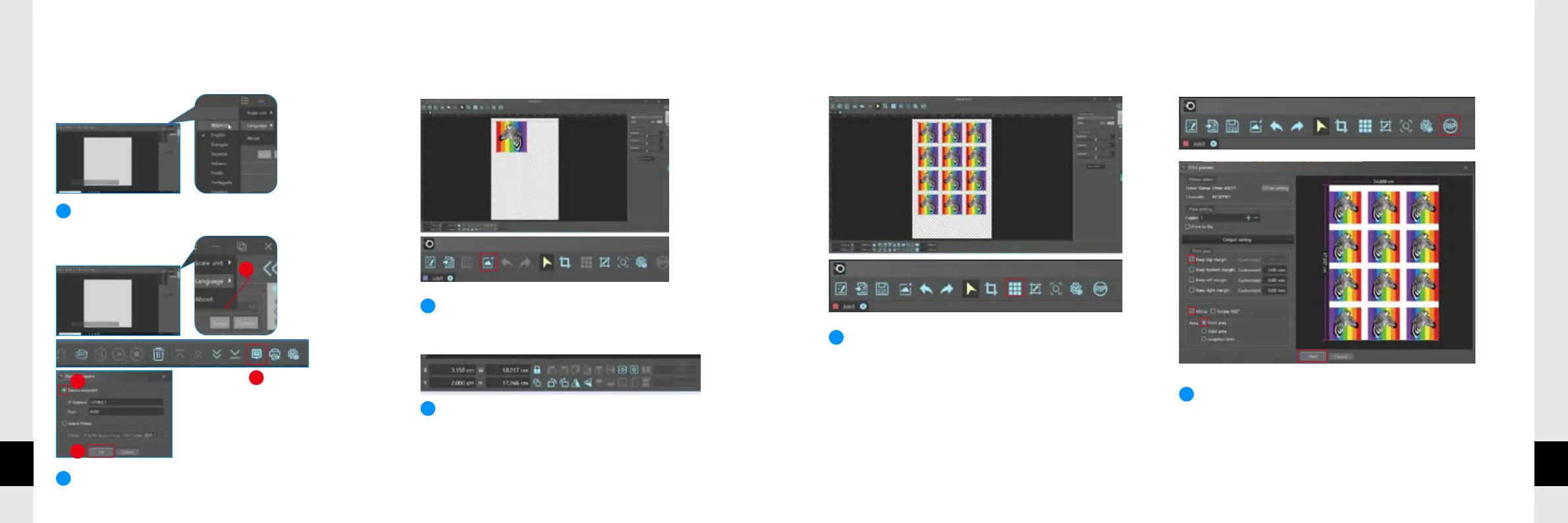
HOW TO USE OTTER RIP SOFTWARE



Clicktoimportthedesign.(BMP,JPG,PNG,TIFF,
TIF,PDFaresupported)


Clickon"AutoLayout",thedesignwill󽗉llthecanvas
automatically.Thisfeatureissuitableforbatchprinting.
Followtheonscreenpromptsandclickon"RIP"toenterthe
printingsetting,andthen,clickon"Print"tosendoutthe
design.