EasyManua.ls Logo

OttLite U11B - User Manual

OttLite U11B
2 pages
Print Icon
To Next Page IconTo Next Page
Loading...
CONGRATULATIONS!
You’ve purchased the finest in natural lighting technology with your new OttLite
®
product.
PRODUCT REGISTRATION FORM
Please complete the enclosed Product Registration Form and return it today by mail, or
register online by going to: OttLite.com/warranty
WARNING: To prevent electric shock, make sure the lamp is not plugged in until all
steps are complete.
NOTE: THIS UNIT IS FULLY ASSEMBLED
1.
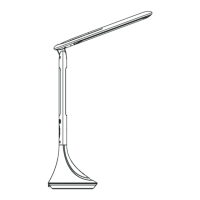
Remove lamp from packing, placing lamp body base (A) flat on a steady surface.
2.
Connect power adapter input (F) into connector (G) in the rear-bottom of the lamp.
3. Plug the power adapter (H) into a standard household 230V AC outlet. Note: Only
use with the supplied power adapter to avoid damage or fire.
4. Power switch (B) is a “touch” switch that controls ON/OFF power, the LED brightness
settings and the colour mode function of the lamp.
5.
To power LED settings, slightly touch the switch to achieve the following:
• Turn lamp “ON” to 1st brightness setting; touch the switch “once”;
• for 2nd brightness setting; touch the switch “two-times”;
• for 3rd brightness setting; touch the switch “three-times”;
• to turn lamp “OFF”; touch the switch “four-times”.
6. This lamp provides three colour modes. To adjust lighting colour mode slightly “press
and hold” switch (B) for three seconds to switch light colour temperature mode;
5000°K, 2700°K, 4000°K. NOTE: 500K is the default colour mode.
7. To reposition the light, hold the lamp base (A) steady and grasp either lamp body (C)
or shade (D) depending on needed adjustment.
REFER TO THE FOLLOWING ICON LEGEND FOR CONTROL PANEL (J), AS IT
PERTAINS TO THE INSTRUCTIONS FOR VARIOUS SETTING FUNCTIONS BELOW.
S
SETTING BUTTON – to set time and calendar; in alarm mode, push “S” key
to turn off alarm.
M
MODE BUTTON – push to set alarm and snooze
ˆ
UP BUTTON– In setting mode, push to increase.
ˇ
DOWN BUTTON – In setting mode, push to decrease.
CALENDAR AND CLOCK SETTING:
NOTE: Control Panel (J) to set Calendar and Clock is located behind lamp body
(C). NOTE: For clock operation layout and features, see diagram 1.
• Under normal mode, press “SETTING BUTTON” to enter setting mode, press
SETTING BUTTON” again for next setting. The sequence of setting is:
HOUR – MINUTE – YEAR – DAY – MONTH. NOTE: Day of the week changes
automatically with date change.
• In setting mode, press
MODE BUTTON” to quit setting, or it will automatically quit to
normal mode if idle for 60 seconds.
• Under normal mode, press “UP BUTTON” to switch between “12h” and “24h” display
ALARM & SNOOZE FUNCTION SETTING:
• Under normal mode, press “MODE BUTTON” to enter alarm mode.
• Under alarm mode, press “SETTING BUTTON” to enter alarm setting, press
SETTING BUTTON” again for next setting, the sequence of setting is:
HOUR – MINUTE – SNOOZE – MUSIC and then exit.
NOTE: There are 8-music tones to select.
• Press “UP BUTTON” and “DOWN BUTTON” to adjust alarm time sequence.
Under alarm mode, press “UP BUTTON” and “DOWN BUTTON” to turn ON/OFF
alarm
and snooze function. “MUSIC NOTE” icon will light up on the display to
indicate alarm is set. “Zz” will appear on the display to indicate snooze is activated.
Snooze can be set from 1 to 60 minutes.
• When alarm time reached, alarm will ring for 1-minute, then snooze and ring again.
Press “SETTING BUTTON” to turn OFF alarm or touch “UP BUTTON” and “DOWN
BUTTON” to activate snooze. NOTE: Snooze defaults to 60-minutes, if loss of
power occurs
.
TEMPERATURE SWITCH SETTING:
• In normal mode, touch “DOWN BUTTON” to switch between
º
F and
º
C display.
SAFETY WARNING: TO REDUCE THE RISK OF FIRE, ELECTRIC SHOCK,
OR INJURY TO PERSONS
1. Turn lamp off and WAIT UNTIL LAMP HEAD (D) IS COOL before handling.
2. The LED panel (E) might get hot after several hours of continuous use DO NOT place
your hands directly on LED light panel.
3. Never use with an extension cord unless the plug can be fully inserted into the
receptacles in the extension cord.
4. Do not alter the plug.
5. The lamp head included with this unit cannot be replaced by the consumer.
6. INDOOR USE ONLY.
NOTE: The important safety instructions appearing in this instruction sheet are not meant
to cover all possible conditions and situations that may occur. It must be understood that
common sense, caution, and care must be used with any electrical product.
BATTERY REPLACEMENT
• This lamp uses a CR2032 battery. For battery replacement see diagram 2.
Battery compartment (K) is located behind lamp body (C).
• To remove/install button cell battery: use a screwdriver to remove battery
compartment door (M). Button cell battery is to be installed with the “+” or flat side
facing upward.
BATTERY DISPOSAL:
Battery disposal should be in compliance with local regulations
pertaining to the disposal of hazardous materials. DO NOT INCINERATE.
SAFETY WARNING:
CAUTION: DO NOT INGEST BATTERY; CHEMICAL BURN HAZARD!
• This lamp contains a coin/button cell battery. If the coin/button cell battery is
swallowed, it can cause severe internal burns in just two hours and can lead to death.
• Keep new and used batteries away from children.
• If the battery compartment does not close securely, stop using the product and
keep it away from children.
• If you think batteries might have been swallowed or placed inside any part of the
body, seek immediate medical attention.
NOTE: Coin/button cell batteries are small, single cell devices having a diameter
greater than their height.
CAUTION!
IF THE EXTERNAL FLEXIBLE CABLE OR CORD OF THIS LUMINAIRE
IS DAMAGED, IT SHALL BE EXCLUSIVELY REPLACED BY THE MANUFACTURER OR ITS
SERVICE AGENT OR A SIMILAR QUALIFIED PERSON IN ORDER TO AVOID A HAZARD.
CAUTION!
THE LIGHT SOURCE OF THIS LUMINAIRE IS NOT REPLACEABLE; WHEN
THE LIGHT SOURCE REACHES ITS END OF LIFE THE WHOLE LUMINAIRE SHALL BE REPLACED.
CAUTION: Any change or modification to product not expressly recognized by OttLite
Technologies voids OttLite’s responsibility for proper function of product.
POWER ADAPTER SPECIFICATION:
Input: AC 100-240V, 50/60 Hz, 0.5A Max
Output: 12V DC, 1.5A with a Male DC Plug
THIS LAMP CONTAINS a 5V, 2,1A USB output port (L) located on the bottom rear of
lamp. USB port can charge items such as tablets, cellular phones, etc.
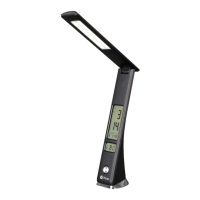
ENGLISH LED Desk Lamp with Digital LCD Display
E
A
D
C
LED Desk Lamp with Digital LCD Display
CSE1300Z-UK CSE13G5Z-UK 286861 U11B
B
L
INS210657 REV052521
CAUTION!
Battery Safety: This
product contains a button
battery. If swallowed, it
could cause severe injury
or death in just 2 hours.
Seek medical attention
immediately.
J
Diagram 2
K
G
M
Diagram 1
DOWN
SETTING MODE
UP
S
H
F
Question and Answer IconNeed help?

Do you have a question about the OttLite U11B and is the answer not in the manual?

Summary

Product Operation and Controls

Basic Lamp Operation

Control lamp power, brightness settings, and color modes by touching the power switch.

Control Panel Overview

Legend for control panel buttons: Setting, Mode, Up, Down for time, alarm, and settings.

Calendar and Clock Setting

Instructions for setting the time, date, and display format (12h/24h).

Alarm and Snooze Functions

Guide to setting alarms, snooze duration, and selecting alarm tones.

Temperature Display Setting

How to switch between Fahrenheit (°F) and Celsius (°C) display.

Safety Information

General Safety Precautions

Precautions for handling the lamp, avoiding electric shock, and LED panel heat.

Battery Safety and Handling

Information on button battery hazards, replacement, and disposal to prevent severe injury or death.

Luminaire Cautions

Warnings regarding damaged cords, non-replaceable light sources, and product modifications.

Technical Specifications and Compliance

Power Adapter Specifications

Details on the input and output specifications for the included power adapter.

Electrical Equipment Disposal

Instructions on how to properly dispose of electrical and electronic equipment.

Declaration of Conformity

Statement of compliance with EU directives and normative standards.

Overview

This document describes the OttLite U11B LED Desk Lamp with Digital LCD Display, a versatile lighting solution designed for indoor use.

Function Description

The OttLite U11B is an LED desk lamp that provides adjustable lighting and integrates a digital LCD display with calendar, clock, alarm, and snooze functions. It offers three distinct light color temperature modes (5000°K, 2700°K, 4000°K) and three brightness settings, allowing users to customize their lighting environment. The lamp also includes a 5V, 2.1A USB output port for charging electronic devices like tablets and cellular phones.

Important Technical Specifications

  • Power Adapter Input: AC 100-240V, 50/60 Hz, 0.5A Max
  • Power Adapter Output: 12V DC, 1.5A with a Male DC Plug
  • USB Output Port: 5V, 2.1A (located on the bottom rear of the lamp)
  • Battery: CR2032 button cell battery (for calendar/clock functions)
  • Light Source: Non-replaceable LED panel
  • Light Color Temperatures: 5000°K (default), 2700°K, 4000°K
  • Brightness Settings: 3 levels
  • Display: Digital LCD with calendar (YEAR, DAY, MONTH), clock (HOUR, MINUTE, 12h/24h format), alarm, and snooze functions.
  • Temperature Display: Switchable between °F and °C.

Usage Features

General Operation: The lamp is fully assembled upon purchase. To set up, remove it from packing, place the lamp body base (A) on a steady surface, connect the power adapter input (F) to the connector (G) at the rear-bottom of the lamp, and plug the power adapter (H) into a standard household 230V AC outlet. Only the supplied power adapter should be used.

Lighting Control: The lamp features a "touch" switch (B) for controlling power, brightness, and color mode.

  • Power ON/OFF & Brightness:
    • Touch once for 1st brightness setting.
    • Touch two times for 2nd brightness setting.
    • Touch three times for 3rd brightness setting.
    • Touch four times to turn the lamp OFF.
  • Color Mode Adjustment:
    • Press and hold switch (B) for three seconds to cycle through the light color temperature modes: 5000°K (default), 2700°K, and 4000°K.
  • Lamp Repositioning:
    • Hold the lamp base (A) steady and grasp either the lamp body (C) or shade (D) to adjust the light's position.

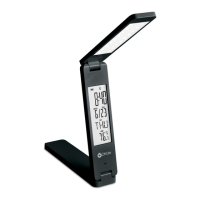
Digital LCD Display Control (Control Panel J): The control panel (J) for the calendar and clock is located behind the lamp body (C). It consists of four buttons: "SETTING BUTTON" (S), "MODE BUTTON" (M), "UP BUTTON" (^), and "DOWN BUTTON" (v).

Calendar and Clock Setting:

  • Enter Setting Mode: In normal mode, press "SETTING BUTTON" (S).
  • Navigate Settings: Press "SETTING BUTTON" (S) repeatedly to cycle through: HOUR - MINUTE - YEAR - DAY - MONTH. The day of the week automatically updates with date changes.
  • Adjust Values: Use "UP BUTTON" (^) and "DOWN BUTTON" (v) to increase or decrease values.
  • Exit Setting Mode: Press "MODE BUTTON" (M) or wait 60 seconds for automatic exit.
  • 12h/24h Display: In normal mode, press "UP BUTTON" (^) to switch between 12h and 24h display formats.

Alarm & Snooze Function Setting:

  • Enter Alarm Mode: In normal mode, press "MODE BUTTON" (M).
  • Enter Alarm Setting: In alarm mode, press "SETTING BUTTON" (S) repeatedly to cycle through: HOUR - MINUTE - SNOOZE - MUSIC (8 tones available).
  • Adjust Values: Use "UP BUTTON" (^) and "DOWN BUTTON" (v) to adjust alarm time and other settings.
  • Turn ON/OFF Alarm/Snooze: In alarm mode, press "UP BUTTON" (^) and "DOWN BUTTON" (v) to activate or deactivate the alarm and snooze. A "MUSIC NOTE" icon indicates the alarm is set, and "Zz" indicates snooze activation.
  • Snooze Duration: Snooze can be set from 1 to 60 minutes (defaults to 60 minutes if power is lost).
  • Alarm Behavior: When the alarm time is reached, it rings for 1 minute, then snoozes and rings again.
  • Turn OFF Alarm: Press "SETTING BUTTON" (S) or touch "UP BUTTON" (^) and "DOWN BUTTON" (v) to turn off the alarm.

Temperature Display Setting:

  • In normal mode, touch "DOWN BUTTON" (v) to switch between °F and °C display.

USB Charging Port: The lamp includes a 5V, 2.1A USB output port (L) on the bottom rear, allowing users to charge devices like tablets and cellular phones.

Maintenance Features

Battery Replacement: The lamp uses a CR2032 button cell battery for its calendar/clock functions.

  • Location: The battery compartment (K) is located behind the lamp body (C).
  • Procedure: Use a screwdriver to remove the battery compartment door (M). Install the new CR2032 battery with the "+" or flat side facing upward.
  • Disposal: Dispose of the battery according to local regulations for hazardous materials. Do NOT incinerate.

Safety Warnings (General):

  • Cooling: Turn the lamp off and wait until the lamp head (D) is cool before handling.
  • LED Panel Heat: The LED panel (E) can get hot after continuous use; do not place hands directly on it.
  • Extension Cords: Only use an extension cord if the plug can be fully inserted into the receptacles.
  • Plug Alteration: Do not alter the plug.
  • Light Source: The LED light source is not replaceable. When it reaches its end of life, the entire luminaire must be replaced.
  • Indoor Use Only: This lamp is intended for indoor use only.
  • Modifications: Any changes or modifications not expressly recognized by OttLite Technologies will void their responsibility for proper product function.

Battery Safety Warning (CR2032):

  • Chemical Burn Hazard: This product contains a coin/button cell battery. If swallowed, it can cause severe internal burns in just two hours and can lead to death.
  • Keep Away from Children: Keep new and used batteries away from children.
  • Secure Compartment: If the battery compartment does not close securely, stop using the product and keep it away from children.
  • Medical Attention: If batteries might have been swallowed or placed inside any part of the body, seek immediate medical attention.
  • Note: Coin/button cell batteries are small, single-cell devices with a diameter greater than their height.

Disposal of Old Electrical & Electronic Equipment: This product, including its batteries, should not be treated as household waste. It must be handed over to an applicable collection point for the recycling of electrical and electronic equipment to prevent potential negative consequences for the environment and human health. For more detailed information, contact your local Council, household waste disposal service, or the shop where the product was purchased.

Declaration of Conformity: The OttLite U11B LED Desk Lamp with Digital LCD Display complies with CE marking in accordance with EU directives (Low Voltage Directive 2014/35/EU and EMC Directive 2014/30/EU) and normative standards including EN 60958-1:2015, EN 60598-2-4:2018, EN 62031:2008, EN 62493:2015, EN 61347-1:2015, EN 61347-2-11:2001, EN 62471:2008, EN 55015:2013, EN 61547:2009, EN 61000-3-2:2014, and EN 61000-3-3:2013.

OttLite U11B Specifications

General IconGeneral
BrandOttLite
ModelU11B
CategoryWork Light
LanguageEnglish

Related product manuals