5
Card Installation
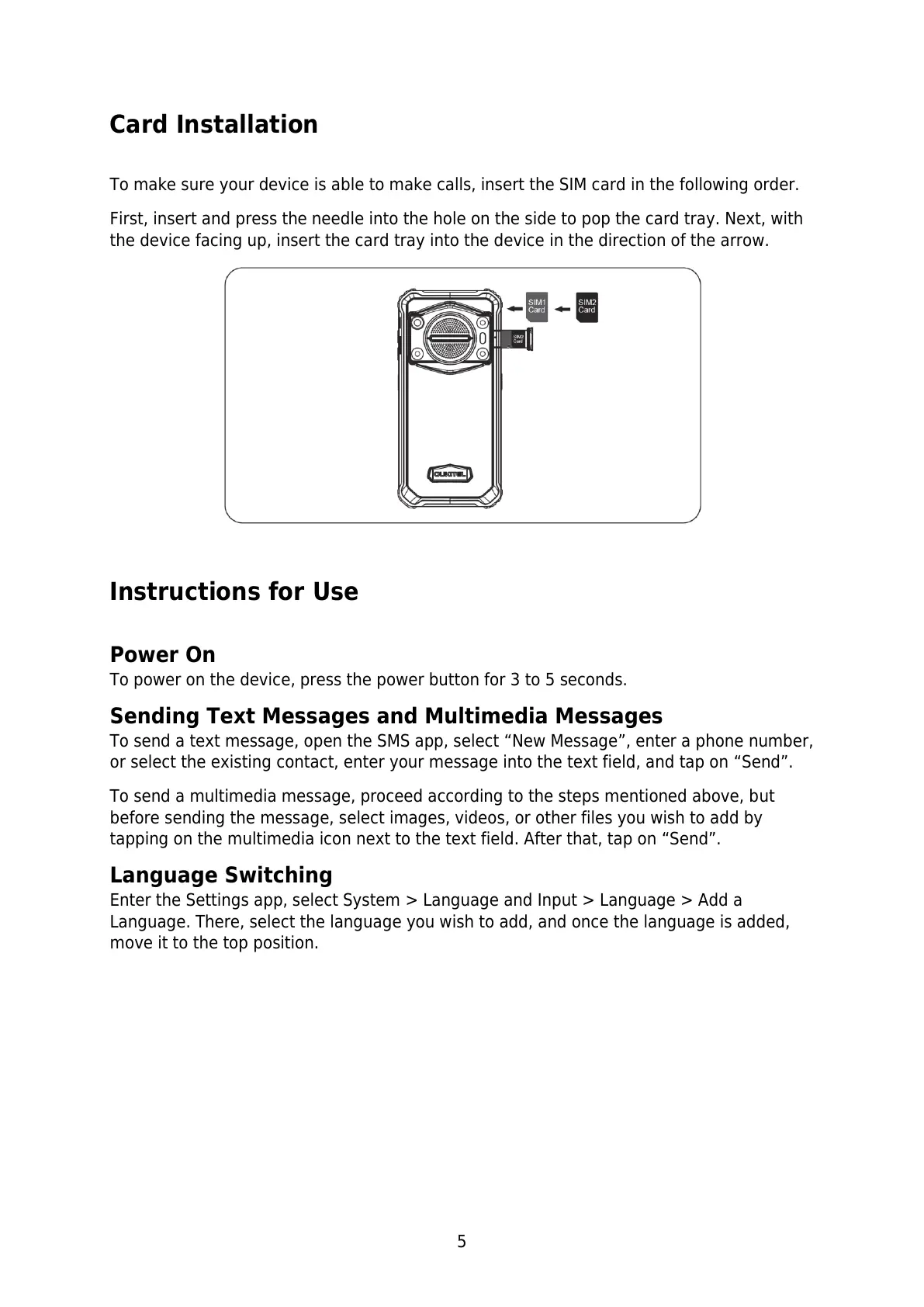
To make sure your device is able to make calls, insert the SIM card in the following order.
First, insert and press the needle into the hole on the side to pop the card tray. Next, with
the device facing up, insert the card tray into the device in the direction of the arrow.
Instructions for Use
Power On
To power on the device, press the power button for 3 to 5 seconds.
Sending Text Messages and Multimedia Messages
To send a text message, open the SMS app, select “New Message”, enter a phone number,
or select the existing contact, enter your message into the text field, and tap on “Send”.
To send a multimedia message, proceed according to the steps mentioned above, but
before sending the message, select images, videos, or other files you wish to add by
tapping on the multimedia icon next to the text field. After that, tap on “Send”.
Language Switching
Enter the Settings app, select System > Language and Input > Language > Add a
Language. There, select the language you wish to add, and once the language is added,
move it to the top position.


 To Next Page