EasyManua.ls Logo

Outdoor EZR30 Series - User Manual

Outdoor EZR30 Series
8 pages
Print Icon
To Next Page IconTo Next Page
Loading...
OUTDOOR MIMO ROUTER
Users Manual
www.outdoorrouter.com
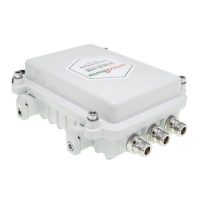
Integrated 4G LTE mobile modem, EZR30 outdoor router connect your phone, tablet, computer, camera, etc. to the internet
via the 3G and 4G mobile networks. Comes with dual 4G MIMO antennas, the router receive signals at a high sensitivity.
Complying with the IEEE 802.11b/g/n Wi-Fi standard, the outdoor router output strong Wi-Fi signals at max 27dBm power
with transmission speeds of up to 300Mbps. You can control the Wi-Fi and LAN networks with OpenWrt enabled firmware,
such as SSID, SSL, DNS, encryption, firewall, port forwarding, Wi-Fi relay, and so on.
IP67 hardened industrial-grade aluminum alloy case enclosure the outdoor router to withstand extreme weather conditions
and rugged deployments. The built-in standard PoE module work on 48Volt PoE injector and support 300-feet LAN cable.
*** The manual is base on firmware version - OPLK1904v3 ***
SKU: EZR30 Series
Internet Mobile
Mast
Outdoor
4G Router
Provide Wi-Fi
& Ethernet
support secondary router
1. Introduction
Question and Answer IconNeed help?

Do you have a question about the Outdoor EZR30 Series and is the answer not in the manual?

Summary

Hardware Overview

Installation

Configuration

Connect to Outdoor Router

Guides on establishing initial network connection via Wi-Fi or Ethernet.

Login Your Outdoor Router

Instructions for accessing the router's web interface and logging in.

Network Interfaces

Overview of managing physical and virtual network interfaces like LAN, MOBILE, WAN, WWAN.

Wi-Fi Settings

Covers configuring Wi-Fi settings, including SSID, security, and Wi-Fi relay.

Reset Factory Settings

Instructions for restoring the router to its original factory default settings.

Troubleshooting

Outdoor EZR30 Series Specifications

General IconGeneral
BrandOutdoor
ModelEZR30 Series
CategoryNetwork Router
LanguageEnglish