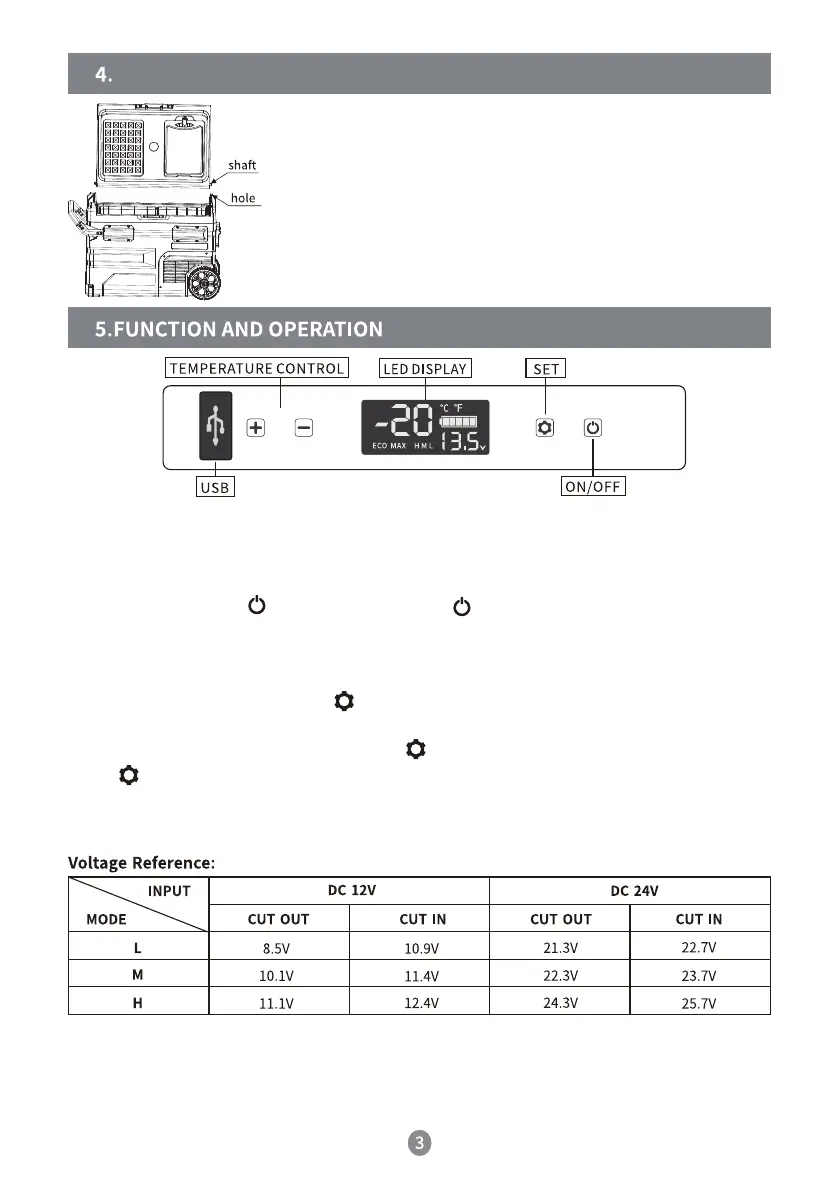
The directions of the door can be changed. Follow the steps
below if necessary:
Taking off the door:
Open the door at a 90° angle and take off the door vertically.
Door installation:
Align the door shaft with the compartment hole on the other
side and insert it.
● The voltage is theoretical, it may differ in different scenarios.
● H should be set when the product is connected to the car power. M or L should be set
when it is connected to a portable or back-up battery.
● Power supply: Connect to DC 12V/24V, AC 100-240V (using an adapter) or solar
(12-50V) power supply.
● Display screen: When the fridge is powered on, the buzzer will make a long sound, the
display will show for two seconds and the appliance will enter standby mode.
● Power on/off: Press to switch on and hold for three seconds to switch off.
● Temperature setting: Press + or- the temperature setting, which will be saved automati-
cally. Note: The current temperature of the compartment is what is displayed. It will take
a while to reach the set temperature. Setting range: -20-20°C (-4-68°F).
● Cooling mode: When on, press to switch to MAX (fast cooling) and ECO (energy
saving mode). Factory setting is MAX.
● Battery protection mode: When on, hold for three seconds until the screen flashes.
Press again to select the protection mode H (High), M (Medium) and L (Low). Factory
setting is H.
CHANGING THE DIRECTION OF THE DOOR



 To Next Page