EasyManua.ls Logo

Outwell ARCTIC FROST 35 - User Manual

Outwell ARCTIC FROST 35
35 pages
Print Icon
To Next Page IconTo Next Page
Loading...
UK: INSTRUCTION MANUAL
DE: BEDIENUNGSANLEITUNG
DK: BRUGERVEJLEDNING
FR: MODE D'EMPLOI
NL: GEBRUIKSAANWIJZING
CZ: NÁVOD K POUŽITÍ
NO: BRUKERVEILEDNING
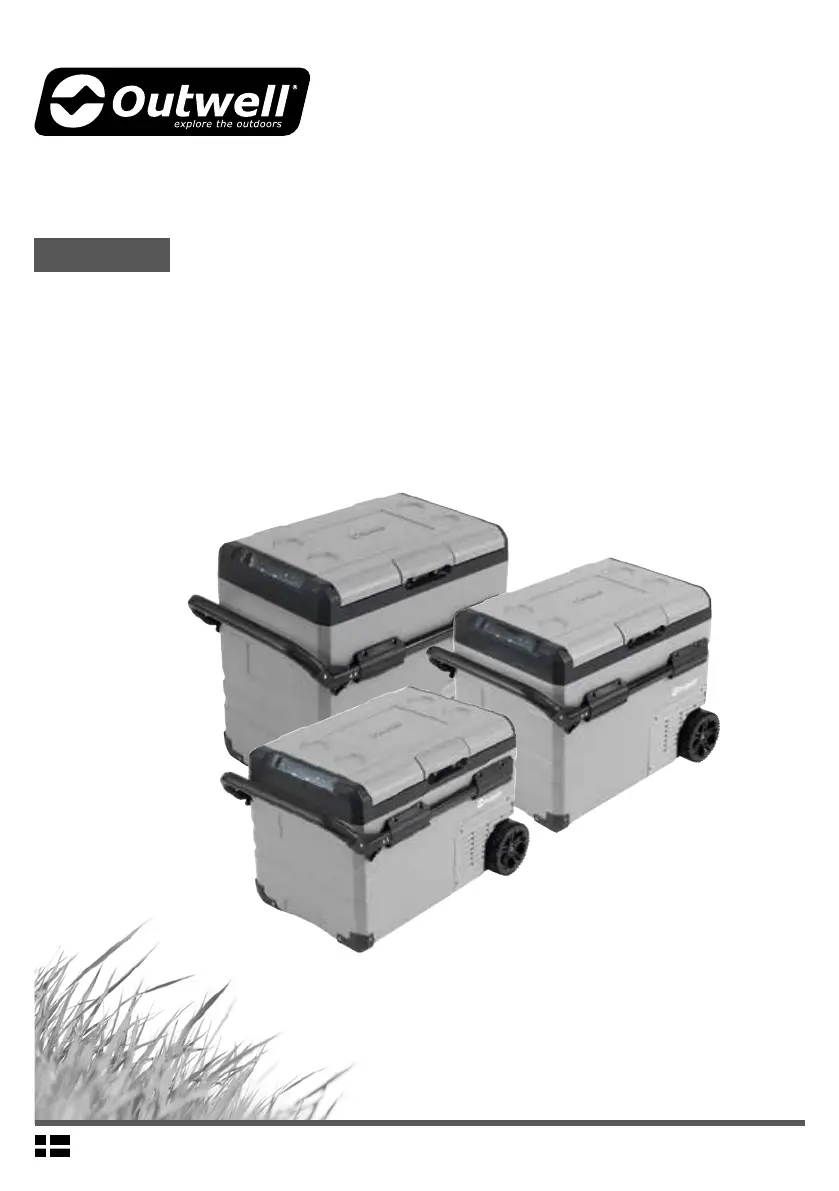
ARCTIC FROST
35/45/55
INNOVATIVE FAMILY CAMPING
Model: 590197, Arctic Frost 35
Model: 590199, Arctic Frost 45
Model: 590201, Arctic Frost 55

Questions and Answers

  • M
    mmonroeAug 15, 2025
    How to troubleshoot Outwell Cooling boxes that do not work?
    • E
      Emily NunezAug 15, 2025
      If your Outwell Cooling box is not working, please check the following: * Ensure the switch is turned on. * Verify that the plug and socket are properly connected. * Inspect the fuse to see if it has burnt out. * Confirm that the power supply is functioning correctly. * Note that frequently switching the cool box on and off may cause a start delay of the compressor.
  • V
    vwuAug 18, 2025
    What to do if Outwell Cooling boxes display CodeFl?
    • X
      xmorrisAug 18, 2025
      If the Outwell Cooling box displays 'CodeFl', it indicates low voltage. To resolve this, adjust the battery protection setting from High to Medium, or from Medium to Low.
  • A
    Adam DelacruzAug 21, 2025
    What to do if Outwell Cooling boxes display CodeF2?
    • M
      Melanie SanchezAug 22, 2025
      If the Outwell Cooling box displays 'CodeF2', it means the condenser fan is overloaded. Disconnect the power to the cool box for 5 minutes, then restart it. If the code reappears, further assistance is needed.
  • D
    Darryl SmithAug 25, 2025
    What to do if Outwell Cooling boxes display CodeF3?
    • A
      amanda70Aug 26, 2025
      If the Outwell Cooling box displays 'CodeF3', it indicates that the compressor is starting too frequently. To solve this, disconnect the power to the cool box for 5 minutes and then restart it. If the code continues to appear, further assistance is needed.
  • K
    Karen VincentAug 27, 2025
    What to do if Outwell Cooling boxes display CodeF4?
    • N
      Nancy AcostaAug 28, 2025
      If the Outwell Cooling box displays 'CodeF4', it indicates the compressor is not starting. Disconnect the power to the cool box for 5 minutes and then restart it. If the code reappears, further assistance is needed.
  • B
    Bradley MartinAug 31, 2025
    What to do if Outwell Cooling boxes display CodeF5?
    • M
      Mark ThompsonAug 31, 2025
      If the Outwell Cooling box displays 'CodeF5', it indicates overheating of the compressor and electronics. Disconnect the power to the cool box for 5 minutes, then restart it. If the code reappears, further assistance is needed.
  • C
    Charles MillerSep 3, 2025
    What to do if Outwell Cooling boxes display CodeF6?
    • J
      Jordan GonzalezSep 3, 2025
      If the Outwell Cooling box displays 'CodeF6', it indicates that no parameter can be detected by the controller. Disconnect the power to the cool box for 5 minutes, then restart it. If the code reappears, further assistance is needed.
  • K
    Kimberly PerrySep 7, 2025
    Why are the Outwell Cooling boxes compartments too warm?
    • S
      Sabrina WeissSep 7, 2025
      If your Outwell Cooling box compartments are too warm, this may be due to a few reasons: * The lid is being opened frequently. * A large amount of warm or hot food was recently stored inside. * The cool box has been disconnected for an extended period.
  • G
    ggriffinSep 12, 2025
    Why is food frozen in my Outwell Cooling boxes?
    • E
      elizabethgutierrezSep 12, 2025
      If food is freezing in your Outwell Cooling box, it's likely because the temperature was set too low. Adjust the temperature setting accordingly.

Summary

Product Features

Product Structure

Reverse Lid Opening Direction

Lid Disassembly

Step-by-step guide for removing the appliance lid.

Lid Installation

Step-by-step guide for reattaching the appliance lid.

Functions and Operation

Temperature Unit Setting

Switch between Celsius and Fahrenheit temperature units for the cool box.

Device Reset

Instructions on how to reset the device settings to their default values.

Temperature Adjustment

How to adjust temperature for left and right compartments of the cool box.

Cooling Mode Selection

Switch between MAX (fast) and ECO (energy saving) cooling modes.

Battery Protection Settings

Select low, medium, or high battery protection levels for the appliance.

Battery Operation

Battery Power Management

Turn battery power on/off and check remaining battery power level.

Battery Charging Guide

Overview of battery charging methods and indicator lights.

Care and Maintenance

Cleaning Instructions

Instructions for cleaning the device using a wet cloth and drying.

Storage Guidelines

How to store the appliance when not in use to prevent odors.

Defrosting Procedure

Steps for defrosting the appliance to maintain optimal cooling.

AC Plug Fuse Replacement

Procedure for replacing the AC plug fuse for 220-240V connection.

Cool Box Fuse Replacement

Procedure for replacing the 15A fuse for the cool box.

Troubleshooting

Error Code F1

Indicates low voltage to the cool box, requiring voltage adjustment.

Error Code F2

Suggests a potential condenser fan overload issue.

Error Code F3

Indicates the compressor may be starting too frequently.

Error Code F4

Indicates the compressor may not be kicking in as expected.

Error Code F5

Signifies potential overheating of the compressor and electronics.

Error Code F6

Indicates a controller parameter detection problem.

Error Codes F7 or F8

Indicates a faulty temperature sensor within the appliance.

Guarantee

Technical Information

Outwell ARCTIC FROST 35 Specifications

General IconGeneral
Volume35L
Material LiningPEVA
Capacity35L
ColorBlue
Size35 L
InsulationPU foam
Material OuterPolyester
MaterialPolyester
Insulation TypeFoam
ClosureZipper

Related product manuals