Fi connection of the camera
Make sure your smartphone is on Wi
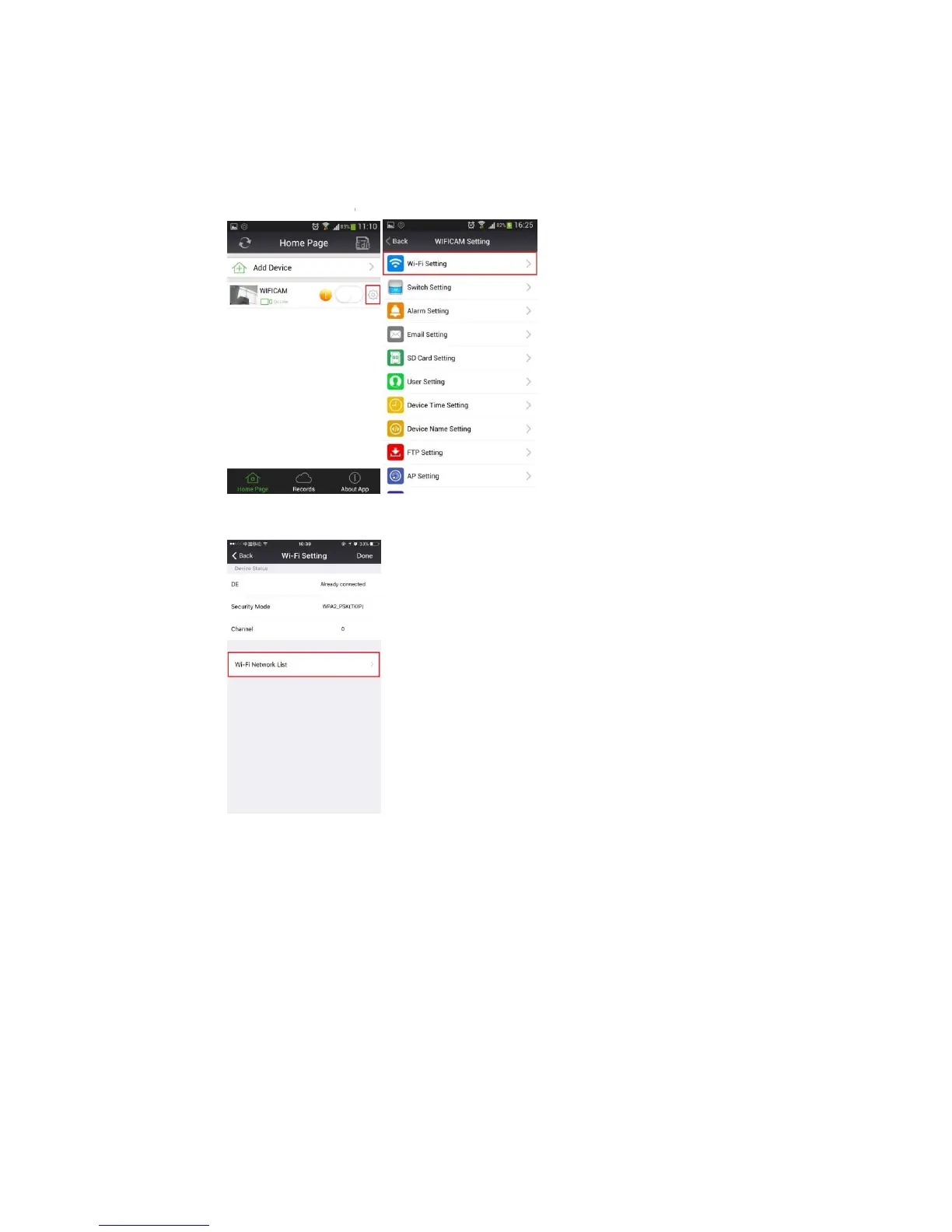
On the Home Page, as long as “WIFICAM” is “On Line”, click on the “GEAR” icon which is
located to the right of “WIFICAM”. This will now take you to the “Setting” page
Fi Setting
network hotspots near you
Fi connection of the camera
Make sure your smartphone is on Wi
Fi (and connected to the 2.4G band
On the Home Page, as long as “WIFICAM” is “On Line”, click on the “GEAR” icon which is
located to the right of “WIFICAM”. This will now take you to the “Setting” page
”, and then click “Wi-Fi Network List” to
search all wireless
network hotspots near you
Fi (and connected to the 2.4G band
On the Home Page, as long as “WIFICAM” is “On Line”, click on the “GEAR” icon which is
located to the right of “WIFICAM”. This will now take you to the “Setting” page


 To Next Page