

EasyManua.ls Logo

Oversteel SOLDER - User Manual

Oversteel SOLDER
6 pages
Print Icon
To Next Page IconTo Next Page
Loading...
SOLDER
RGB GAMING MOUSE
USER MANUAL
Question and Answer IconNeed help?

Do you have a question about the Oversteel SOLDER and is the answer not in the manual?

Overview

The Oversteel Solder is an RGB gaming mouse designed for an enhanced gaming experience. It features a plug-and-play USB interface, making it ready for use without the need for initial driver installation. For more advanced settings and functions, users can download and install dedicated software from the Oversteel Gaming website.

Function Description:

The Oversteel Solder is a wired gaming mouse equipped with a PIXART 3519 Gaming Optical sensor, offering on-the-fly adjustable DPI settings ranging from 200 to 4200 DPI. This wide range allows for precise control and adaptability to various gaming scenarios, ensuring pinpoint accuracy for critical in-game actions. The mouse boasts a high polling rate of 1000 Hz, which translates to rapid and responsive tracking, crucial for competitive gaming. It features 10 million-click Huano switches, indicating high durability and a long lifespan for its primary buttons. The mouse also supports up to 48 inches per second (ips) tracking speed and 10G acceleration, further contributing to its responsiveness and ability to handle fast movements.

Important Technical Specifications:

  • Product Name: Oversteel Solder
  • Sensor: PIXART 3519 Gaming Optical sensor
  • DPI: On-the-fly Adjustable DPI 200-4200 DPI
  • Polling Rate: 1000 Hz
  • Switch Lifespan: Huano 10,000,000 Clicks Lifetime
  • Tracking Speed: Up to 48 ips
  • Acceleration: 10G
  • Cable: 1.8m Nylon Braided Cable
  • Scroll Wheel: Silicon Rubber Roller
  • Design: Ergonomic Both Handed Design
  • Lighting: RGB 16.8 million Customizable Color Options
  • Dimensions: 129mm (Length) X 68mm (Width) X 41mm (Height)
  • Connectivity: USB 2.0/3.0 port
  • Operating Systems: Windows XP/7/8/10; MAC OS

Usage Features:

The mouse features a standard layout with a Left Button, Right Button, and Mid Button (scroll wheel). It also includes dedicated Forward and Back buttons for navigation, a DPI+ button for adjusting DPI levels, and an RGB Switch button for controlling the lighting effects. The ergonomic design is suitable for both left and right-handed users, ensuring comfort during extended gaming sessions.

The accompanying software provides extensive customization options:

  • Button Assignment: Users can program each mouse button to perform various multimedia or gaming functions. This includes assigning specific commands, Windows keys, control keys, media functions, or even custom macros. The software allows for multiple profiles, enabling users to switch between different button configurations for various games or applications.
  • DPI Setting: The software allows for detailed customization of DPI levels and associated RGB light settings. Users can define specific DPI steps (e.g., 200, 1000, 1800, 2600, 3400, 4200) and link them to different lighting patterns or colors, providing visual feedback for the current DPI setting.
  • Parameter Adjustment: This section allows users to fine-tune the mouse's performance parameters, including Pointer Speed, Wheel Speed, Double Click Speed, and Report Rate (125Hz, 250Hz, 500Hz, 1000Hz). These adjustments help tailor the mouse's responsiveness to individual preferences.
  • Macro Editing: The macro management feature is a powerful tool for automating complex sequences of actions. Users can create new macros, record key presses (including delays), and assign them to any mouse button. Macros can be configured to repeat a specific number of times, repeat while pressed, or repeat until the key is pressed again. This functionality is particularly useful for executing intricate in-game combos or streamlining workflow tasks. The software also allows for importing and exporting macros, making it easy to share or back up configurations.

Maintenance Features:

While the manual does not explicitly detail maintenance features, the robust build quality with Huano switches (rated for 10 million clicks) suggests a durable product requiring minimal maintenance beyond standard cleaning. The nylon braided cable enhances durability and prevents tangling, contributing to the mouse's longevity. The silicon rubber roller for the scroll wheel provides a smooth and reliable scrolling experience. The software's ability to save and apply settings ensures that customized configurations are retained, reducing the need for frequent re-setup.
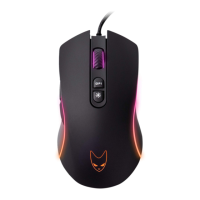
Oversteel SOLDER Specifications

General IconGeneral
BrandOversteel
ModelSOLDER
CategoryMouse
LanguageEnglish

Related product manuals