HARDWARE PACKAGE REGULATION GUIDELINES
I-shaped knob
Regulating balance
If the machine is uneven after assembly, adjust the plug on the rear support
pipe to balance it.
Warning!
It may crush or cut the body when moving parts such as cushions. Please
do not touch the slide rail when using the machine.
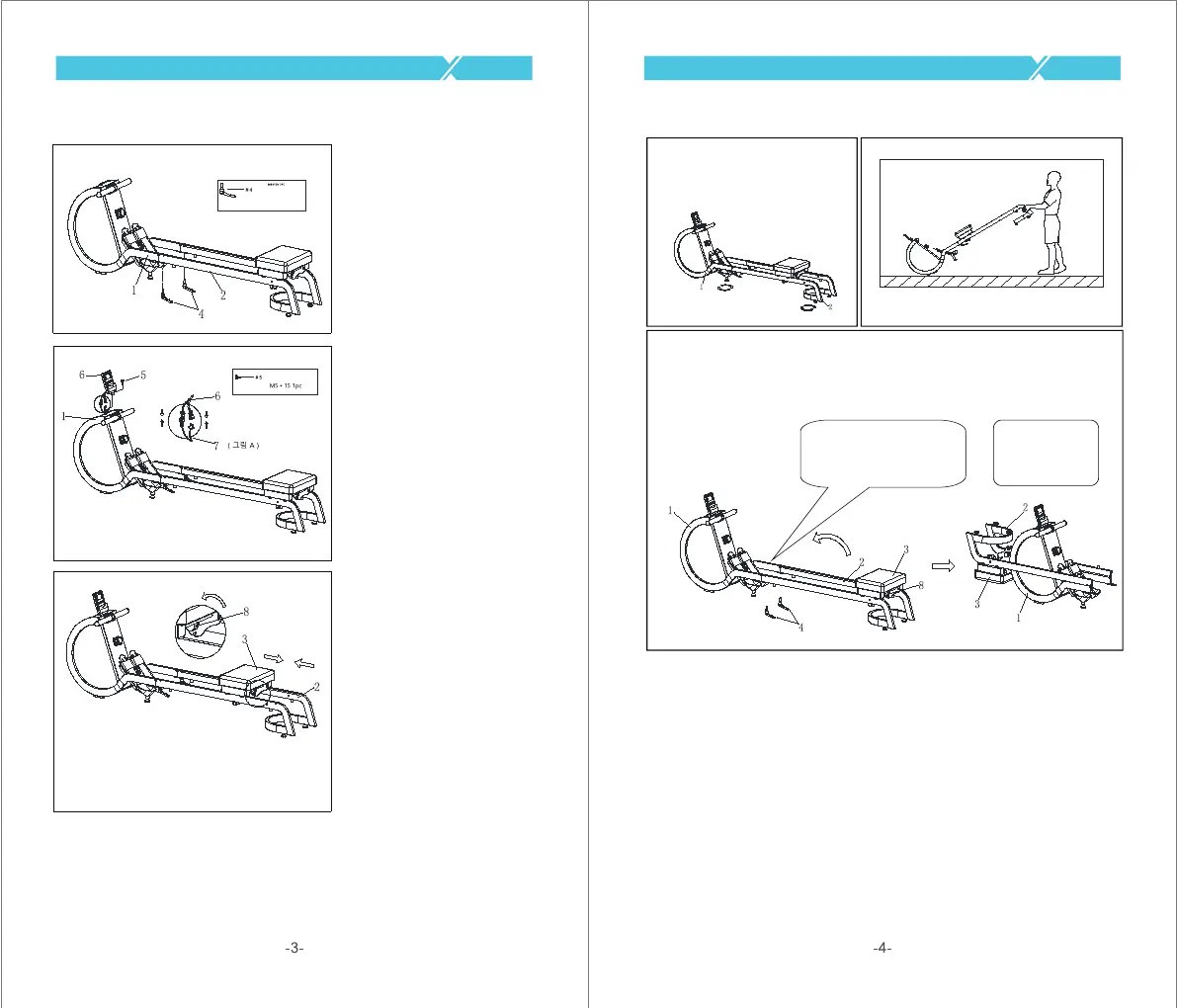
To move the machine, lift the back end of the rail assembly until the moving wheel at
the bottom of the front end of the main frame assembly touches the ground, and then
move the machine to the desired place
Warning!
When folding the machine, pay attention to using the
elastic knob (# 8) first to secure the cushion assembly (#
3) to the slide rail assembly (# 2), and then release the two
L-shaped knobs (# 4) before folding the machine.
When not in use, you can fold up the
machine to save space, and there is
an adjustable foot pad support at the
bottom of the machine.
Move the machine
Machine storage
Assembling is finished!
Step 5:
First, connect the two wire
terminals as shown in Fig. # 7,
place the spreadsheet assembly (#
6) on the mainframe assembly (#
1), connect the two wire terminals #
7, and lock them with a I-shaped
knob M5 # 15 (# 5).
Step 4:
First, rotate the elastic knob (# 8)
on the cushion assembly (# 3)
counterclockwise and then pull the
knob so that the cushion assembly
(# 3) is detached from the slide rail
assembly (# 2), and the cushion
assembly (# 3) can slide smoothly
forward and backward.
L-shaped knob
Step 4:
Lock and secure the main frame
assembly (# 1) and the slide rail
assembly (# 2) with two L-shaped
knobs M10 # 20 (# 4).



 To Next Page
 Loading...