The OvisLink EVO-W311AR is a 150 Mbps Wireless N Broadband Router, designed to provide a reliable and secure network connection for home and office use. This device functions as a wireless router, enabling users to connect to the internet and establish a local area network (LAN) with both wired and wireless devices.
Function Description:
The EVO-W311AR serves as a central hub for network connectivity. It allows multiple devices to share a single internet connection, whether from an xDSL modem, cable modem, or Ethernet. The router supports both automatic and manual internet configuration, making it adaptable to various internet service provider (ISP) setups. Its wireless capabilities are based on the 802.11n standard, offering faster speeds and improved range compared to older wireless standards.
The device includes a "Setup Tool" for initial configuration, an "Internet Wizard" to guide users through internet connection setup, and a "Wireless Wizard" for setting up and securing the wireless network. These wizards simplify the installation process, even for users with limited networking knowledge.
Important Technical Specifications:
- Wireless Standard: 11N (IEEE 802.11n, backward compatible with 802.11b/g)
- Wireless Speed: Up to 150 Mbps (Note: WEP security limits speed to 54 Mbps)
- Ports:
- 1 x WAN port (RJ-45) for connecting to a modem (xDSL, Cable, or Ethernet).
- 4 x LAN ports (RJ-45) for connecting wired PCs, hubs, or switches.
- 1 x DC IN port for power adapter.
- Antenna: Fixed or detachable omni antenna, adjustable to different models.
- Buttons:
- RST (Reset): Press for five seconds to restore factory default settings.
- WPS (Wi-Fi Protected Setup): Used for quick and secure wireless connection with WPS-enabled LAN adapters. Press the button on the router and then on the LAN adapter within two minutes to automatically generate a secret key.
- LED Indicators (Front Panel):
- 1, 2, 3, 4 (LAN Ports):
- Off: No device connected.
- On: Device connected.
- Flashing: Active device connected.
- WAN Port:
- Off: No device connected.
- On: Device connected.
- Flashing: Active device connected.
- (()) (Wireless):
- Off: Wireless function disabled.
- Flashing: Wireless function enabled.
- CPU:
- Off: Hardware error.
- Flashing: Working properly.
- Power:
- Off: Power off.
- On: Power on.
- Default Login Credentials:
- Username:
admin (lowercase)
- Password:
admin (lowercase)
- Default IP Address:
http://192.168.0.1
Usage Features:
- Easy Installation: The Quick Installation Guide provides step-by-step instructions for hardware setup and network card configuration across Windows XP, Vista, and 7. The graphical user interface (GUI) with wizards simplifies the process of connecting to the internet and setting up wireless security.
- Multiple Internet Connection Types: Supports PPPoE (for DSL), Dynamic IP (for cable modems with DHCP), and Static IP connections, accommodating various ISP requirements.
- Wireless Security: Offers WPAPSK/WPA2PSK encryption with a minimum of 8 characters for enhanced wireless network security. Users can choose between TKIP (up to 54 Mbps) or AES (up to 150 Mbps) cryptography. WEP security is also available but limits speed to 54 Mbps.
- MAC Address Cloning: For dynamic IP connections, the router allows cloning the MAC address of a previously connected PC to ensure compatibility with certain ISPs.
- Country-Specific Channel Selection: The wireless configuration wizard prompts users to select their country, ensuring that the router operates on channels compliant with local regulations. This is crucial for optimal performance and legality, as available channels and frequencies differ by region (e.g., North American FCC, France, Singapore, Japan, Israel).
- Detachable Antenna: The antenna interface supports fixed or detachable omni antennas, allowing for potential upgrades or adjustments to optimize wireless coverage.
Maintenance Features:
- Factory Reset: A dedicated RST button on the back panel allows users to restore the router to its factory default settings by pressing it for five seconds. This is useful for troubleshooting or reconfiguring the device.
- Power Adapter Warning: The manual emphasizes using the original power adapter to prevent damage to the Evo-W311AR, highlighting a key aspect of device longevity.
- Firmware Updates (Implied): While not explicitly detailed, the presence of a configuration interface suggests the possibility of firmware updates to improve performance, add features, or address security vulnerabilities, a common maintenance practice for network devices.
- Troubleshooting Indicators: The comprehensive LED indicators provide immediate visual feedback on the device's status, including power, CPU activity, WAN/LAN connectivity, and wireless function, aiding in quick troubleshooting of common issues.
- Lifetime Guarantee: OvisLink offers a lifetime guarantee for the product, ensuring repair or replacement in case of manufacturing defects or malfunctions, provided the issue is not caused by misuse, unqualified manipulation, or third-party incompatibilities. This commitment to quality reduces long-term maintenance concerns for users.
- Technical Support: Contact information (email and web addresses) for support in the UK, Ireland, Spain, Brazil, and Portugal is provided, offering channels for users to seek assistance with any issues or for further information.

 Need help?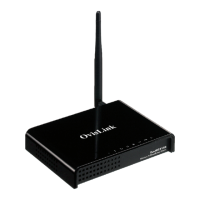

 To Next Page
 General