

EasyManua.ls Logo

OVLENG MX333 - User Manual

OVLENG MX333
5 pages
Print Icon
To Next Page IconTo Next Page
Loading...
MX333usermanual
AOLANGE(HK)INDUSTRIALLIMITED
1) QuickStartGuideEnglish
PackagingArticles
Bluetooth Headphone Quick.start.guide.(this.guide) 
Bluetooth Headphone 
Chargingcable
Question and Answer IconNeed help?

Do you have a question about the OVLENG MX333 and is the answer not in the manual?

Summary

Quick Start Guide

Packaging Articles

Lists the items included in the product packaging.

Function Introduction

Mode Switch Function

Explains how to switch between TF card, FM Radio, and Bluetooth modes.

Volume Control

Details on how to increase or decrease the volume.

Media Control

Instructions for controlling media playback, including track selection.

Call and Power Operations

Covers answering/ending calls and powering the device on/off.

Headset User Manual

Power On and Pairing

Instructions for powering the headset on and pairing with Bluetooth devices.

Call Handling

Procedures for answering and rejecting incoming calls.

Volume and Track Navigation

Guides for adjusting volume and skipping tracks.

Parameters Introduction

Technical Parameters

Lists key specifications such as distance, battery, and working time.

Overview

The MX333 is a HiFi Wireless Headphone manufactured by AOLANGE (HK) INDUSTRIAL LIMITED, designed for a versatile audio experience.

Function Description:

The MX333 offers multiple modes for audio playback and communication:

  • Mode Switch: Users can switch between TF card Mode, FM Radio Mode, and Bluetooth Mode by pressing the "M" button.
  • FM Radio Mode: After pressing "M" and hearing the "FM Tuner" voice prompt, a long press of the Play/Pause key initiates an automatic search for available radio stations. During the search, a blue light will flicker; once all stations are found and set, the blue light will enter a blinking mode. Volume control keys can be used to navigate between stations.
  • Bluetooth Mode: The device enters Bluetooth pairing mode when the power button is held for 3 seconds, causing the blue light to flash rapidly. Users can then find "MX333" on their Bluetooth-enabled device and select it for pairing. Once paired, the blue light remains constant.
  • Volume Control:
    • To decrease volume, long-press the "Volume -" button.
    • To increase volume, long-press the "Volume +" button.
  • Media Control:
    • To go to the previous track, press the "Previous track" button.
    • To go to the next track, press the "Next track" button.
  • Call Management:
    • Answering Call: Click the mode button to answer an incoming call.
    • Rejecting/Ending Call: Click the mode button to reject or end a call.
  • Power Switch:
    • Power On: A short long-press of the power button will cause the power indicator to flash and then become constant upon successful connection.
    • Power Off: Holding down the power button for a short time will turn off the power indicator, indicating the device is powered off.

Important Technical Specifications:

  • Distance: <10M (Bluetooth range)
  • Battery Volume: 200mA
  • Charging Voltage: DC5V
  • Speaker Size: Φ 40mm
  • Speaker Impedance: 32Ω
  • Working Time:
    • Music Playback: 4-6 hours
    • Call Time: 8-10 hours
  • Bluetooth Version: 4.1
  • Microphone: Built-in
  • Power Rating: 100mW
  • Working Voltage: DC3.7V
  • Frequency Response: 20-20kHz
  • System Requirement: Compatible with Window XP, Window Vista, Windows 7.

Usage Features:

The MX333 is designed for comfort and high-quality audio:
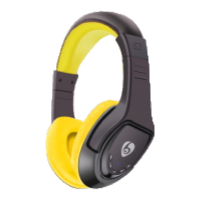
  • HiFi Sound Quality: Features a unique sound quality for wireless headsets, with a signature appearance and 40mm HD driver unit that provides clear sound, depth, and definition for music.
  • Comfort and Durability: Equipped with a super light headband, aiming to provide the most comfortable wearing experience and best durability.
  • Versatile Use: Suitable for working or listening to music, allowing users to instantly change their working style.
  • FCC Compliance: The device complies with part 15 of the FCC Rules, ensuring it meets standards for radio frequency emissions and interference. It is designed to operate without causing harmful interference and to accept any interference received.

Maintenance Features:

  • Interference Management (FCC Guidelines): In case of harmful interference, users are encouraged to:
    • Reorient or relocate the receiving antenna.
    • Increase the separation between the equipment and receiver.
    • Connect the equipment to an outlet on a circuit different from that to which the receiver is connected.
    • Consult the dealer or an experienced radio/TV technician for help.
  • Modification Warning: Any changes or modifications to the device not explicitly approved by the manufacturer could void the user's authority to operate the equipment.
  • Pre-Connection Note: Before connecting the mobile phone with the wireless headset, it is recommended to close all other multimedia players to ensure the headset works properly.
  • RF Exposure: The device has been evaluated to meet general RF exposure requirements and can be used in portable exposure conditions without restriction.

OVLENG MX333 Specifications

General IconGeneral
BrandOVLENG
ModelMX333
CategoryHeadphone
LanguageEnglish