
 Need help?
Do you have a question about the OWC THUNDERBOLT HUB and is the answer not in the manual?
Specifies the required operating system and hardware for the Thunderbolt Hub.
Lists all the items included in the OWC Thunderbolt Hub packaging.
Notes on manual accuracy, firmware changes, and warranty information.
Instructions for installing and using the OWC Dock Ejector utility.
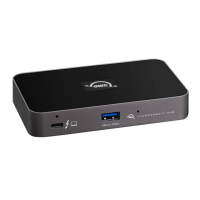
Details the ports and LED indicators on the front and top of the hub.
Identifies the DC power input, security slot, and Thunderbolt ports on the rear.
Step-by-step guide for connecting the hub to a PC and other devices.
Explains power delivery, hot-plugging, port capabilities, and display support.
Guidance for resolving common issues with the Thunderbolt Hub.
Provides phone, chat, and email contact details for OWC support.
Warnings for electrical shock, water exposure, and device handling.
Guidelines for operating environment, temperature, and device care.
Information on the OWC Limited Warranty period and details.
Legal notices for OWC product content and intellectual property.
The OWC Thunderbolt Hub is a versatile device designed to expand the connectivity of Thunderbolt 4 PCs by adding three Thunderbolt 4 ports and one USB port. This hub is compatible with Thunderbolt 4 PCs running Windows 10 or later.
The OWC Thunderbolt Hub serves as a central point for connecting various Thunderbolt and USB devices to your computer. It allows users to transfer data, run a display, and power their notebook all from a single cable. The hub is designed to simplify fast-paced mobile workflows by providing a convenient way to manage multiple peripherals.

 To Next Page
 General