8 How to use BabySat
8.1 Sock Size, Fit & Placement
In App: Guide>BabySat Basics>Sock Placement: How to Get Reading
Sock fit refers to the snugness of the Sock on the foot. Sock placement refers
to the orientation and alignment of the Sock to the foot. Proper Sock size, fit
and placement is essential for BabySat performance.
Step 1: Take the Sensor o the Base Station
When you take the Sensor o the Base Station’s charging port, the Base
Station light will start bouncing green, indicating that the Sensor is looking
for readings from your baby, and that it’s time to put the Sensor and Sock
on your baby’s foot.
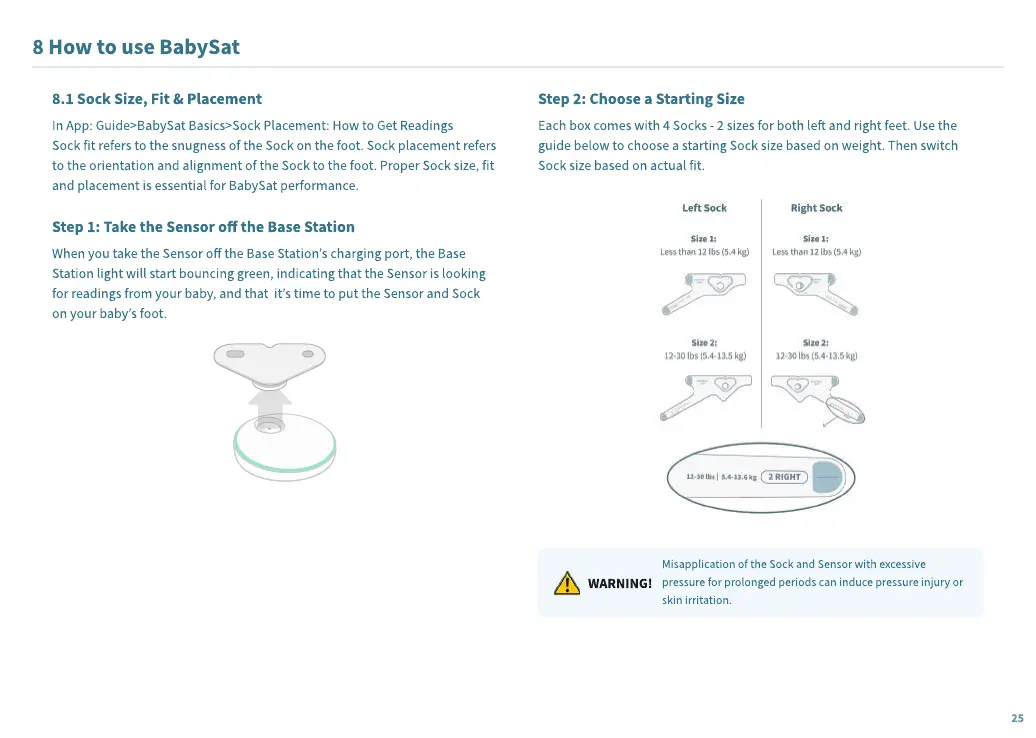
Step 2: Choose a Starting Size
Each box comes with 4 Socks - 2 sizes for both le and right feet. Use the
guide below to choose a starting Sock size based on weight. Then switch
Sock size based on actual fit.
WARNING!
Misapplication of the Sock and Sensor with excessive
pressure for prolonged periods can induce pressure injury or
skin irritation.
25


 To Next Page
 Loading...