Alarm Types and Meanings
BabySat produces several alarms based on Sensor and other data when
certain alarm conditions have occurred. These alarms are designed to
provide physiological and technical alarms to the Caregiver. The following
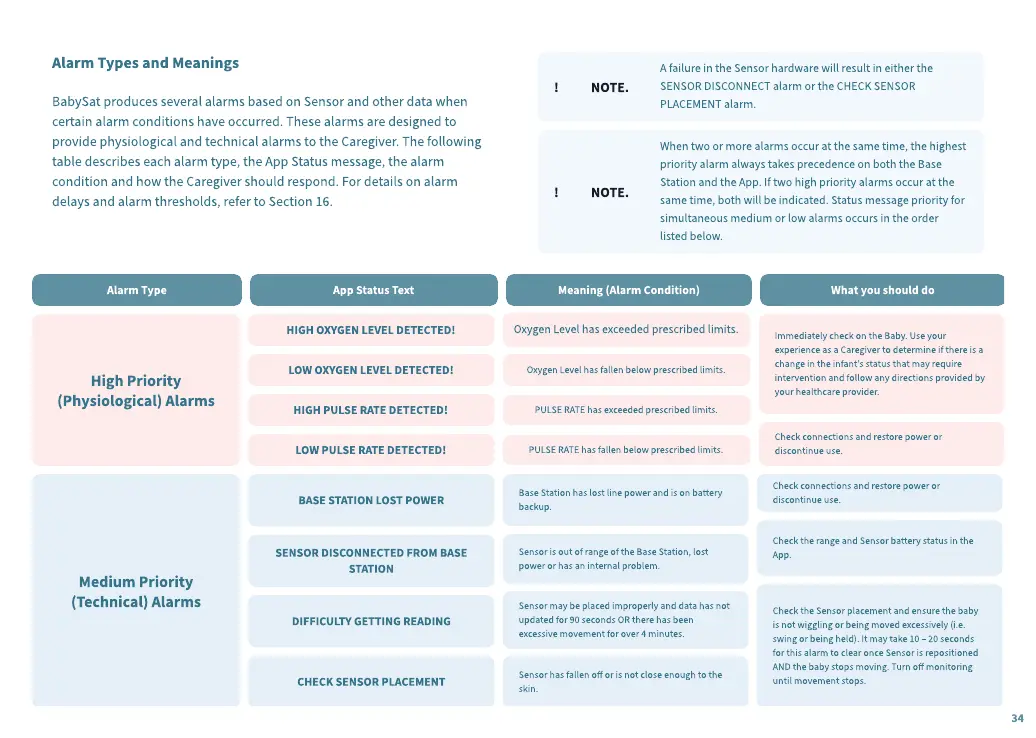
table describes each alarm type, the App Status message, the alarm
condition and how the Caregiver should respond. For details on alarm
delays and alarm thresholds, refer to Section 16.
! NOTE.
A failure in the Sensor hardware will result in either the
SENSOR DISCONNECT alarm or the CHECK SENSOR
PLACEMENT alarm.
! NOTE.
When two or more alarms occur at the same time, the highest
priority alarm always takes precedence on both the Base
Station and the App. If two high priority alarms occur at the
same time, both will be indicated. Status message priority for
simultaneous medium or low alarms occurs in the order
listed below.
High Priority
(Physiological) Alarms
HIGH OXYGEN LEVEL DETECTED!
LOW OXYGEN LEVEL DETECTED!
HIGH PULSE RATE DETECTED!
LOW PULSE RATE DETECTED!
Oxygen Level has exceeded prescribed limits.
Oxygen Level has fallen below prescribed limits.
PULSE RATE has exceeded prescribed limits.
PULSE RATE has fallen below prescribed limits.
Immediately check on the Baby. Use your
experience as a Caregiver to determine if there is a
change in the infant’s status that may require
intervention and follow any directions provided by
your healthcare provider.
Check connections and restore power or
discontinue use.
Medi
u
m Priority
(Technical) Alarms
B
ASE STATION LOST POWER
SENSOR DISCONNECTED
F
ROM
B
ASE
STATION
DI
FF
ICULTY GETTING READING
CHEC
K
SENSOR PLACEMENT
Base Station has lost line power and is on battery
backup.
Sensor is out of range of the Base Station, lost
power or has an internal problem.
Sensor may be placed improperly and data has not
updated for
90
seconds OR there has been
excessive movement for over
4
minutes.
Sensor has fallen o
or is not close enough to the
skin.
Check connections and restore power or
discontinue use.
Check the range and Sensor battery status in the
App.
Check the Sensor placement and ensure the baby
is not wiggling or being moved excessively
(
i.e.
swing or being held
)
. It may take 1
0
–
20
seconds
for this alarm to clear once Sensor is repositioned
AND the baby stops moving. Turn o
monitoring
until movement stops.
Alarm Type
App Stat
u
s Te
x
t
Meaning (Alarm Condition)
What yo
u
sho
u
ld do
34


 To Next Page
 Loading...