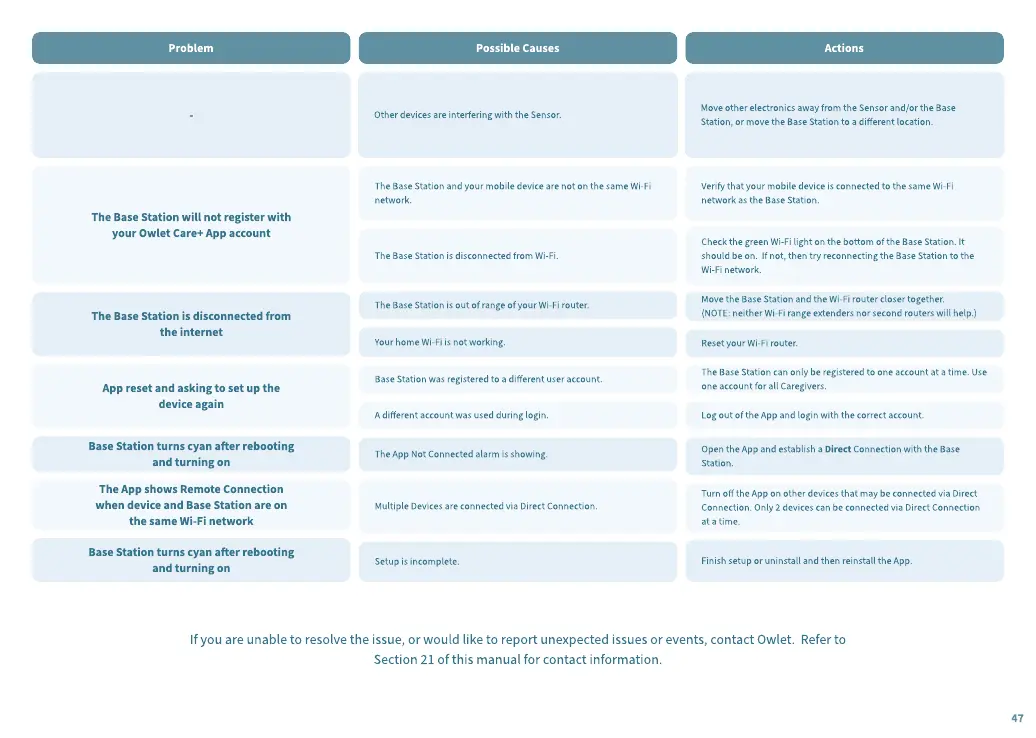
Problem
Possible Causes Actions
-
The Base Station will not register with
your Owlet Care+ App account
The Base Station is disconnected from
the internet
App reset and asking to set up the
device again
Base Station turns cyan aer rebooting
and turning on
The App shows Remote Connection
when device and Base Station are on
the same Wi-Fi network
Base Station turns cyan aer rebooting
and turning on
Other devices are interfering with the Sensor.
The Base Station and your mobile device are not on the same Wi-Fi
network.
The Base Station is disconnected from Wi-Fi.
The Base Station is out of range of your Wi-Fi router.
Your home Wi-Fi is not working.
Base Station was registered to a dierent user account.
A dierent account was used during login.
The App Not Connected alarm is showing.
M
ultiple
D
evices are connected via
D
irect Connection.
Setup is incomplete.
M
ove other electronics away from the Sensor and
/
or the Base
Station
,
or move the Base Station to a dierent location.
V
erify that your mobile device is connected to the same Wi-Fi
network as the Base Station.
Check the green Wi-Fi light on the bottom of the Base Station.
I
t
should be on.
I
f not
,
then try reconnecting the Base Station to the
Wi-Fi network.
M
ove the Base Station and the Wi-Fi router closer together.
(
NOT
E:
neither Wi-Fi range e
x
tenders nor second routers will help.
)
R
eset your Wi-Fi router.
The Base Station can only be registered to one account at a time.
U
se
one account for all Caregivers.
L
og out of the App and login with the correct account.
Open the App and establish a
D
irect Connection with the Base
Station.
Turn o the App on other devices that may be connected via
D
irect
Connection. Only
2
devices can be connected via
D
irect Connection
at a time.
Finish setup or uninstall and then reinstall the App.
I
f you are unable to resolve the issue
,
or would like to report une
x
pected issues or events
,
contact Owlet.
R
efer to
Section
2
1
of this manual for contact information.
47


 To Next Page
 Loading...