EN - NEREA 230V – DO IT YOURSELF (DIY) INSTALLATION
1) Using the Release Key, close the gate and lock the motors (or the motor in the case of a single leaf gate).
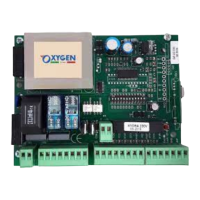
2) Connect the motors according to the diagram on the first page of the manual:
- Common (COM) is the GREY or BLUE wire.
- Opening (AP) and closing (CH) are BROWN and BLACK.
- connect the capacitor (white or black cylinder with two wires) in parallel between BROWN and BLACK (AP and CH), there is
no polarity
- connect the yellow/green wire (Ground/Earth) on any of the three available terminals of the CN1 connector
3) Supply 230V to terminals 1 and 2 of CN2 (L and N)
4) Place two jumpers on DS1 and DS2, so, between 8-9 and 9-10 of CN3 (the DS1 and DS2 LEDs must be on)
DOUBLE LEAF GATES:
5A) Remote Control buttons store:
- press the SEL button once, AUT/PP LED will start flashing.
- Press the SEL button again, and the LED CODE will start flashing.
- Press a button on the remote control - the CODE LED stays lit steady – remote control stored successfully
- Repeat with every remote control that needs to be stored.
6A) – Press the button on the remote control, the gate opens (The motor will be active and will open for 30 seconds).
- Press the remote control button again, the gate closes (The motor will be active and will close for 30 seconds).
7A) Warmly Recommended: Follow the procedure as indicated in the instruction manual (chapter 5 - T.MOT and SLOWING) in
order to set the desired times and slowdown function.
If the motors work backwards, the BROWN and BLACK wires (AP and CH) must be switched one with the other.
SINGLE LEAF GATES:
5B) Remote Control buttons store:
- Press the SEL button once and the AUT/PP LED will start flashing.
- Press the SEL button again, the LED CODE will start flashing.
- Press the SEL button again, the CODE PED LED will start flashing.
- Press a button on the remote control – the LED CODE PED will stay lit – remote control stored.
- Repeat with every remote control that needs to be stored.
6B) - Press the button on the remote control, the gate opens (The motor will be active and will open for 10 seconds).
- Press the remote control button again, the gate closes (The motor will be active and will close for 10 seconds).
7B) Warmly Recommended: : Follow the procedure as indicated in the instruction manual (chapter 6 - T.MOT PED) in order to
set the desired times and slowdown function.
8) Use a screwdriver to adjust the force trimmer to the maximum (clockwise rotation) and gradually decrease it according
to the force required to open and close the gate.
In case of necessity or incorrect setting, you can always restore the factory default values by simply pressing the SEL and SET
buttons simultaneously for a few seconds, all the LEDs in the upper right corner will light up and go out = reset successful
ACCESSORIES CONNECTIONS (depending on the purchased kit):
9) - Place the photocells on the Gate Pillars, about 50cm far from the ground, and connect them as shown in the diagram
on the first manual page.
At the end of the connection remove the jumper on DS1
- In the case of two pairs of photocells (2 Transmitters and 2 Receivers) connect the internal photocell according to the
main photocell diagram, but with the NC terminal on number 10 instead of number 8.
When finished, remove the jumper on DS2.
10) Connect a 17cm wire to terminal 12 (Antenna) only after storing the remote controls. Leave it inside the waterproof
box, there is no need to drill holes on the box or connect external antennas.
11) Connect the 230V flashing light to terminals 3 and 4 of CN2.
12) Connect the Electric Lock on terminals 3 and 4 of CN3.
If the electric lock is 12VDC (direct current), the polarity must be respected, (+12Vdc = number 3)
13) Connect all the desired opening devices, as a push button, an intercom, a key selector, etc., to terminals 5 and 6 of CN3,
in case of a single leaf gate, connect them to terminals 6 and 7,
Notice: device contacts must not be powered (clean contact)
14) The Wireless Keypad works like a remote control, follow step 5A or 5B by entering the desired code (instead of pressing
the remote control button), this way the control unit will save that code

 Need help?
 General

 To Next Page