EasyManua.ls Logo

Ozark Trail OT-300L - User Manual

Ozark Trail OT-300L
2 pages
Print Icon
To Next Page IconTo Next Page
Loading...
10/19/17
Made in China • Printed in China
IMPORTANT INFORMATION
1. Operating time for your Ozark Trail 300L Rechargeable
Headlamp depends on continuous or intermittent use.
Intermittent operation extends the run time of the battery.
2. The LEDs are a lifetime light source. They will never need to be replaced.
Aim Adjustment
Your Ozark Trail 300L Rechargeable Headlamp is
equipped with a self-locking,
aim adjustment feature.
1. Grasp sides of headlamp and rotate to desired
position. (Fig. 8)
FIG. 8
WARNING! Do not disassemble product. Do not charge the battery if the prod-
uct / battery is cracked or damaged. Do not short terminals, crush, heat above
140 Degrees F. (60 Degrees C.), throw into a fire, or incinerate. Please recycle.
For Customer Service:
Call Toll Free 1-888-774-5840
for product questions.
Mon-Fri, 8:00 a.m. – 5:00 p.m. Central Time
Insight 2 Design, Inc.,
Overland Park, KS
OT•300L
RECHARGEABLE
HEADLAMP
User Guide
Your Ozark Trail 300L Rechargeable Headlamp has easy access multiple switch
functions: Spot Light Button Switch for Spot Light, Area Light/Red Light Switch
for softer area lighting and a Red Light mode to preserve your night adapted
vision.
OPERATION
Spot Light Button Switch:
1. Press once for “High”, twice for “Low”, third to turn “Off. (Fig. 7)
Area Light/Red Light Button Switch:
1. Press once for “High”, twice for “Low”, third to turn “Off area light. (Fig. 7)
To access Red Light Mode:
1. Press and hold down Area Light/Red
Light Button Switch until red light
turns to “ON” (approximately 2
seconds), twice to turn “Off.
(Fig. 1 & 6)
FIG. 7
Spot Light Button
Switch
Area Light/Red
Light Button
Switch
Question and Answer IconNeed help?

Do you have a question about the Ozark Trail OT-300L and is the answer not in the manual?

Summary

Headlamp Operation

Spot Light Control

Operate the spot light using the dedicated button for High, Low, and Off modes.

Area & Red Light Control

Manage area and red lights via the other button, cycling through High, Low, and Off.

Red Light Mode Activation

Access red light mode by holding the Area Light/Red Light button until red light turns on.

Aim Adjustment

Important Usage Notes & Warnings

Operational Notes

Notes on operating time, intermittent use, and LEDs as lifetime light sources.

Safety Warning

Crucial safety instructions regarding product disassembly, charging damaged batteries, and disposal.

Charging the Battery

Battery Charging Procedure

Step-by-step instructions for charging the rechargeable lithium-polymer battery via USB.

Charging Indicators

Information about the indicator light's behavior during charging and low battery status.

Overview

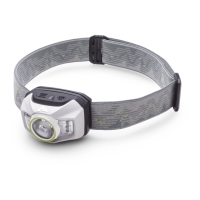
The Ozark Trail 300L Rechargeable Headlamp is a versatile lighting device designed for various outdoor activities and general use, offering multiple lighting modes and convenient features. Its primary function is to provide illumination, with options for both focused spot lighting and broader area lighting, as well as a red light mode for preserving night vision.

Function Description

The headlamp features two main light sources: a spot light and an area light, complemented by a red light function. The spot light is designed for focused, long-distance illumination, ideal for navigating trails or identifying distant objects. The area light provides a softer, wider beam, suitable for close-up tasks, reading, or illuminating a broader immediate vicinity without harsh glare. The red light mode is particularly useful for maintaining night adaptation, as red light has minimal impact on the eyes' ability to see in low-light conditions, making it perfect for stargazing, discreet movement, or avoiding disturbing others.

Usage Features

The headlamp is operated via two distinct button switches, each controlling specific lighting functions.

Spot Light Button Switch:

This switch controls the spot light's intensity and on/off state.

  • High Mode: Pressing the button once activates the spot light in its high-intensity mode, providing maximum illumination for demanding situations.
  • Low Mode: Pressing the button a second time switches the spot light to a lower intensity, conserving battery life and providing sufficient light for less demanding tasks.
  • Off: A third press of the button turns the spot light off.

Area Light/Red Light Button Switch:

This switch manages the area light's intensity and the red light function.

  • Area Light High Mode: Pressing this button once activates the area light in its high-intensity mode, offering broad illumination.
  • Area Light Low Mode: A second press switches the area light to a lower intensity, suitable for close-range work or when less light is needed.
  • Area Light Off: A third press turns the area light off.

Red Light Mode:

To access the red light mode, the user needs to press and hold the Area Light/Red Light Button Switch for approximately two seconds. This action turns the red light ON. To turn the red light OFF, the button should be pressed twice. This dedicated red light feature is crucial for activities where maintaining night vision is paramount, such as camping, hunting, or emergency situations.

Aim Adjustment:

The headlamp incorporates a self-locking aim adjustment feature, allowing users to direct the light precisely where needed. To adjust the beam, simply grasp the sides of the headlamp and rotate it to the desired position. This flexibility ensures that the light can be angled up or down to illuminate the path ahead, a map, or a work area without requiring the user to tilt their head uncomfortably.

Battery Indicator Light:

A battery indicator light is integrated into the headlamp, providing visual feedback on the battery's status. This light helps users monitor the charge level, ensuring they are aware of when the battery needs recharging.

Charging the Battery:

The Ozark Trail 300L Rechargeable Headlamp is powered by a rechargeable lithium-polymer battery.

  1. Accessing the Charging Port: To begin charging, the Micro USB charging port cover needs to be opened.
  2. Connecting the Charger: Plug the Micro USB cable into the headlamp's input port. The other end of the cable can be connected to any standard USB outlet, such as a computer's USB port or a USB wall adapter (not included).
  3. Charging Time: Charging the headlamp using a USB wall adapter is generally faster than charging via a computer's USB port.
  4. Charge Status Indicator: During charging, the indicator light on the top of the headlamp will glow green when the battery is properly charged. If the battery level is low, a red indicator light will turn on, signaling that a recharge is needed.
  5. Completion of Charging: Once the battery is fully charged, the Micro USB cable should be removed from the charging port, and the USB cover should be securely closed to protect the port from dust and moisture.

Maintenance Features

Battery Management:

The headlamp is designed for optimal battery performance. Users are advised to recharge the battery immediately when the light output becomes low, as indicated by the red indicator light. This practice helps maintain the battery's health and ensures consistent performance. The operating time of the headlamp depends on whether it's used continuously or intermittently. Intermittent use can extend the battery's run time, making it more efficient for prolonged activities.

LED Longevity:

The headlamp utilizes LEDs (Light Emitting Diodes) as its light source. LEDs are known for their exceptional durability and long lifespan, meaning they will not need to be replaced during the product's lifetime. This eliminates the need for bulb replacements, reducing maintenance and ensuring a reliable light source for years to come.

Product Care and Safety:

To ensure the longevity and safe operation of the headlamp, several important guidelines must be followed:

  • No Disassembly: Users are strictly warned not to disassemble the product. Attempting to disassemble the headlamp can damage internal components and void any warranty.
  • Battery Integrity: Do not charge the battery if the product or battery casing is cracked or damaged. This could pose a safety risk, including the potential for overheating or fire.
  • Avoid Short Circuits: Do not short circuit the terminals of the battery.
  • Temperature Control: The headlamp and its battery should not be crushed, heated above 140 degrees Fahrenheit (60 degrees Celsius), thrown into a fire, or incinerated. Extreme temperatures can cause the battery to malfunction, leak, or explode.
  • Recycling: When the product reaches the end of its useful life, it should be recycled responsibly, in accordance with local regulations, to minimize environmental impact.

The Ozark Trail 300L Rechargeable Headlamp is a robust and user-friendly device, offering reliable illumination and practical features for a wide range of applications, from everyday tasks to demanding outdoor adventures. Its intuitive controls, adjustable aim, and durable design make it a valuable tool for anyone needing hands-free lighting.

Ozark Trail OT-300L Specifications

General IconGeneral
Lumens300
Beam Distance80 meters
Water ResistanceIPX4
MaterialPlastic
ColorBlack
Battery Type3 AAA
ModesHigh, Low
AdjustabilityAdjustable Headband