SDL-5000
5. SWIVEL HANDLE 6. SCREWDRIVING
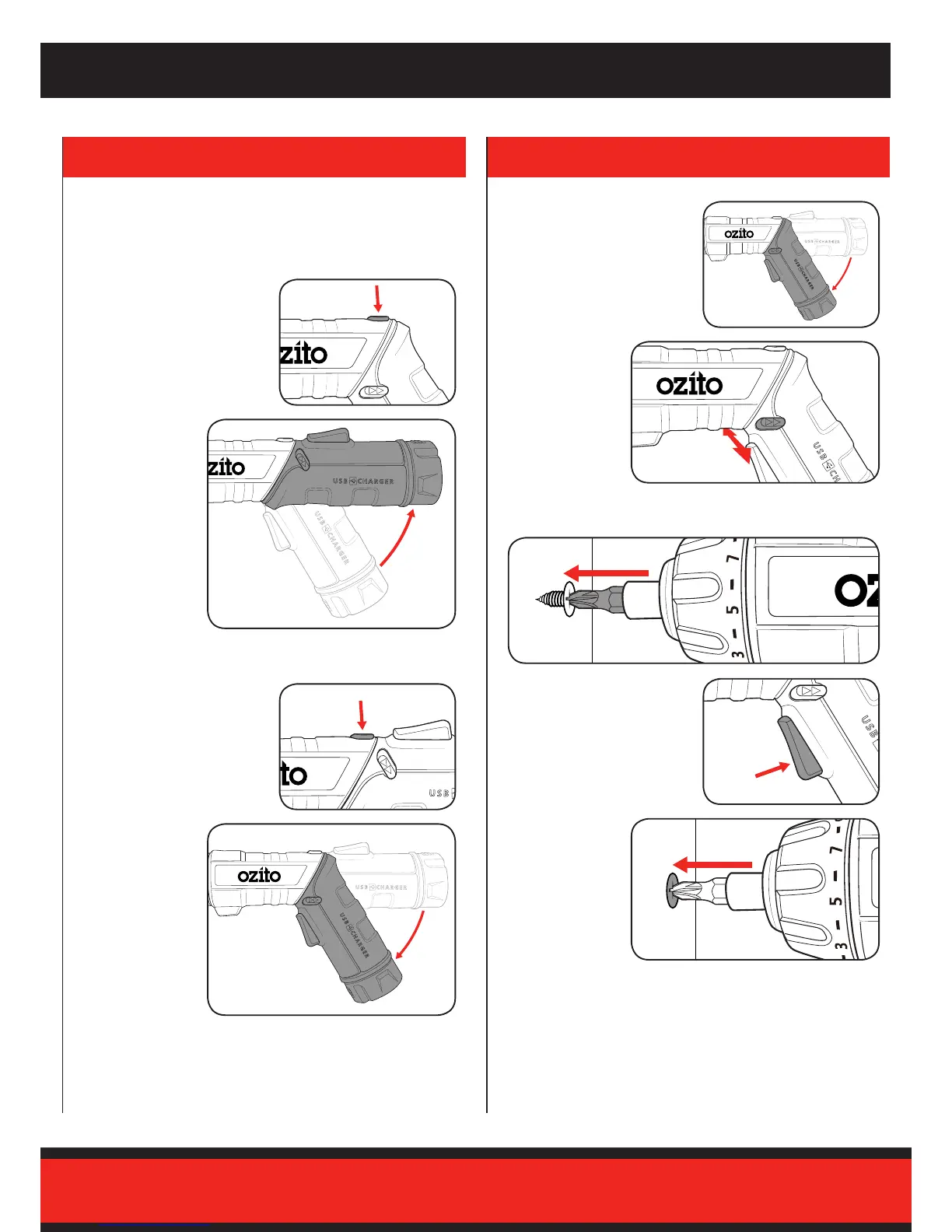
In-line Position
Angled Position
1 Hold the handle locking button
down.
The screwdriver / torch features a rotating handle to suit a range of
applications. You can operate the screwdriver of torch in either handle
position.
1 Select the desired handle
position.
4 Squeeze the on/off trigger to
start the screwdriver.
3 Hold the screwdriver rmly and place the bit on the screw to be
fastened.
1 Hold the handle locking button
down.
2 Rotate the handle
clockwise until it
clicks into position.
2 Check the
forward/reverse
lever is in the
desired setting.
5 Fasten the screw
into the work
piece.
Note: Do not force the screwdriver or apply side pressure to elongate
the hole. Let the screwdriver do the work.
2 Rotate the handle
anti-clockwise
until it clicks into
position.



 To Next Page