5
Multimedia and othershortcut keys on keyboard
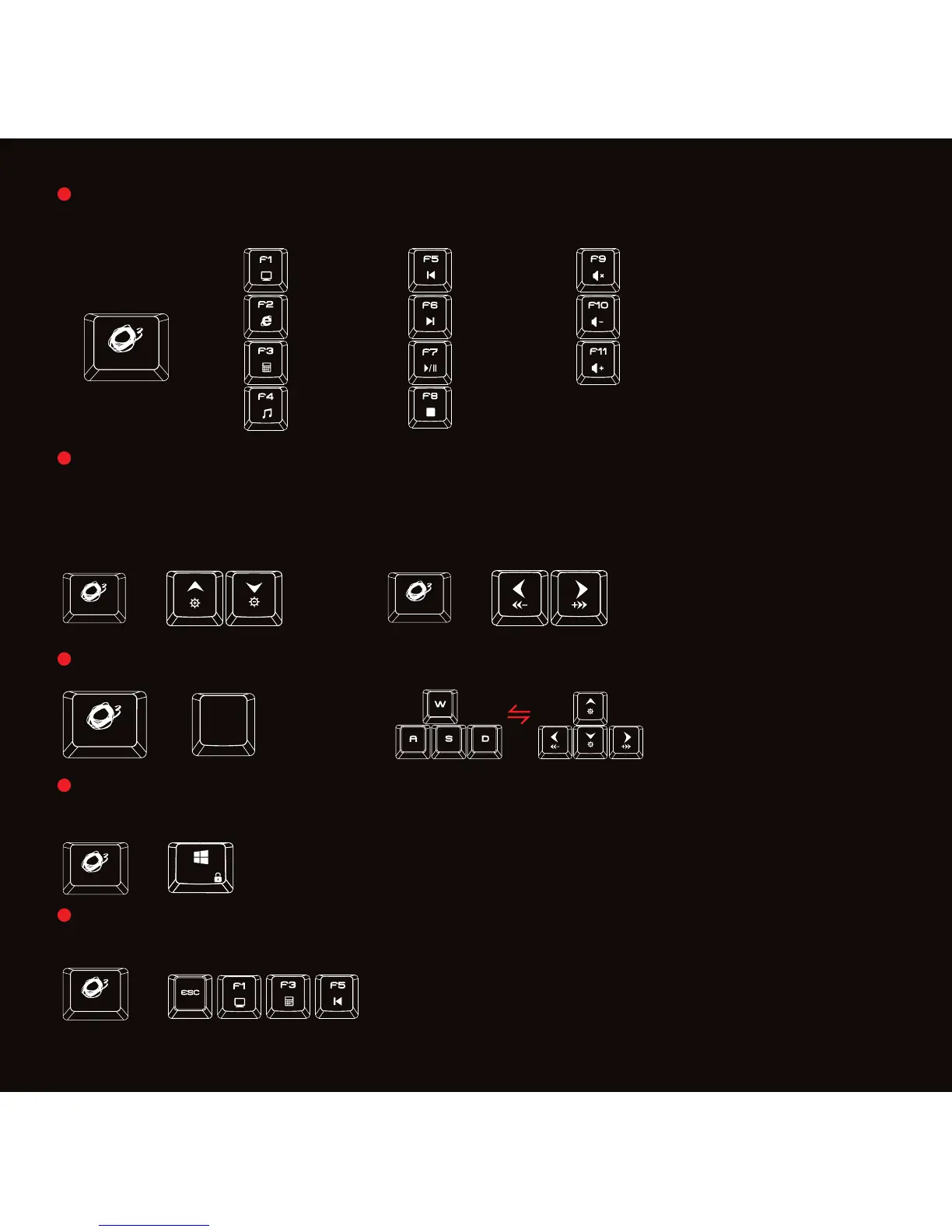
Press o + F1 to F11 key for media playback and other functions
Gaming Mode: Press o + Windows key on keyboard to enter gaming mode
(G-Mode) and block windows key.
Reset to default: Press o + Esc + F1 + F3 + F5 on keyboard to reset the
keyboard to the default configuration.
Press o + ArrowUp or ArrowDn on keyboard to increase or decrease back
lighting brightness in 4 different levels. Press o + ArrowLeft or ArrowRight
on keyboard to increase or decrease back lighting breathing frequency and
circle running control.
Press o + W (3 sec) on keyboard to swap WASD and the ARROW KEYS
+
+
+
Web/Home
My computer
Next Track Volume -
Prev Track Mute
Calculator Play/
Volume +
Media Player Stop
+
+
+
W


 To Next Page