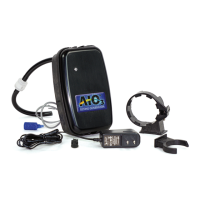
The OzotechEOG is an Enhanced Oxidation Generator designed for various applications, likely in water treatment or air purification, given its function of producing ozone. The device is manufactured by Ozotech, Inc., a company specializing in Applied Ozone Technologies.
Function Description
The OzotechEOG operates as an ozone generator, producing ozone through a corona discharge (CD) cell. It is designed to be integrated with a Clack® control valve, which manages the device's on/off schedule. The control board within the OzotechEOG utilizes an on-board diagnostic LED light to provide real-time performance status, indicating various operational states and potential issues. The device is intended to operate under a negative pressure situation.
The OzotechEOG PCB (Printed Circuit Board) is activated to produce ozone when a pilot input signal is applied across its "+" and "pilot" terminals. It also features NO/NC auxiliary outputs with a 3-second off-delay after the pilot signal is shut off. These outputs are capable of delivering a maximum of 60mA at 70°F and are designed for control circuit applications. The control PCB is equipped with automatically resetting on-board fuses to protect against shorts in the HV transformer or excessive load on the auxiliary outputs.
Important Technical Specifications
- Input Power Requirements: 12VDC via a 120/240VAC 50/60Hz switching power supply.
- Power Consumption: 600mA @ 12VDC (7.2 watts) nominal.
- Size (L x W x H): 6.8" x 4.4" x 5.4".
- Shipping Weight: 2 lbs.
- Ozone Output: 220 mg/hr.
- Enclosure: ABS.
Usage Features
The OzotechEOG is designed for straightforward installation and operation, particularly when integrated with a Clack® control valve.
Installation:
- Mounting: The unit mounts to the Clack® control valve using a clamp ring and port clip, secured with a #2 Philips screwdriver. The OzotechEOG is rotated counterclockwise to secure the port clip, and the clamp screw is tightened.
- Wiring: Power to the control valve must be disconnected. The front cover and control board bracket are removed from the valve backplate. A grey control wire from the OzotechEOG is routed into the Clack® valve housing through a hole in the backplate and a strain relief channel. Sufficient wire length is needed to connect to the signal relay terminal block of the control circuit board. The control board bracket is then replaced.
- Electrical Connections: A red wire is secured into the RLY 1 terminal, and a black wire into the +COM terminal on the Clack® control board.
- Power Supply: The supplied wall transformer is plugged into a wall outlet, and the male DC plug is connected to the female DC jack at the back of the OzotechEOG.
- Programming: The ozone start and end schedule are programmed using the control valve PCB. This involves entering cycle programming mode and setting specific times for backwash (14 minutes), draw time (40 minutes), and relay "on" time (15 minutes, one minute longer than backwash). The relay duration is set for 38 minutes (2 minutes less than draw time). Fill and rinse cycles are turned off. The unit is then returned to service, and the regeneration button is pressed to lock in the timing.
Operation:
The OzotechEOG automatically turns on and off according to the Clack® control PCB's timing schedule. The on-board diagnostic LED provides visual feedback on the unit's status:
- Green Light Blinking Slowly: Standby mode (unit powered, pilot input OFF).
- Green Light Blinking Quickly: High voltage startup (up to 3 seconds).
- Green Light Solid: High voltage is ON and stable, CD cell producing ozone.
- Red Light Solid: Unstable operation, CD cell may need cleaning.
- Green/Red Light Alternating Twice/Second: HV is ON, but operating current is low (CD cell may need cleaning).
- Red Light Flashing: NO or NC contacts are shorted (remove short condition).
- Orange Light: 1-year timer has expired (clean CD cell, then reset timer by pressing red "alarm reset" button on PCB).
Maintenance Features
Regular maintenance is crucial for the OzotechEOG's performance and longevity. The manufacturer emphasizes that only simple maintenance and appropriate operating conditions are required to keep the unit within specifications. Any other modifications or adjustments to internal components will void the warranty.
Frequency of Maintenance: Every 12 months, or more frequently in high humidity areas.
CD Cell Cleaning Procedure:
- Disassembly: Unplug the power supply. Remove the front cover. Disconnect the red spade terminal connector from the CD cell. Cut and discard the CD cell retaining strap. Disconnect air inlet and ozone outlet hoses from the CD cell barb fittings. Pull the CD cell straight up from the retaining clips.
- Flushing: Flush the CD cell with warm water until it runs clean. Connect a 3/16" I.D. tubing piece to either barb fitting. Use a syringe or rubber bulb pump to work warm water through the cell, removing nitric acid or obstructions. Hot water can be used for severe nitric acid buildup.
- Drying: Ensure the CD cell is completely dry, inside and out, before re-installation. Use dry, compressed air to blow through one barb fitting until no moisture is ejected from the opposite fitting.
- Reassembly: Reinstall the clean, dry CD cell in reverse order, ensuring all air and electrical connections are secure.
General Maintenance:
- Disconnect the OzotechEOG from the power source.
- Remove the cover.
- Inspect the inside of the generator for dust and moisture.
- Thoroughly clean and dry the inside of the generator.
- Replace the top cover.
- Replace any in-line and brine elbow check valves.
Maintenance Timer Service Reset Instructions:
- Normal Reset: When the LED indicator turns orange, signaling that cell maintenance is due, perform the service, then press the "Alarm Reset" button on the PCB to reset the timer.
- Forced Reset (for EOGs made after May 2020): If the cell is serviced or replaced before the one-year signal, a forced reset can be performed. Disconnect power from the EOG II. Press and hold the reset button while repowering the unit. A pulsing orange LED indicates the timer reset function is active. Press the reset button again to complete the reset; the LED will pulse green when finished. To abort the forced reset, disconnect and reconnect power without pressing any buttons.
Spare/Replacement Parts:
- Replacement CD cell, w/tubing (Part # 33218)
- Ozone resistant in-line check valve (Part # 47035) - recommended spare
- Wall transformer, 120/240VAC to regulated (domestic customers only) (Part # 40080-03)
- CD cell maintenance kit (Part # 47044-1)



 To Next Page
 General