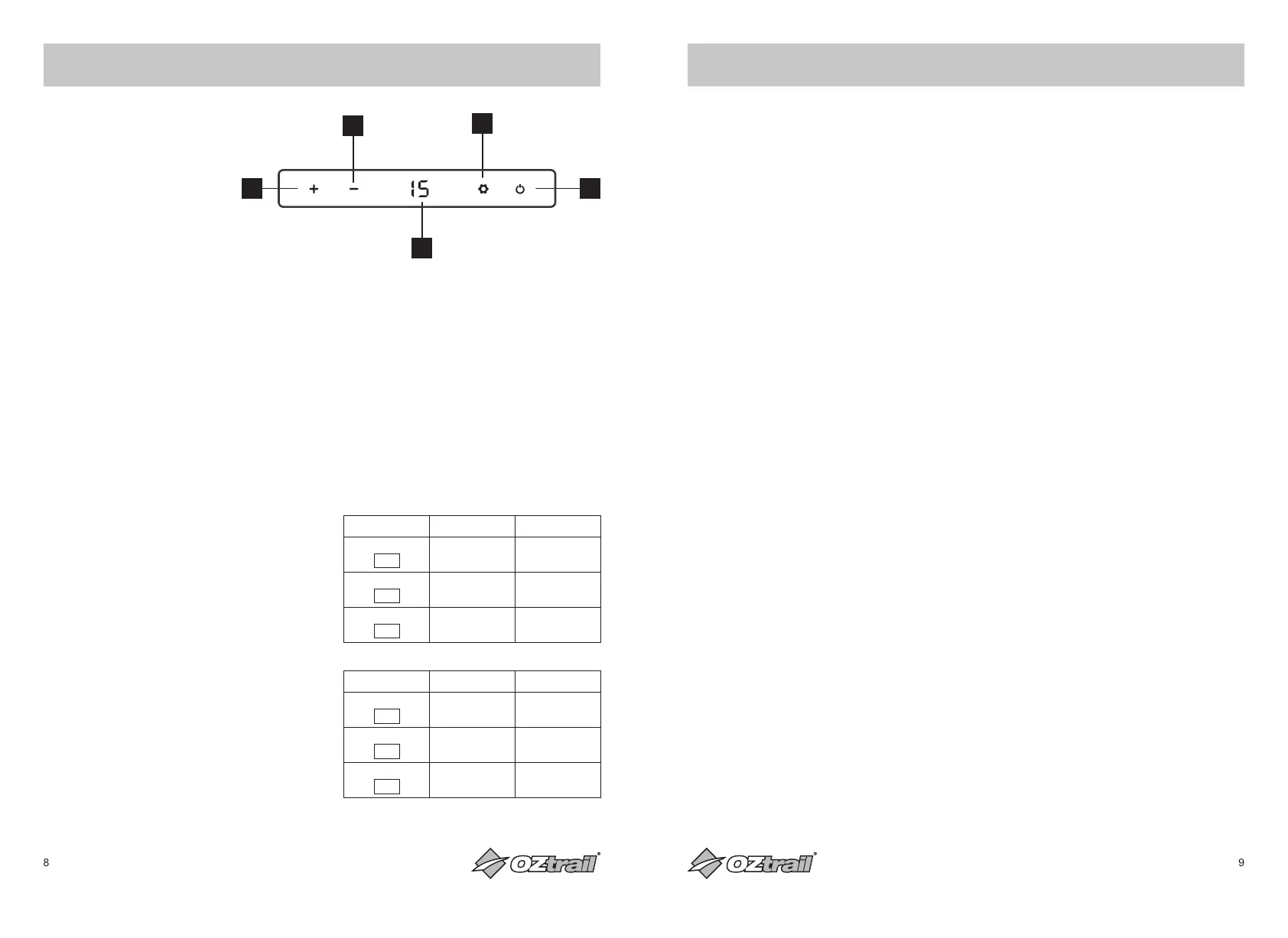
DRAWER FRIDGE OPERATION
1. Power On/Off Button
2. Temp Decrease Button
3. Temp Increase Button
4. Temp Display
5. Settings Button
POWER – OFF AND ON
1. Press power button & fridge will go into
standby mode then switch off after 5
seconds
2. Press the power button & fridge will re-start
with previously selected settings
CABINET TEMPERATURE – SETTING
1. Adjust Temperature by pressing the +
button to increase temp and the - button to
decrease temp
Note: Maximum temperature settings are from
-20°C to 20°C. We recommend +3 for a fridge
or -16 for a freezer
2. Temperature display will flash when
selecting temperature & return to solid
display when showing actual internal
temperature
BATTERY MONITOR – SETTING
1. Adjust the battery monitor setting by
pressing & holding the settings button for 3
seconds until the current setting is flashing.
Scroll through settings by pressing the
settings button while display flashing until
desired setting is reached. Setting will stop
flashing to indicate it has been selected
We recommend using LOW or MEDIUM
setting to avoid the F1 (Low Voltage) error
12V DC Input Cut Out Cut In
HIGH
- - -
- - -
- - -
11.3V 12.6V
MEDIUM
- - -
- - -
10.1V 11.4V
LOW
- - -
9.6V 10.9V
24V DC Input Cut Out Cut In
HIGH
- - -
- - -
- - -
24.3V 25.7V
MEDIUM
- - -
- - -
22.3V 23.7V
LOW
- - -
21.6V 23.0V
USING WITH SOLAR PANEL OR GENERATOR
USING WITH SOLAR PANELS
• The power consumption and efficiency of
your Fridge or Freezer makes it ideal to be
used in conjunction with solar panels to
provide recharging of the DC power source.
Solar panels will provide charge into the
battery during the daylight hours even while
the appliance is operating.
• As the output from solar panels changes
depending on the level of sunlight and
intensity, your Fridge or Freezer cannot be
connected directly to the solar panels. The
appliance must be connected to a suitable
DC battery and then the solar panels
connected to the battery.
• We recommend the use of the quality
regulated portable solar panel kits from 60
to 250 watts for use with your Fridge or
Freezer.
DO NOT connect the Fridge or Freezer
directly to the solar panel as it will not work.
Connection must be via the battery.
USING PORTABLE GENERATORS
• It is important that the correct generator
size is used with your Fridge or Freezer. An
incorrect generator or voltage output may
result in reduced performance or damage
to your Fridge or Freezer which may void
your appliance warranty.
• If connecting directly to an AC generator,
ensure that only a digital or inverter type
generator is used. These provide a more
reliable and constant 240V AC output
power source and are specifically designed
for use with electronic and other power
sensitive appliances.
• Most generators are fitted with a DC power
output socket - DO NOT connect your
fridge directly to the DC power output of
the generator as this will result in damage
to your Fridge or Freezer and void warranty.
• When charging the battery using a digital
or inverter type generator, we recommend
only using a ‘smart battery charger’ that
is fully automatic, spark proof and reverse
polarity protected. The battery charger is
connected directly to the AC power output
socket of the generator.
3
4
2
5
1
10000773_DW20_Drawer_Fridge_Freezer_202301_MAN.indd 8-910000773_DW20_Drawer_Fridge_Freezer_202301_MAN.indd 8-9 11/1/2023 1:36 pm11/1/2023 1:36 pm


 To Next Page
 Loading...