9
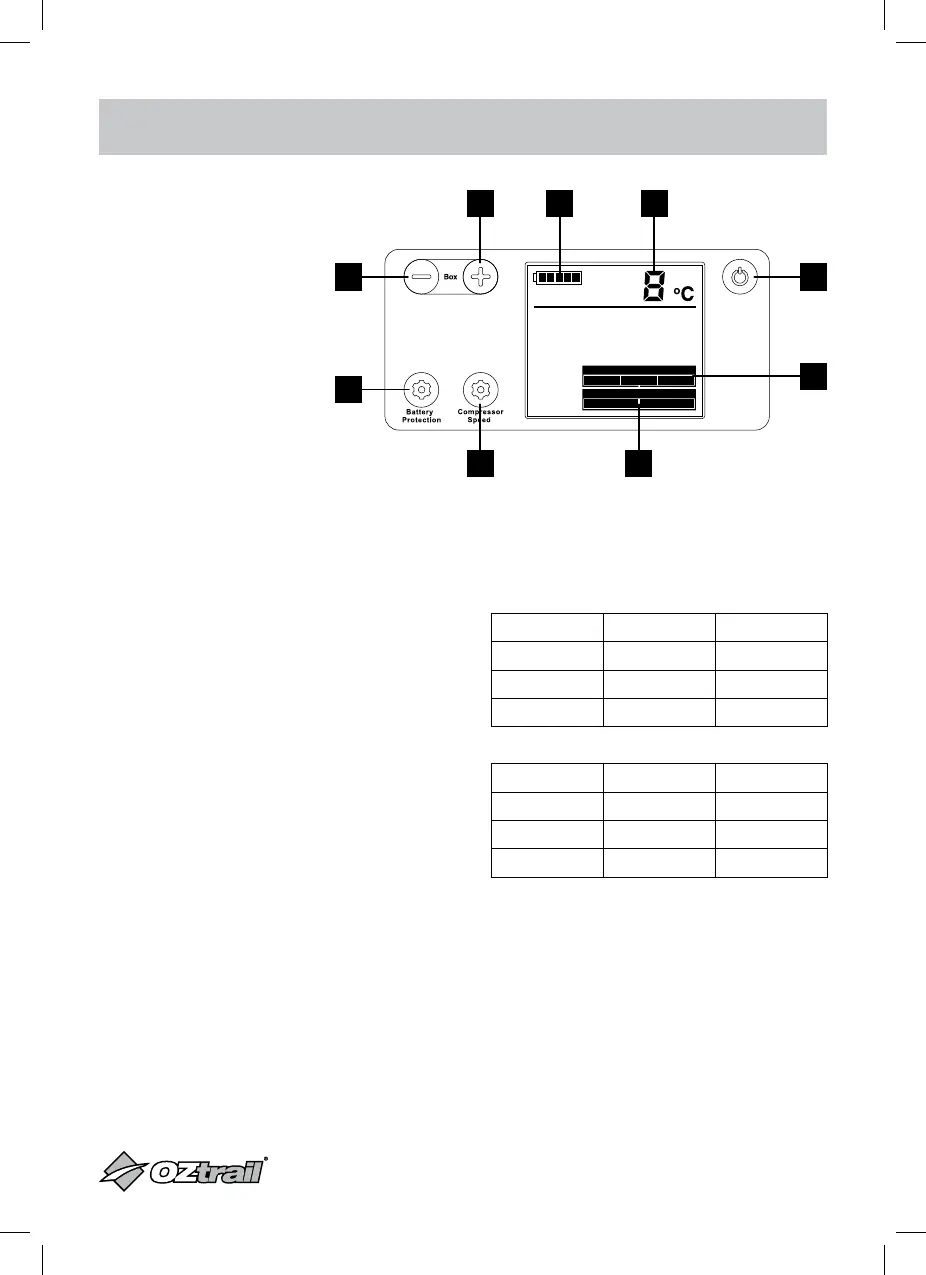
SINGLE ZONE OPERATION
1. Power On/Off Button
2. Battery Monitor Display
3. Temp Decrease Button
4. Temp Increase Button
5. Temp Display
6. Battery Protection Button
7. Battery Protection Display
8. Compressor Speed Button
9. Compressor Speed Display
POWER – OFF AND ON
1. Press power button & fridge will go into
standby mode then switch off after 5
seconds
2. Press the power button & fridge will re-start
with previously selected settings
ECO FUNCTION – SETTING
1. Press the compressor speed button & the
speed setting will go between ECO & MAX
CABINET TEMPERATURE – SETTING
1. Adjust Temperature by pressing the +
button to increase temp and the - button to
decrease temp
Note: Maximum temperature settings are from
-20°C to 20°C.
2. Temperature display will flash when
selecting temperature & return to solid
display when showing actual internal
temperature
BATTERY MONITOR – SETTING
1. Adjust the setting by pressing the Battery
Protection button until desired setting is
highlighted on display
12V DC Input Cut Out Cut In
HIGH 11.3V 12.6V
MEDIUM 10.1V 11.4V
LOW 9.6V 10.9V
24V DC Input Cut Out Cut In
HIGH 24.3V 25.7V
MEDIUM 22.3V 23.7V
LOW 21.6V 23.0V
High Med
• Battery Protection •
• Compressor Speed •
Max Eco
Low
High Med
• Battery Protection •
• Compressor Speed •
Max Eco
Low
3
4 2 5
8 9
1
7
6



 To Next Page