© 2020 AAMP Global. All rights reserved. PAC is a Power Brand of AAMP Global.
PAC-Audio.com
Pacific Accessory Corporation
Page 5
Rev: V1
Date: 091120
Advanced Subwoofer Amplier Interface
for Select Chrysler / Dodge / Jeep Vehicles
APSUB-CH41
Firmware Updates (cont.)
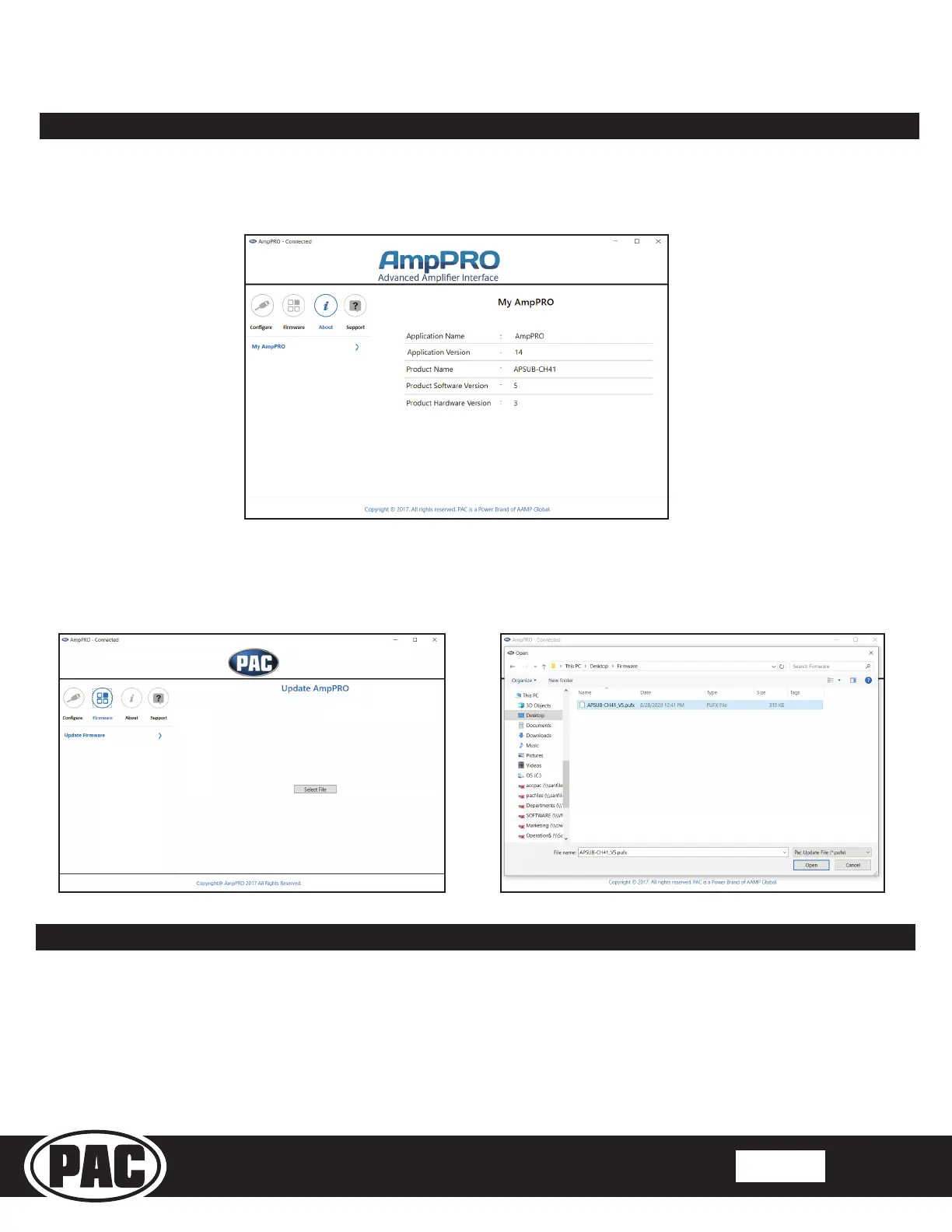
To view Product Software and Hardware Version, connect the interface to your PC and select "About".
AmpPRO PC App (cont.)
To update the rmware, connect the interface to your PC and select "Firmware", then “Update Firmware”. Now select “Select
File”. Finally, browse to the place where you saved the le and select it. This will begin the updating process. Once nished,
disconnect the interface from the PC and resume normal operation.
Restoring Factory Settings
You can restore the interface to factory default settings by pressing and holding the programming button on the side of the module
for 10 seconds until the status LEDs start blinking red. Once the LEDs start blinking red, release the button.
This reset will restore the following settings to their factory defaults:
• Minimum Volume Level
• Enable / Disable Factory EQ
• Factory EQ Frequency
• Factory EQ Q Factor


 To Next Page