EasyManua.ls Logo

PAC RPK5-GM4102 - User Manual

PAC RPK5-GM4102
9 pages
Print Icon
To Next Page IconTo Next Page
Loading...
Pacific Accessory Corporation
Page 1
© 2019 AAMP Global. All rights reserved. PAC is a Power Brand of AAMP Global.
PAC-audio.com
Email - support@pac-audio.com - Phone: 727-592-5991
Complete Radio Replacement Kit with Integrated Climate
Control Retention for 2010-2015 Chevrolet Camaro
RPK5-GM4102
Rev: R6
Date: 010419
Parts List
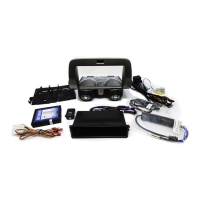
The RPK5-GM4102 includes everything you need for a professional installation of an aftermarket radio in your Camaro.
This kit contains:
1. Dash Kit
(x1) PAC HVAC Control Panel (including factory style HVAC knobs)
(x2) Radio Mounting Brackets (One left and one right)
(x1) Pocket (For single DIN applications)
(x8) Radio Mounting Screws
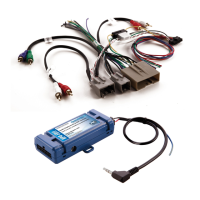
2. RP5-GM4101 (Camaro specic radio replacement module)
3. Camaro specic antenna adapter (BAA-DIN22).
4. Reverse camera retention harness for vehicles equipped with the MyLink system.
5. USB retention cable. This cable is compatible with vehicles equipped with the MyLink radios and vehicles equipped with the standard
non-touchscreen radios. It will require that the cable be ran to the back of the center console.
6. AUX retention cable for 2010-2012 vehicles equipped with the standard non-touchscreen radios and a USB port.
Overview
The RPK5-GM4102 is a complete radio replacement kit with integrated climate control retention for the 2010-2015 Chevrolet Camaro. This
kit comes equipped with factory style HVAC control knobs for a factory look and experience. To add to the factory look and experience, the
exterior temperature display is retained by a small OLED display at the top of the kit retaining this valuable vehicle feature. This kit also
includes all of the modules and cables needed to retain all of the important features of the factory system such as OnStar, factory warning
chimes, factory Bluetooth, steering wheel mounted radio controls, factory reverse camera, factory amplier (if equipped), factory AUX jack
(if equipped) and the factory USB port (if equipped). The RPK5-GM4102 also provides data bus driven outputs such as retained accessory
power (RAP), vehicle speed sensor (VSS), illumination, reverse trigger and parking brake. Use of this interface also allows you to program
two radio functions to each SWC button by using short press long press dual command functionality.
Important Notes
1. These instructions only apply to R.2.5.6.3 or later revisions of the RP5 interface. The revision info can be found on a small white sticker on the
interface.
2. The center inserts on the control knobs are made to install once! They are not easily removable / swappable. Please ensure you have selected
the correct inserts for your installation before snapping the inserts into the control knobs.In the event that the center inserts need to be removed,
see the troubleshooting section on page 9.
3. For vehicles with heated seats: When installing the center caps, you need to rst install the light pipes. They are keyed so they will only t one
way. Pay close attention to the shape and orientation of the light pipes to ensure correct lighting.
4. When discussing the control knobs, we will refer to “Left” indicating the driver side, and “Right” indicating the passenger side.
5. It is recommended that the user’s phone(s) be “Unpaired” from the factory Bluetooth. This will ensure the user’s phone will always pair to the
aftermarket radio’s bluetooth.
6. Once the radio has been removed, the vehicle settings which are normally selected through the factory radio can be accessed using the
PAC-UP along with the PAC Vehicle Settings program (for windows PC), which can be downloaded here: http://www.pac-audio.com/
rmware.
7. The Answer/Voice and End/Mute buttons can be set to control the factory OnStar functions, or to control the aftermarket radio. This option can
be found in the PAC Vehicle Settings program mentioned above in note one. The default setting for these buttons is to control the factory OnStar.
If these buttons are set to control the aftermarket radio, OnStar can still be accessed by using the mirror controls.
8. The radio replacement interface comes pre-programmed for all of the vehicle’s factory SWC functions and does not require programming unless
you wish to re-assign the SWC functions or utilize the short press long press dual command functionality. The SWC can always be restored to
default settings by pressing and releasing the program button on the side of the interface once and waiting 7 seconds for the LED to ash 4 times.
9. The radio select rotary switch on the side of the interface must be adjusted to the proper radio setting before plugging the interface into the
vehicle (see page 4 for setting chart).
Question and Answer IconNeed help?

Do you have a question about the PAC RPK5-GM4102 and is the answer not in the manual?

Summary

Removing the factory radio from the vehicle

Apply the parking brake

Step-by-step guide to removing the front floor console front cover.

Remove radio control assembly

Steps to remove the radio control assembly from the dash.

Remove radio and disconnect wiring

Steps to remove the radio from the dash and disconnect electrical connections.

Dash Panel Assembly

Remove retention clips

Remove retention clips from factory radio control assembly.

Attach retention clips

Attach removed clips to the PAC HVAC control assembly.

Interface Wiring Connection Chart

Aftermarket Radio Connections

Wiring chart for connecting aftermarket radio components.

SWC Connector

Details for Steering Wheel Control (SWC) connector.

Antenna Adapter

Wiring for antenna adapter.

RCA Connectors (Main Connector)

Wiring for main RCA connectors.

RCA Connector (Grey connector)

Wiring for grey RCA connector.

3.5 mm Connector (Black connector)

Wiring for black 3.5mm connector.

Interface Illustration; Schematic

Wiring

Schematic of the wiring connections.

SWC Connection

Illustration of SWC connection.

Interface Installation Steps

SET RADIO SELECT SWITCH

Instructions for setting the rotary switch for radio compatibility.

Make all connections

Connect wires as per the wiring chart.

Interface Installation Steps (cont.)

USB and AUX cable Installation

Default Steering Wheel Assignments

IMPORTANT! Pre-programmed functions

Interface is pre-programmed; no programming needed unless reassigning functions.

Optional Steering Wheel Control Programming

Short Press Long Press Dual Command Functionality

Explanation of dual command functionality for SWC buttons.

Optional Steering Wheel Control Programming (cont.)

Optional Programming Order

Table detailing the order for programming SWC functions.

Programming the SWC assignments

Turn the key to the ignition position

Start programming by turning the ignition key.

Press programming button

Press the interface's programming button to start.

Learn SWC buttons

Learn SWC buttons by pressing them on the steering wheel.

Test interface functionality

Verify SWC functionality after programming.

Sub-Dash Preparation

Sub-Dash Preparation (cont.)

Warning: Check for factory wiring

Safety warning about cutting wiring.

Kit Assembly Instructions

Installation of the PAC HVAC control panel

Installation of the PAC HVAC control panel (cont.)

Interface Testing and Verification

Verify SWC functionality

Verify all SWC are functioning properly for aftermarket radio and OnStar.

PAC HVAC Control Panel Testing and Verification

Troubleshooting

Summary

Removing the factory radio from the vehicle

Apply the parking brake

Step-by-step guide to removing the front floor console front cover.

Remove radio control assembly

Steps to remove the radio control assembly from the dash.

Remove radio and disconnect wiring

Steps to remove the radio from the dash and disconnect electrical connections.

Dash Panel Assembly

Remove retention clips

Remove retention clips from factory radio control assembly.

Attach retention clips

Attach removed clips to the PAC HVAC control assembly.

Interface Wiring Connection Chart

Aftermarket Radio Connections

Wiring chart for connecting aftermarket radio components.

SWC Connector

Details for Steering Wheel Control (SWC) connector.

Antenna Adapter

Wiring for antenna adapter.

RCA Connectors (Main Connector)

Wiring for main RCA connectors.

RCA Connector (Grey connector)

Wiring for grey RCA connector.

3.5 mm Connector (Black connector)

Wiring for black 3.5mm connector.

Interface Illustration; Schematic

Wiring

Schematic of the wiring connections.

SWC Connection

Illustration of SWC connection.

Interface Installation Steps

SET RADIO SELECT SWITCH

Instructions for setting the rotary switch for radio compatibility.

Make all connections

Connect wires as per the wiring chart.

Interface Installation Steps (cont.)

USB and AUX cable Installation

Default Steering Wheel Assignments

IMPORTANT! Pre-programmed functions

Interface is pre-programmed; no programming needed unless reassigning functions.

Optional Steering Wheel Control Programming

Short Press Long Press Dual Command Functionality

Explanation of dual command functionality for SWC buttons.

Optional Steering Wheel Control Programming (cont.)

Optional Programming Order

Table detailing the order for programming SWC functions.

Programming the SWC assignments

Turn the key to the ignition position

Start programming by turning the ignition key.

Press programming button

Press the interface's programming button to start.

Learn SWC buttons

Learn SWC buttons by pressing them on the steering wheel.

Test interface functionality

Verify SWC functionality after programming.

Sub-Dash Preparation

Sub-Dash Preparation (cont.)

Warning: Check for factory wiring

Safety warning about cutting wiring.

Kit Assembly Instructions

Installation of the PAC HVAC control panel

Installation of the PAC HVAC control panel (cont.)

Interface Testing and Verification

Verify SWC functionality

Verify all SWC are functioning properly for aftermarket radio and OnStar.

PAC HVAC Control Panel Testing and Verification

Troubleshooting

Overview

The RPK5-GM4102 is a comprehensive radio replacement kit designed for 2010-2015 Chevrolet Camaro vehicles, integrating climate control retention for a seamless aftermarket radio installation. This kit aims to provide a factory-like look and feel, ensuring that essential vehicle features are maintained and enhanced.

Function Description:

At its core, the RPK5-GM4102 facilitates the installation of an aftermarket radio while preserving critical factory functionalities. It includes a PAC HVAC Control Panel equipped with factory-style HVAC control knobs, offering a familiar tactile experience. A small OLED display at the top of the kit retains the exterior temperature display, a valuable feature for the driver.

The kit is engineered to retain a wide array of factory features, ensuring that the vehicle's original capabilities are not lost with the radio upgrade. These retained features include OnStar functionality, factory warning chimes, and factory Bluetooth connectivity. Steering wheel mounted radio controls are also preserved, allowing drivers to maintain convenient access to audio functions without taking their hands off the wheel. For vehicles equipped with them, the kit retains the factory reverse camera, factory amplifier, factory AUX jack, and the factory USB port.

Beyond retention, the RPK5-GM4102 provides several data bus driven outputs that are crucial for aftermarket radio integration. These outputs include retained accessory power (RAP), which keeps the radio on for a short period after the ignition is turned off, vehicle speed sensor (VSS) output for navigation systems, illumination output for synchronized lighting, a reverse trigger for backup cameras, and a parking brake output for safety features.

A notable feature of this interface is its dual command functionality for steering wheel controls (SWC). Users can program two radio functions to each SWC button using a combination of short press and long press actions. This allows for greater customization and control over the aftermarket radio.

The kit also includes specific components for various vehicle configurations. For instance, it comes with a Camaro-specific antenna adapter (BAA-DIN22), a reverse camera retention harness for MyLink systems, a USB retention cable compatible with both MyLink and standard non-touchscreen radios, and an AUX retention cable for 2010-2012 vehicles with standard non-touchscreen radios and a USB port.

Usage Features:

Installation involves several steps, starting with the removal of the factory radio and control assembly. The kit emphasizes careful handling, particularly when dealing with delicate components like the center inserts on the control knobs, which are designed for a single installation. For vehicles with heated seats, specific light pipes must be correctly oriented during the installation of the center caps to ensure proper lighting.

The interface's radio select rotary switch must be adjusted to the correct radio setting before plugging the interface into the vehicle, ensuring compatibility with the aftermarket head unit. The kit supports various radio brands, including Alpine, JVC, Kenwood, Clarion/Nakamichi, Pioneer/Other, Sony, and Fusion, among others.

Steering wheel control programming is a key usage feature. The interface comes pre-programmed with default SWC functions, but users have the option to re-assign these functions or utilize the short press long press dual command functionality. The programming process is guided by a sequence of steps, allowing users to customize their controls. If a steering wheel button does not exist or a function is not desired, the programming step can be skipped. The Mute/End button, by default, offers dual functionality: a short press for mute and a long press for end.

The temperature display at the top of the kit is a multifunction display. It shows the external temperature, firmware version number, and allows users to switch between Fahrenheit and Celsius by pressing and holding the A/C (snowflake) button. The firmware version of the PAC HVAC control panel can be displayed by holding the recirculation button. Additionally, the kit offers customizable splash screens that appear when the unit powers up, which can be cycled through by holding the rear defrost button.

Maintenance Features:

The RPK5-GM4102 is designed with maintainability in mind, particularly through its firmware update capabilities. The interface can be updated with new firmware as it becomes available, using the PAC-UP interface updater (sold separately). This ensures that the device remains compatible with future vehicle updates or new aftermarket radio technologies, and allows for bug fixes or feature enhancements. The PAC-UP program, along with the PAC Vehicle Settings program, can be downloaded from the PAC-audio website.

For the HVAC board, firmware updates are also possible using the RadioPRO application, accessible from the same website. This modular approach to updates helps prolong the life and functionality of the kit.

Troubleshooting guidance is provided for common issues, such as removing or swapping the center inserts in the knob assemblies. This involves carefully disassembling the knob to access and replace the light pipes and inserts, ensuring that the correct insert for heated or non-heated seats is used.

The kit also includes testing and verification steps to ensure proper functionality after installation. This includes checking the ignition, accessory power, radio balance and fade, SWC functionality (including OnStar volume adjustment), RAP (retained accessory power) operation, and the HVAC control panel's display and button functionality. These checks help confirm that all integrated features are working as intended, providing a robust and reliable aftermarket solution.

PAC RPK5-GM4102 Specifications

General IconGeneral
TouchscreenYes
Steering Wheel Control RetentionYes
OnStar RetentionYes
Backup Camera RetentionYes
BluetoothYes
Apple CarPlayYes
Android AutoYes
Rear Camera InputYes
Operating SystemAndroid
GPSYes
Wi-FiYes
Amplifier RetentionYes
Supported Audio FormatsMP3, WMA, AAC
Supported Video FormatsMP4, AVI

Related product manuals