Related tasks
Using the Manual -
Automatic Button
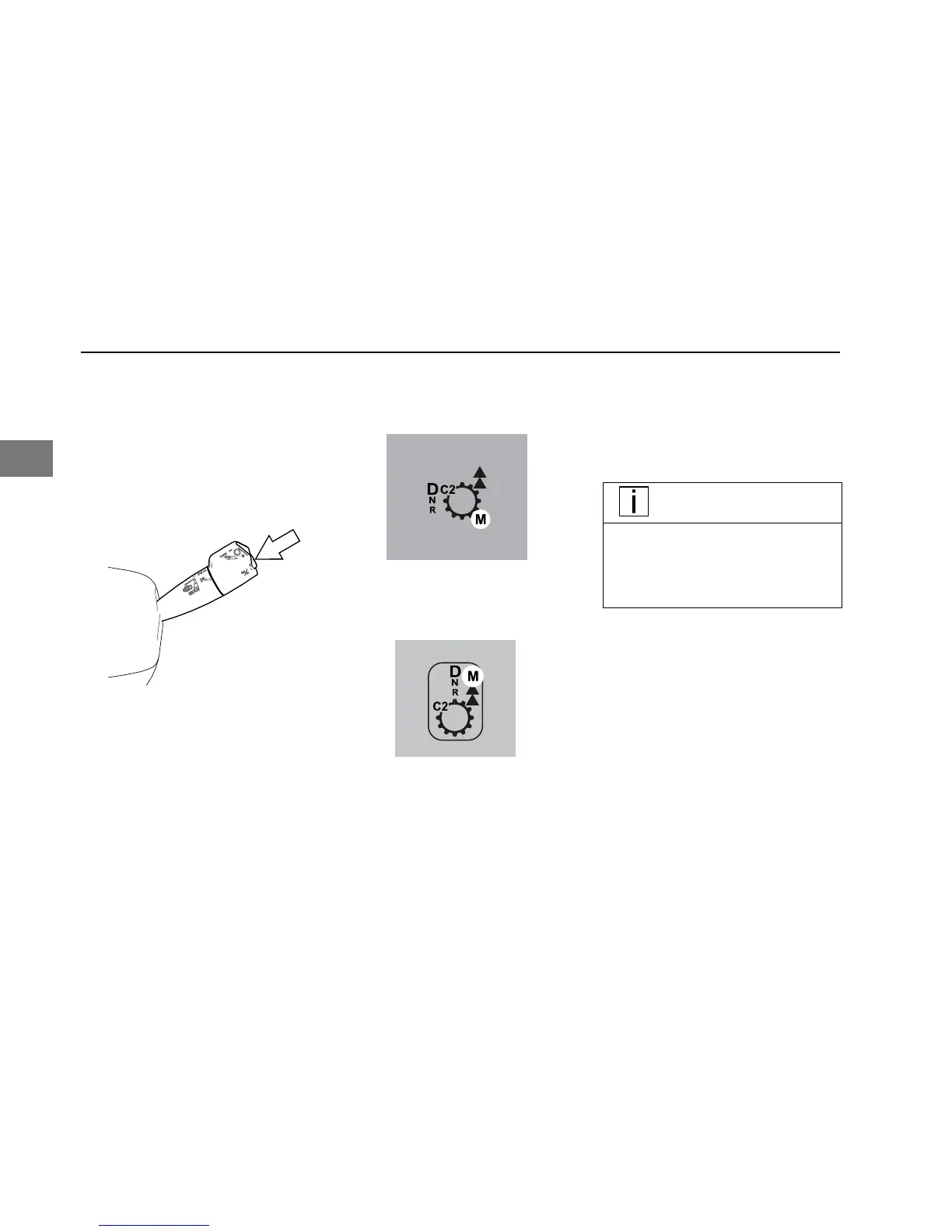
This button will put the transmission into
manual mode. Manual mode will allow the
operator to select the gear. See Up or
Down Shifting on page 15.
To activate, put the gear selector in the D
(drive) mode and then depress the M/A
button. The instrument cluster will display
the corresponding selection.
For Peterbilt Vehicles
For Kenworth Vehicles
MANUAL Mode
MANUAL mode should be used whenever
the driver wants to select the shifts instead
of letting the transmission select them
automatically.
• Driver manually selects the start
gear and uses the up/downshift
request to shift.
NOTE
Multiple gear upshifts and downshifts
may be allowed when the up/downshift
request procedure is performed multi-
ple times (Each request equals one
gear change request).
• If the driver attempts to select a
non-neutral mode without
depressing the service brakes the
transmission will not shift into gear.
The driver must re-select Neutral
and depress the service brakes
before selecting the desired mode
again.
• System holds current gear unless
otherwise prompted by using up/
downshift request, except for the
“Transmission Manual Override”
conditions noted below.
DRIVING - Using the Manual - Automatic Button
18 Y53-1272-1B1 (08/17)
2


 To Next Page