11
THE PACEMASTER SILVER SELECT CONTROL PANEL (cont’d)
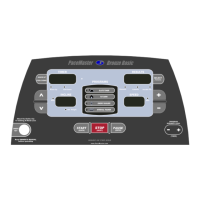
INDICATOR LIGHTS
Set Weight indicator – 3 seconds after the magnetic safety key is inserted, the Set Weight indicator flashes and the last entered body
weight is shown on the INCLINE display. Body weight can be adjusted using the INCLINE buttons. Once the desired setting is displayed,
press PAUSE (ENTER).
Set Age indicator – 3 seconds after the magnetic safety key is inserted, the Set Age indicator flashes and the last entered age is shown
on the SPEED display. Age can be adjusted using the SPEED buttons. Once the desired setting is displayed, press PAUSE (ENTER).
INCLINE Max indicator – When illuminated during the selection of a programmed workouts, the displayed Incline is the maximum incline
that will be encountered during the selected workout and intensity level.
SPEED Max indicator – When illuminated during selection of a programmed workouts, the displayed speed is the maximum speed that
will be encountered during the selected workout and intensity level.
WARM Up and COOL DOWN indicators – Illuminated Warm Up or Cool Down indicators show that these routines will be part of the
workout. When in the Warm Up or Cool Down mode, the appropriate indicator will blink.
DISTANCE, CALORIES, And AEROBIC POINTS indicators – They tell you which value is being displayed in the Results window.


 To Next Page