27
EXCLUSIVE PACEMASTER FEATURES (cont’d)
Step Three:
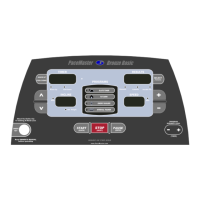
Press the Incline
buttons to set your weight and the Speed buttons to set your age, then press the
(ENTER)
button.
Step Four:
Enter the workout time by pressing the WORKOUT INTENSITY LEVEL (TIMER)
buttons until the desired workout time
appears, you may also add a warm up and/or cool down.
Step Five:
Press the SELECT (Preview)
(PREVIEW)
button until the Aerobic Points indicator is illuminated.
Step Six:
Enter speed. You will begin to see the number of Aerobic points you will earn in the RESULTS display as you increase the speed.
Step Seven:
Enter Incline. You will begin to see the number of Aerobic points you will earn in the RESULTS display as you increase the speed.
To create a workout based on calorie expenditure, determine how many calories you want to burn Press the SELECT (Preview) button
until the Calories indicator is illuminated and follow steps 4, 5 and 6 above.


 To Next Page