CONFIGURING USER ID’S
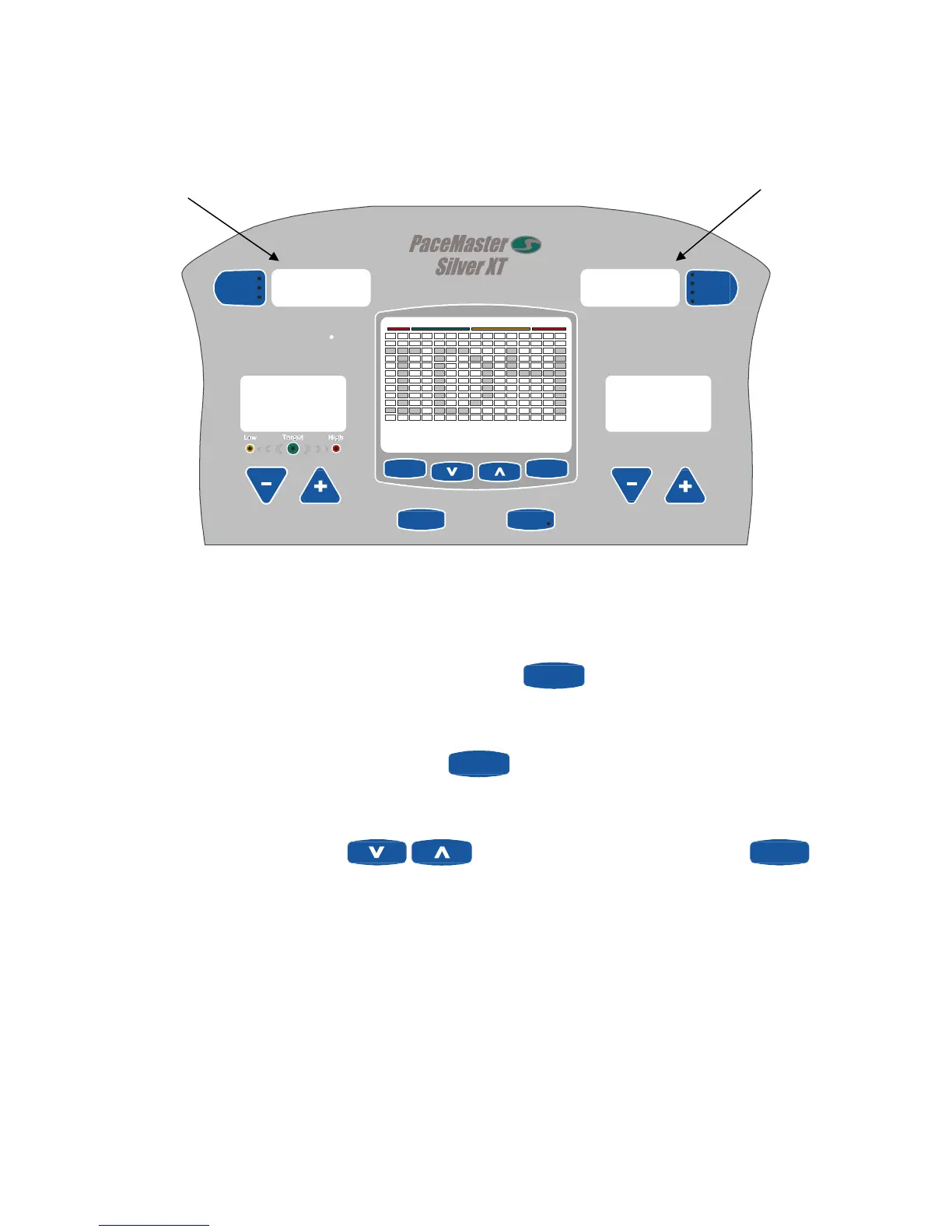
The four USER ID positions give you the ability to view the results from your last seven workouts. They can be recalled as a cumulative
total or as individual workouts.
STRIDES/MIN
Elapsed
Remaining
Distance
Aerobic Pts.
Heart Rat e
Calories
Segment
RESISTANCE
RESULTSTIMER
USER ID
ENTER
(RESET)
PROGRAMS
FBT
Max
Max
HEART RATE ZONE
70% to 85%< 55% 55% to 69% > 85%
USER 1 cumulative
results for the last
seven workouts.
USER 1 cumulative
workout time for the
last seven
workouts.
1324
3:27
W 160 AG 46
00.0
00.0
Selecting and setting up a USER ID
Step One: Stand on the foot pads of your elliptical.
Step Two: Select a USER ID number (ID1, ID2, ID3, or ID4) by pressing the
USER ID
button. The current settings for the Used ID
chosen, are displayed in the message center. The default settings for all USER ID positions are 150 lbs. for the weight and 40 years for
the age.
Step Three: To modify the user ID settings, press and hold the
USER ID
button for two seconds, then release the button. The current
weight setting will be flashing in the message center
Step Four: Press the increase and decrease
buttons to set your weight, and then press enter
ENTER
(RESET)
. Use
the same procedure to enter your age.
21


 To Next Page
 Loading...