33
Twice a Year
- Inspect all wheels for looseness and tire wear.
- Clean the upholstery as needed.
Yearly
- Thoroughly examine your wheelchair to look for undetected wear and other potential prob-
lems and have problems repaired immediately. The expense involved is always less than repair
bills caused by a lack of proper maintenance. In the same way a car would not last without
service, a wheelchair should be maintained regularly.
AND REMEMBER! If you ever notice any part of your
power wheelchair working in an
improper or unsafe manner, stop riding it immediately and contact your dealer to arrange
repairs. Do not use your wheelchair if there is a possibility it is not safe!
Troubleshooting
If the
power wheelchair will not move, check the following.
1. Turn the power switch OFF and then back ON.
2. Check to see that the joystick console is not locked. Refer to unlocking instructions.
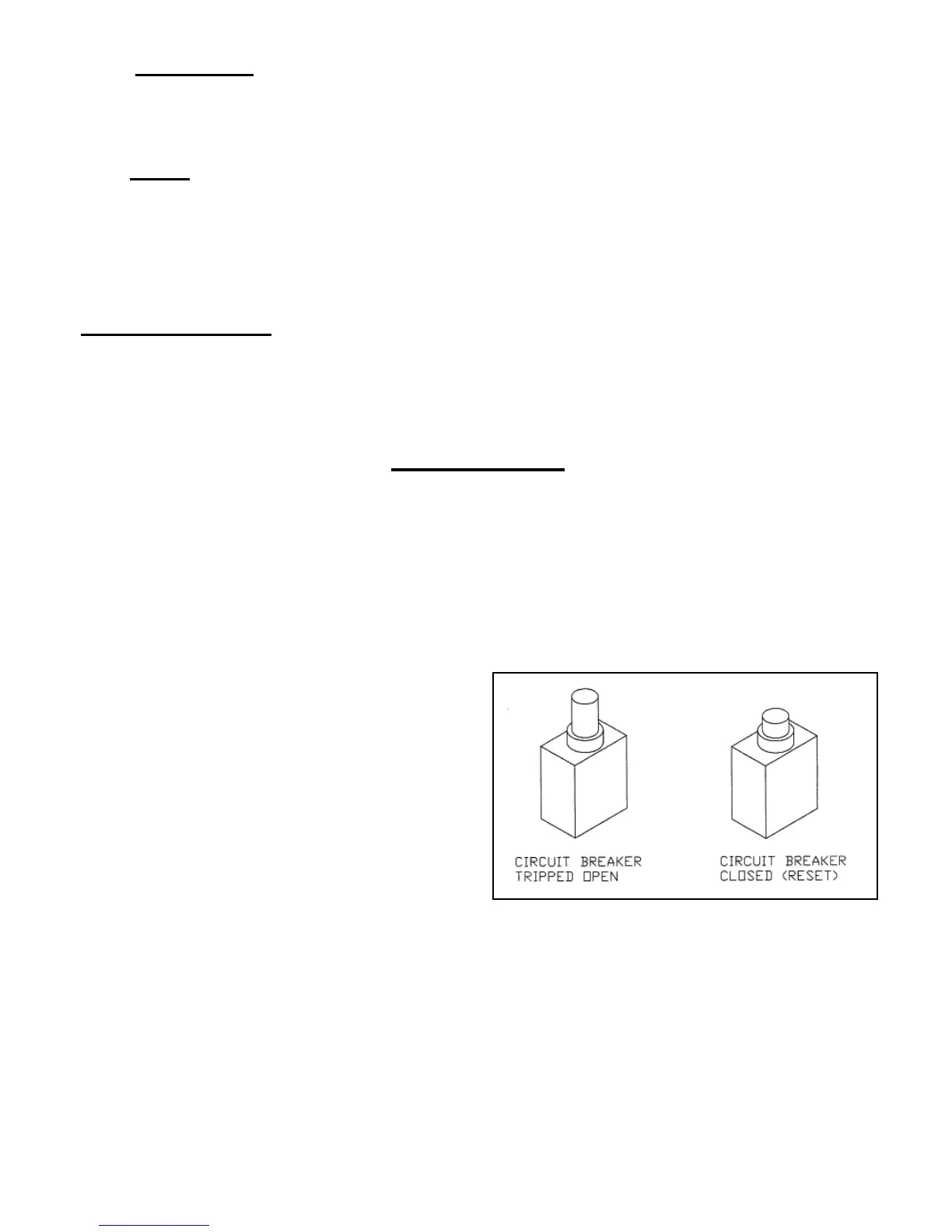
3. There is a visible circuit breaker. It is
located on the front of unit under the seat. You
will not see any white on the button when it is
set in the correct operating position. Also check
to see that all of the wires are securely attached
to the box.
4. Check the joystick console plug (located at
the rear of the seat) for proper connection.
5. Check the battery plugs for proper connections
6. Check the BATTERY indicator for discharged batteries.
7. Turn the power switch OFF and then back ON a second time.
8. If the wheelchair still will not move, check the LED status indicator to see if it indicates a
fault and consult the diagnostic section of this manual or contact your dealer.



 To Next Page